A memory-optimized filegroup adds a folder to your restore plan, not just another file. If you forget to move that folder, the restore stops with an error. Read the backup’s file list first, move every row, then check the durable data afterward.

Why this restore is different
Picture a migration weekend. The restore command that always worked on the old server fails on the new one, and nobody remembers that this database has memory-optimized tables. The error mentions a path that looks like a file name, but it is a directory.
Every restore needs a place for each file in the backup. Normal data and log files are easy. A memory-optimized filegroup keeps its durable data in a container folder, and the restore has to put that folder somewhere too.
The demo creates two databases, SqlAuthorityDemo and SqlAuthorityDemoRestored, plus one backup file. It drops the databases at the end. I put the backup in the instance’s default data folder because SQL Server can always write there. In real life, use your normal backup location.
Build a source database with a container
First the database and its memory-optimized filegroup. The container path must be a literal in ALTER DATABASE, so I build that one statement as text. The default data path on my server ends with a backslash, so check yours.
USE master;
DROP DATABASE IF EXISTS SqlAuthorityDemoRestored;
DROP DATABASE IF EXISTS SqlAuthorityDemo;
GO
CREATE DATABASE SqlAuthorityDemo;
GO
DECLARE @DataFolder nvarchar(300) = CONVERT(nvarchar(300), SERVERPROPERTY('InstanceDefaultDataPath'));
DECLARE @Sql nvarchar(max) = N'
ALTER DATABASE SqlAuthorityDemo ADD FILEGROUP MemoryGroup CONTAINS MEMORY_OPTIMIZED_DATA;
ALTER DATABASE SqlAuthorityDemo ADD FILE
    (NAME = N''MemoryContainer'', FILENAME = N''' + @DataFolder + N'SqlAuthorityDemo_container'')
    TO FILEGROUP MemoryGroup;';
EXEC (@Sql);
Now a durable memory-optimized table with two rows. SCHEMA_AND_DATA means the rows survive a restart, and a restore, so we can check them later.
USE SqlAuthorityDemo;
GO
CREATE TABLE dbo.DurableRows
(
    Id    int          NOT NULL PRIMARY KEY NONCLUSTERED,
    Value nvarchar(40) NOT NULL
) WITH (MEMORY_OPTIMIZED = ON, DURABILITY = SCHEMA_AND_DATA);

INSERT dbo.DurableRows (Id, Value)
VALUES (1, N'First durable row'), (2, N'Second durable row');
Back up and read the file list
Take the backup, then ask what is inside it with RESTORE FILELISTONLY. That is the list you must map.
USE master;
GO
DECLARE @Backup nvarchar(400) =
    CONVERT(nvarchar(300), SERVERPROPERTY('InstanceDefaultDataPath')) + N'SqlAuthorityDemo.bak';

BACKUP DATABASE SqlAuthorityDemo TO DISK = @Backup WITH INIT, FORMAT, CHECKSUM;
RESTORE FILELISTONLY FROM DISK = @Backup;
The list has three rows. SqlAuthorityDemo is type D, the data file. SqlAuthorityDemo_log is type L, the log. MemoryContainer is type S, and its physical name is the container folder. Write down each LogicalName exactly, because MOVE uses the logical name, not the path.

Restore it the wrong way first
Many people move the data and log files and forget the third row. Here is what happens. The source database is still on this server, so the restore tries to reuse its container folder.
DECLARE @Backup nvarchar(400) =
    CONVERT(nvarchar(300), SERVERPROPERTY('InstanceDefaultDataPath')) + N'SqlAuthorityDemo.bak';
DECLARE @DataFolder nvarchar(300) = CONVERT(nvarchar(300), SERVERPROPERTY('InstanceDefaultDataPath'));
DECLARE @NewData nvarchar(400) = @DataFolder + N'SqlAuthorityDemoRestored.mdf';
DECLARE @NewLog  nvarchar(400) = @DataFolder + N'SqlAuthorityDemoRestored_log.ldf';

RESTORE DATABASE SqlAuthorityDemoRestored FROM DISK = @Backup
WITH MOVE N'SqlAuthorityDemo' TO @NewData,
     MOVE N'SqlAuthorityDemo_log' TO @NewLog,
     RECOVERY;
It fails with error 1834, then 3156, and SQL Server adds its usual closing lines, 3119 and 3013, to say the restore stopped. The message says the container file cannot be overwritten because it is used by database SqlAuthorityDemo, and tells you to use WITH MOVE. Nothing was restored. This is the error you want to meet on a rehearsal, not at 2 AM.
Move every row and verify
Now add the third MOVE, with its own new folder.
DECLARE @Backup nvarchar(400) =
    CONVERT(nvarchar(300), SERVERPROPERTY('InstanceDefaultDataPath')) + N'SqlAuthorityDemo.bak';
DECLARE @DataFolder nvarchar(300) = CONVERT(nvarchar(300), SERVERPROPERTY('InstanceDefaultDataPath'));
DECLARE @NewData      nvarchar(400) = @DataFolder + N'SqlAuthorityDemoRestored.mdf';
DECLARE @NewLog       nvarchar(400) = @DataFolder + N'SqlAuthorityDemoRestored_log.ldf';
DECLARE @NewContainer nvarchar(400) = @DataFolder + N'SqlAuthorityDemoRestored_container';

RESTORE DATABASE SqlAuthorityDemoRestored FROM DISK = @Backup
WITH CHECKSUM,
     MOVE N'SqlAuthorityDemo' TO @NewData,
     MOVE N'SqlAuthorityDemo_log' TO @NewLog,
     MOVE N'MemoryContainer' TO @NewContainer,
     RECOVERY;
This time it succeeds. Check the restored database. The LEFT JOIN to sys.filegroups keeps the log in the list, because a log file has no filegroup.
USE SqlAuthorityDemoRestored;
GO
SELECT f.name, f.type_desc, g.type_desc AS FilegroupType
FROM sys.database_files AS f
LEFT JOIN sys.filegroups AS g ON g.data_space_id = f.data_space_id
ORDER BY f.file_id;

SELECT Id, Value FROM dbo.DurableRows ORDER BY Id;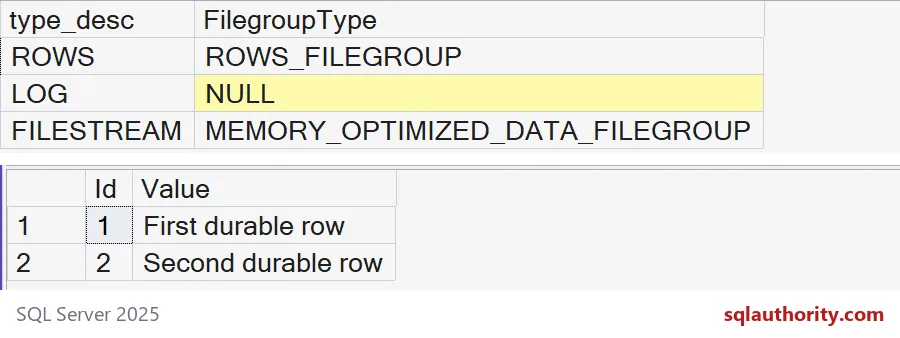
The container shows as type FILESTREAM inside a MEMORY_OPTIMIZED_DATA_FILEGROUP. Both durable rows are back. One more check confirms the table kept its durability.
SELECT name, durability_desc FROM sys.tables;It reports SCHEMA_AND_DATA. A SCHEMA_ONLY table keeps no rows across a restart, so check durability for every table you care about.
Before the real restore
Check the destination edition, available memory, free disk space and the service account’s access to the new folders. Disk size alone does not tell you how much memory the tables need. Keep the file list with your restore procedure, and refresh it when files change.
USE master;
DROP DATABASE IF EXISTS SqlAuthorityDemoRestored;
DROP DATABASE IF EXISTS SqlAuthorityDemo;
The backup file stays behind. Delete SqlAuthorityDemo.bak from the data folder yourself when you are done.
Rehearse the restore once, and the migration weekend gets a lot calmer.
A container is not a data file, it is a folder the restore must place.
Published by Pinal Dave on SQLAuthority. More of my work at pinaldave.com.
Discover more from SQL Authority with Pinal Dave
Subscribe to get the latest posts sent to your email.