Database scoped settings changed from their defaults are clues, not mistakes. One column in a catalog view lists every one of them, and it is only the start of a conversation.

The cleanup that undid a decision
A new DBA joins a team and runs a quick audit. One database has MAXDOP set to 2, and the others do not. It looks like an accident, so it gets “fixed” back to the default. Next week, a busy query starts hogging every core.
Somebody had set that value on purpose. The audit found the difference, but nobody asked why. So the habit I suggest is simple: find the settings that differ, then ask the owner before you touch them.
The view that finds them is sys.database_scoped_configurations. It reports on the database you are connected to, so keep the database name with your notes. Let me build a demo database and make one deliberate change.
USE master;
DROP DATABASE IF EXISTS SqlAuthorityDemo;
GO
CREATE DATABASE SqlAuthorityDemo;
GO
USE SqlAuthorityDemo;
GO
SELECT N'before' AS phase, name, value, value_for_secondary, is_value_default
FROM sys.database_scoped_configurations
WHERE name = N'MAXDOP';
A new database starts with MAXDOP at 0, and is_value_default is 1. Zero means this database defers to the server setting. The value_for_secondary column is NULL, which means no separate value for a read-only replica.
Make a change and let the flag find it
Now set MAXDOP to 2 for this database only. Then ask for every setting whose is_value_default is 0. That filter is the whole audit.
ALTER DATABASE SCOPED CONFIGURATION SET MAXDOP = 2;

SELECT N'changed' AS phase, name, value, value_for_secondary, is_value_default
FROM sys.database_scoped_configurations
WHERE is_value_default = 0
ORDER BY name;
One row comes back: MAXDOP, value 2, is_value_default 0. In this fresh database it is the only setting that differs. On a real database you may get a longer list. Each row is a decision somebody made.
The nice thing about the flag is that you do not need a hand-written list of defaults. SQL Server keeps that knowledge for you.
ALTER DATABASE SCOPED CONFIGURATION SET MAXDOP = 0;

SELECT N'restored' AS phase, name, value, value_for_secondary, is_value_default
FROM sys.database_scoped_configurations
WHERE name = N'MAXDOP';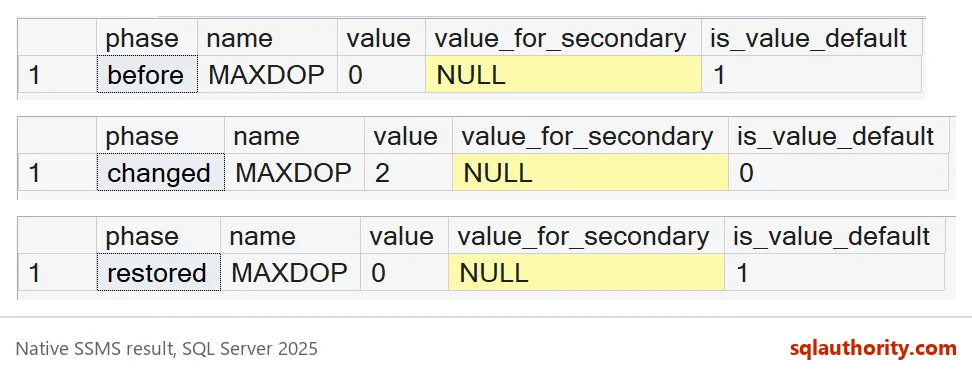
Setting it back to 0 puts the flag back to 1. That is how you reset one setting without touching anything else.
The flag has a blind spot: secondary values
Here is something that surprised me. A replica can have its own value, kept in value_for_secondary. Let me set a secondary MAXDOP of 4 and look again.
ALTER DATABASE SCOPED CONFIGURATION FOR SECONDARY SET MAXDOP = 4;

SELECT name, value, value_for_secondary, is_value_default
FROM sys.database_scoped_configurations
WHERE name = N'MAXDOP';

ALTER DATABASE SCOPED CONFIGURATION FOR SECONDARY SET MAXDOP = PRIMARY;
The row shows value 0, value_for_secondary 4, and is_value_default still 1. The flag looks only at the primary value. So an audit that filters on is_value_default = 0 would miss this override completely. Always read value_for_secondary as its own column. The last statement clears it.

Before you reset anything
A nondefault value does not prove a setting is wrong. It also does not prove the default would be better. Ask who changed it and why. Write the reason next to the setting. If it needs to change, test with a real application workload first.
Also remember that this value is one of several controls. A query hint can override it for a single statement. If you are chasing a parallelism problem, look at the actual plan.
USE master;
DROP DATABASE IF EXISTS SqlAuthorityDemo;
Next time an audit finds a difference, ask about it before you reset it.
A nondefault setting is not a mistake, it is a decision that needs a reason.
Published by Pinal Dave on SQLAuthority. More of my work at pinaldave.com.
Discover more from SQL Authority with Pinal Dave
Subscribe to get the latest posts sent to your email.