
Question: How do you round a number up or down in SQL Server? Interviewers sometimes ask it another way: how do you find the ceiling or floor of a value?

Answer: Use CEILING for the smallest integer at or above the input, and FLOOR for the greatest integer at or below it. Use ROUND when you need a value rounded to a specified decimal position. These are three different rules, so first ask which result the question requires.
The SQL and Its Result
Notice that the variable is declared decimal(10,2). Assigning 50.516171 stores 50.52 before any of the three functions run. That detail explains why ROUND(@value, 2) returns 50.52.
DECLARE @value decimal(10,2);
SET @value = 50.516171;
SELECT ROUND(@value, 2) AS RoundNumber;
SELECT CEILING(@value) AS CeilingNumber;
SELECT FLOOR(@value) AS FloorNumber;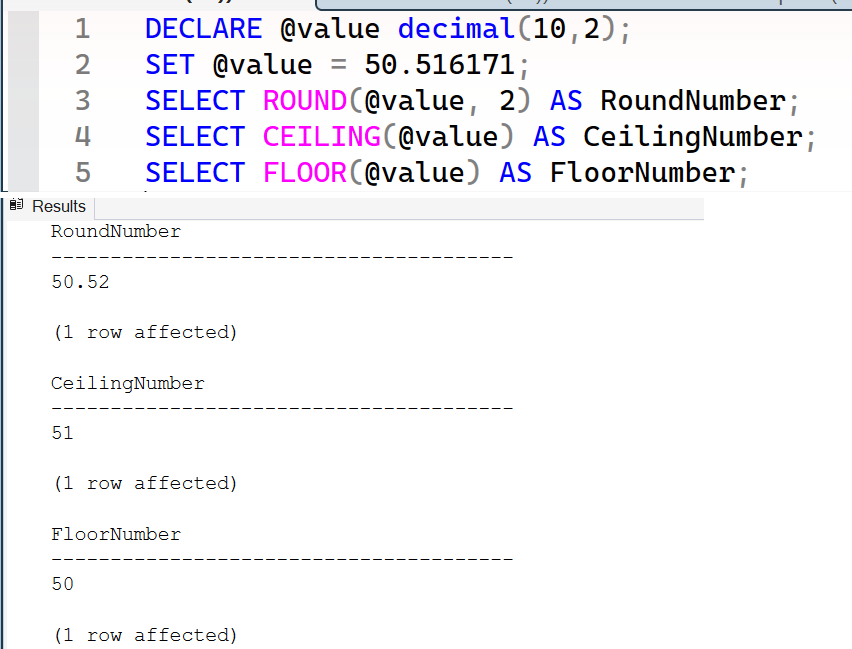
The three results are 50.52, 51 and 50. If you want to demonstrate rounding the unmodified input, declare enough scale first, for example decimal(10,6).
For negative values, remember that up means toward positive infinity: CEILING(-50.52) is -50, while FLOOR(-50.52) is -51. Neither function simply removes the fractional part.
That’s the interview answer: define the intended direction or decimal position, keep the input’s precision visible, and choose the function that implements that rule.

CEILING is not “drop the decimals”, it is “go up to the next integer”, and for negative numbers up means toward zero.
Published by Pinal Dave on SQLAuthority. More of my work at pinaldave.com.
Discover more from SQL Authority with Pinal Dave
Subscribe to get the latest posts sent to your email.




9 Comments. Leave new
I want to round down to nearest to 5 multiples E.g. 20.00 to 24.99 would display 20 and 25.00 to 29.99 would display 25
Divide your column by 5, use a floor function, then multiply the result by again.
I want to round down to Higher to 5 multiples E.g. 20.01 to 25 and 29.5 to 30.00 .
If its Greater then tens by 0.1 i.e., 10.01 then also display would display 15.
and 25.01 to 30.
Is am Using
1) SET @Length= ‘1642’;
SET @Length2 = (CAST(@Length / 5 AS INT) + IIF(CAST(ROUND(@Length, 0) AS INT) % 5 > 1, 1, 0)) * 5;
print @Length2;
Its Displaying 1645
2)SET @Length1= ‘2230.5’;
SET @Length4 = CEILING(@Length1)
print @Length4;
SET @Length3 = (CAST(@Length4 / 5 AS INT) + IIF(CAST(ROUND(@Length4, 0) AS INT) % 5 > 1, 1, 0)) * 5;
print @Length3;
Its should display 2235 but Displaying 2230
3) SET @Length= ‘1641’;
SET @Length2 = (CAST(@Length / 5 AS INT) + IIF(CAST(ROUND(@Length, 0) AS INT) % 5 > 1, 1, 0)) * 5;
print @Length2;
Its Displaying 1640 but should display 1645
I’m finding that CEILING doesn’t work as expected for positive numbers below 1. Ex – SELECT CEILING(2/7) is returning 0.
Try this ..SELECT CEILING(CONVERT(Float,2)/CONVERT(Float,7))
select left(cast(600422.11759 – floor(600422.11759) as decimal(16,5)) * 100000,4)
will return 1175
Student can learn SEO Online from SeoWebChecker to get list of SQL related stuff in internet.
Thank you, you can find more on SeoWebChecker website.
When rounding 75.4966 to an integer you would expect 76, but round(75.4966,0) returns 75. So it only “looks” at the number after the decimal and not at the right most digit and round from right to left?