
Interview question: How do you put a stored procedure’s result into a temporary table, especially if you don’t want to declare that table first?

Answer: If you know the result columns, create the temp table and use INSERT ... EXEC. If you truly need no pre-created table, SELECT ... INTO from an OPENROWSET call can create the table from a provider’s returned rowset. That needs a separately configured OLE DB provider and permission to use ad hoc distributed queries, so it’s not the normal first choice merely to avoid two column declarations.
Here is a tiny procedure for a disposable lab database where dbo.TestSP doesn’t already exist. CREATE deliberately fails instead of overwriting an existing procedure:
CREATE PROCEDURE dbo.TestSP
AS
BEGIN
    SET NOCOUNT ON;
    SELECT CONVERT(int, 1) AS Col1,
           CONVERT(int, 2) AS Col2;
END;
GO
For most applications, I would use the known shape directly. The table lives only for this session:
CREATE TABLE #Result (Col1 int NOT NULL, Col2 int NOT NULL);
INSERT INTO #Result (Col1, Col2)
EXEC dbo.TestSP;
SELECT Col1, Col2 FROM #Result;
DROP TABLE #Result;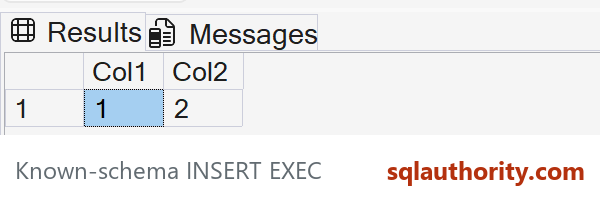
When the Table Must Come From the Result
If the requirement really is to create the table from the returned columns, the pattern looks like this. The provider call opens another connection, even when it points back to the same SQL Server. It’s an environment-specific pattern, not a paste-and-run production script:
-- First arrange a supported OLE DB provider, connection security,
-- server permissions, and administrator-approved Ad Hoc access.
-- Replace YOUR_SERVER and use the correct database for TestSP.
SELECT Col1, Col2
INTO #ResultFromProvider
FROM OPENROWSET(
    'MSOLEDBSQL',
    'Server=YOUR_SERVER;Trusted_Connection=yes;Encrypt=Mandatory;',
    'EXEC YourDatabase.dbo.TestSP'
) AS p;

SELECT Col1, Col2 FROM #ResultFromProvider;
MSOLEDBSQL is the current OLE DB provider; older scripts use SQLNCLI, which is no longer supported. Ad hoc access is disabled by default, and enabling it broadens what authenticated accounts can ask that provider to access. Have the DBA review the provider, certificates, authentication and policy before using this workaround. Don’t turn on a server-wide setting just to simplify this example.
There are other limits. The provider must be able to determine the first result set’s columns, the procedure should return one stable result shape, and a second connection can see different transaction state. A changing or complicated procedure may make this technique unsuitable. If the caller can own the output contract, an explicit temp table is easier to reason about and test.

Skipping the CREATE TABLE is not a shortcut, it is a provider, a second connection and a server setting, so declare the table when you can.
Published by Pinal Dave on SQLAuthority. More of my work at pinaldave.com.
Discover more from SQL Authority with Pinal Dave
Subscribe to get the latest posts sent to your email.



14 Comments. Leave new
Hi Pinal, Good to see this. Once I also used this tip. Another time I had problem with this because I am using this task in another StoredProcedure, and it was working fine on my machine. But the problem comes when I have to distribute my StoredProcedures script to other machines (5-10) depending on some specific scenario. So here I stuck with this because I have to change SERVERNAME/CREDENTIALS for each. Is there any way to overcome this.
Hi Pinal,
Thank you for sharing this. How is it different from the following code. We are using SQL 2005
create table #temptb (col1 int,…)
insert into #tempdb
exec stored_proc parameter1, …
It works fine for us
In your method you will have to create a table first, that means you need to know the exact column count and the data type.
In the method which I suggest you do not need to know any of those.
This Code is not working if the SP has temptable operations inside an sp.
getting error like
“Msg 11526, Level 16, State 1, Procedure sp_describe_first_result_set, Line 1
The metadata could not be determined because statement ‘INSERT INTO #AllUsers
SELECT col1,col2,col3
in procedure ‘Gettest uses a temp table.”
My first reaction was to try using this method with system stored procedures, which are notorious for changing between SQL versions.
Using SQL 2016 SP1
sp_who works
sp_who_2 does not
sp_tables does not
Still could be useful given the limitations.
Muhammad, OPENROWSET doesn’t accept variables for its arguments and therefore you’d have to use dynamic SQL. Could get quite messy quite quickly.
John
Pinal, you do indeed need to know the columns and data types in order to create the temp table. But you also need to know the columns in order to query it, so what are we gaining by doing it like this? I’m sure this technique has its place, but I’d advise to think carefully about increasing the surface area by allowing ad hoc distributed queries before using it.
John
Thanks for sharing your thoughts. I agree with you.
Hi Pinal Dave- If sproc returns multiple result sets as below then step2 returns only first select.
How can we get data from 2nd select statement?
CREATE PROCEDURE TestSP
AS
BEGIN
SELECT 1 AS Col1, 2 AS Col2
SELECT 3 AS Col1, 4 AS Col2, 5 AS col
END
GO
Hi Pinal,
Does the sproc need to be created in tempDB, or can it be in any DB? How about a schema other than dbo. I’d assume so, but we all know the dangers of making assumptions!
Thanks in advance!
if I have my StoredPorcedure expects Paramters. Then how to pass params to the above query?
SELECT *
INTO #TempTable
FROM OPENROWSET(‘SQLNCLI’, ‘Server=(local)\SS14;Trusted_Connection=yes;’,’EXEC TempDB.dbo.TestSP param1 = ‘)
GO
Joihn
Hi, I tried this solution but I got a The OLE DB provider “DB_Server” has not been registered.
Your logic will fail when your SP manipulating anything with # (temporary) tables.
Example : create your sp as following
CREATE PROCEDURE TestSP
AS
begin
Create Table #temp (Col1 int,Col2 int)
Insert into #temp values (1,2)
Insert into #temp values (3,4)
SELECT * from #temp
end
I know you may answer with @ tables but it won’t work when I use that @ table in dynamic sql query.
I hope, there is a limitation of SQL on OPENROWSET