
Question: Which performs better, EXCEPT or NOT IN?
Answer: First check whether they return the result you need. They can produce similar plans for some non-null, unique data, but they are not interchangeable in every query and do not have a universal performance tie.

An attendee asked me this at the SQL PASS Summit. In my original AdventureWorks comparison, the two statements produced the same-looking plans. That observation was useful, but my conclusion that there is “absolutely no difference” went too far.
Keep the original comparison, then test its limits
These are the original Product and WorkOrder queries, followed by a small counterexample. The database name is updated for the current sample:
USE AdventureWorks2025;
-- Original comparison, using the current sample-database name.
SELECT ProductID FROM Production.Product
EXCEPT SELECT ProductID FROM Production.WorkOrder;
SELECT ProductID FROM Production.Product
WHERE ProductID NOT IN (SELECT ProductID FROM Production.WorkOrder);
-- A counterexample: duplicates on the left, and NULL on both sides.
DECLARE @Left TABLE (ID int NULL);
DECLARE @Right TABLE (ID int NULL);
INSERT @Left VALUES (1),(1),(2),(NULL);
INSERT @Right VALUES (2),(NULL);
SELECT N'EXCEPT' AS Method, COUNT(*) AS ReturnedRows
FROM (SELECT ID FROM @Left EXCEPT SELECT ID FROM @Right) AS e
UNION ALL
SELECT N'NOT IN', COUNT(*) FROM @Left
WHERE ID NOT IN (SELECT ID FROM @Right)
UNION ALL
SELECT N'NOT IN, right NULL removed', COUNT(*) FROM @Left
WHERE ID NOT IN (SELECT ID FROM @Right WHERE ID IS NOT NULL)
UNION ALL
SELECT N'NOT EXISTS', COUNT(*) FROM @Left AS l
WHERE NOT EXISTS (SELECT 1 FROM @Right AS r WHERE r.ID = l.ID);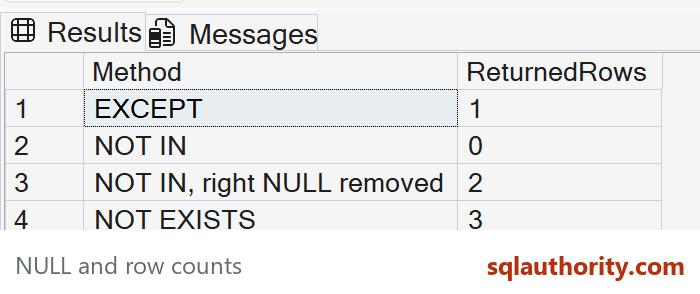
The final result contains these row counts: EXCEPT returns one row, NOT IN returns zero, NOT IN after removing right-side NULL returns two, and NOT EXISTS returns three.
Why? EXCEPT returns distinct left-side rows absent from the right and treats NULLs as equal for that set comparison. NOT IN encounters an unknown comparison when its right side contains NULL, so no row in this example qualifies. Filtering that NULL out still leaves both copies of 1 and does not admit the left-side NULL. NOT EXISTS uses the stated equality predicate, preserves the duplicate 1 rows, and admits the left NULL because no equality match exists.
What the old execution plan actually demonstrates
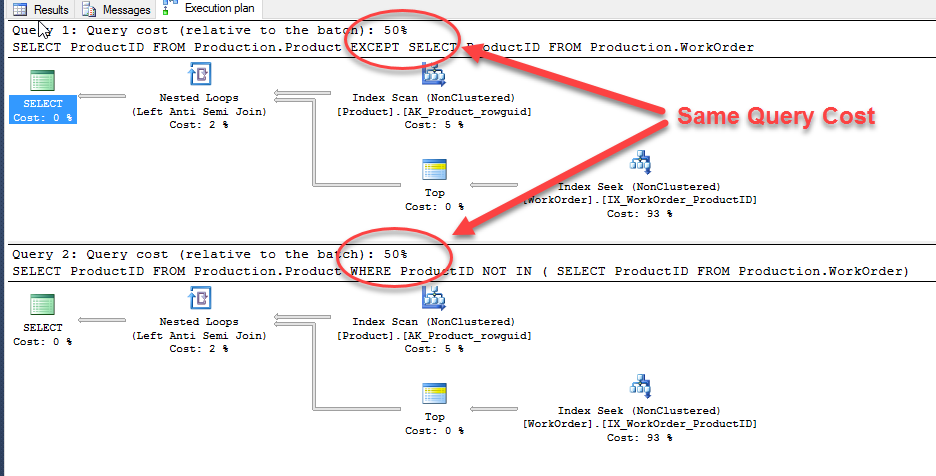
This is the original native plan comparison. It remains a useful illustration for those particular queries and data. Its equal relative estimated costs are not measured elapsed times and do not establish that every EXCEPT and NOT IN query performs identically.
Once you have equivalent intended results, compare actual plans, logical reads and repeatable execution measurements on representative data. Nullability, duplicates, indexes and cardinality affect the work. An EXCEPT query may need duplicate elimination that another formulation does not.
For an interview, I would appreciate a candidate who asks about NULLs and duplicates before declaring a winner. That discussion is more useful than choosing an operator by its name.
Published by Pinal Dave on SQLAuthority. More of my work at pinaldave.com.
Discover more from SQL Authority with Pinal Dave
Subscribe to get the latest posts sent to your email.




7 Comments. Leave new
Performance may be similar, but EXCEPT handles NULLs as equivalent (i.e. ANSI NULLS OFF) where NOT IN does not, so the results will be different if NULLs exist in the comparison column(s).
I wish SQLServer experts would test edge cases instead of blindly reposting the same bad “interview questions”. This one was posted five separate times to Twitter tonight.
You are not guaranteed that the execution plan will stay the same forever, when using either EXCEPT and NOT IT.
It is possible that if the queries become more complex, then the Optimizer will decide to treat them differently and generate two different execution plans.
Also, looking at cost is not relevant, since you should also look at number of executions per each item of the execution plan tree (especially in the case of Nested Loops).
There are more details which need checking (and in my opinion it is good to do so) when deciding if two queries are the same.
Dear Pinal Sir,
As you have also mentioned “The EXCEPT operator returns all of the distinct rows from the query to the left of the EXCEPT operator”, so there will be difference in the output as it will not happen in the case of “NOT IN”.
In the below example, the both operator works differently.
declare @tab1 table(id int)
insert into @tab1 select 1 union all select 1 union all select 2
declare @tab2 table(id int)
insert into @tab2 select 2
select id from @tab1
except
select id from @tab2
select id from @tab1
where id not in (select id from @tab2)
Well…..EXCEPT can work on a result set. NOT IN cannot. NOT IN works only on a given column. Therefore, depending upon the business context, EXCEPT and NOT IN cannot be used interchangeably.
The return query There is a distinct difference between EXCEPT and NOT IN key words especially when the sub query used in the NOT IN query returns NULL values. See below sample codes.
declare @table1 table (id smallint, name varchar(100))
declare @table2 table (id smallint, name varchar(100))
insert into @table1 values (1,’Rob’),(2,’John’)
insert into @table2 values (1,’Rob’),(3,’Max’),(Null,’Sam’)
Qurey 1
———-
select * from @table1 where id NOT IN (select id from @table2)
Qurey 2
———-
select * from @table1
except
select * from @table2
Result 1
———-
id name
Result 2
———-
id name
1 2 John
Therefore, it is best practise to avoid NOT IN key word when you are uncertain that the sub query doesn’t return any NULL values.
Not completely true sir. I have faced a scenario where delete with not in clause got stuck for hours while when I changed the query with except clause it executed in 2 minutes. I have seem the different execution plan for it. I believe it depends on certain scenario as well.
I believe that except performs a distinct operation. Other sources I have read say that due to having to run the distinct the query can be slower, also their query plan comparison shows the distinct which yours does not. It may be best to update this as your answer was the first on Google but the next 10 all said not in performed better due to this.