
Question: What is a quick way to display a stored procedure’s code?
Answer: In the correct database, execute sys.sp_helptext with its schema-qualified name. Results to Text, selected with Ctrl+T in SSMS, is convenient for reading the returned definition.

I sometimes see interviewers ask for the fastest way to display a stored procedure. I would not give a candidate a negative mark for missing this shortcut. It is an old-school question about a useful tool, not a test of whether someone understands stored procedures.
Object Explorer’s Modify or Script as options are perfectly reasonable. When you already know the name, typing one command saves navigating a long list. This is the habit I wanted readers to pick up:
EXEC sys.sp_helptext N'dbo.NameOfYourProcedure';Replace the name, include the actual schema, and select the database that owns the procedure. I often use Ctrl+T first. The output arrives as text rows; the procedure itself is not executed.
Try a short definition
In your own sample database, this example creates a uniquely named procedure, displays its definition in two ways and removes it. It stops if that object name already exists. The definition is deliberately short so the whole result can be read:
-- Run only in your own sample database; creates and removes one named procedure.
USE AdventureWorks2025;
IF OBJECT_ID('dbo.SqlaDefinition38598') IS NOT NULL
    THROW 50001, 'The sample procedure already exists in this session.', 1;
EXEC(N'CREATE PROCEDURE dbo.SqlaDefinition38598 AS
BEGIN
    SET NOCOUNT ON;
    SELECT N''A short stored procedure definition'' AS Example;
END;');
EXEC sys.sp_helptext N'dbo.SqlaDefinition38598';
SELECT OBJECT_DEFINITION(OBJECT_ID('dbo.SqlaDefinition38598')) AS CompleteDefinition;
DROP PROCEDURE dbo.SqlaDefinition38598;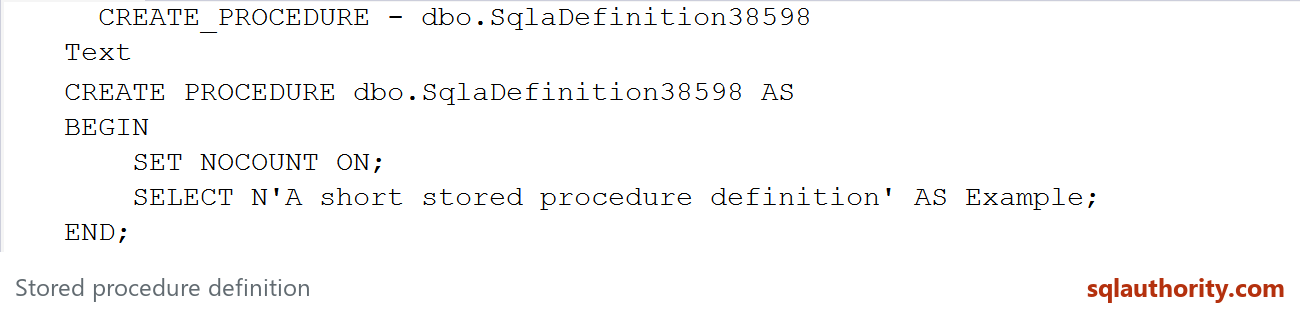
sp_helptext returns the definition in chunks of up to 255 characters. OBJECT_DEFINITION returns a single value, which can be easier for a tool to consume, although the client’s display limit can still truncate what you see.
If a definition is missing, check the database, name and permissions. VIEW DEFINITION is relevant for another user’s object. An encrypted definition is not exposed by these ordinary methods, and lack of visibility can also produce NULL. For deployment-quality source, keep the original script in your approved source-management location rather than relying on a screen copy.
Once you use sp_helptext a few times, it becomes an easy shortcut. That is its value. There is no need to turn knowing one keyboard command into an interview trap.
Published by Pinal Dave on SQLAuthority. More of my work at pinaldave.com.
Discover more from SQL Authority with Pinal Dave
Subscribe to get the latest posts sent to your email.



7 Comments. Leave new
select object_definition(object_id(‘NameofYourSP’)) ?
SELECT text
FROM sys.syscomments
WHERE OBJECT_NAME(id) = ‘spname’
We can add a query shortcut (Tools->Options->Environment->Keyboard->Query Shortcuts) of SP_HELPTEXT and assign to a key. Then, we can get the code by selecting the stored procedure name and hit the short cut key.. :) hope that helps
Great post! I’ve used sp_helptext many times but the ‘Results to Text’ is a game changer. Gives me the stored procedure in proper format rather than all in one line.
heh. as someone who have used sql server 6.0 I immediately thought “sp_helptext”! but I also thought that it couldn’t possibly be the fastest way to display a proc after so many years!
Hi Pinal, This Is Pasha.
I have a problem and learnt a lot from your blogs a lot. Really appreciates your dedication.
I need to create a stored procedure, in which I need to keep track of daily track of each file runs daily and also count of the records track too for each file. Like below:
Table Name: AuditLog
Date No.OfRec. FileName LogMessage Status Record
2017-01-09 1200 \\File1.txt Successful Loaded 1200 Success 1
2017-01-09 1000 \\File2.txt Successful Loaded 1000 Success 2
2017-01-10 1100 \\File3.txt Successful Loaded 1100 Success 3
2017-01-11 80 \\File4.txt Needs to reload, deviation is too loo None 4
For Record # 4, I do not create a text file in SSIS package after this message, else create file. My problem is , how to check this deviation (NoOfRec) in stored procedure by using this table.
I would appreciate, if you reply me.
Thanks
Pasha
You can use query with LIKE operator to choose word deviation.