
Last week we had amazing time with an interesting puzzle about Datetime. You can see the puzzle over SQL SERVER – Puzzle – Playing with Datetime with Customer Data. The puzzle was extremely well received and lots of people asked me to bring another puzzle which can help us learn something new. Looking at the request of everyone, here is another very simple puzzle with Date Format.

This puzzle is very simple – first, execute following script.
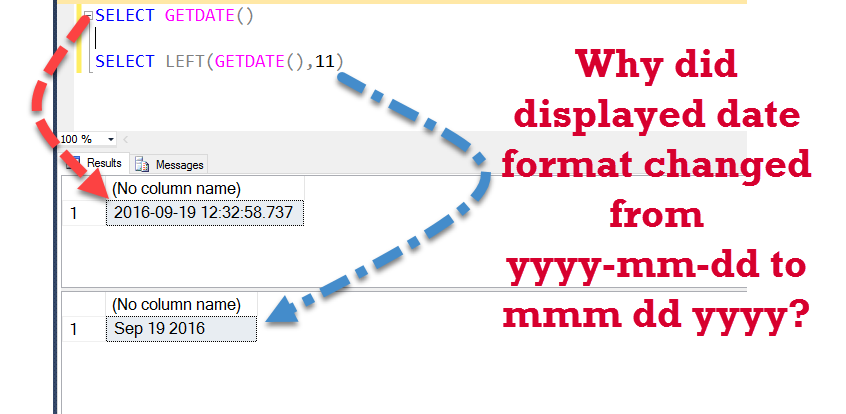
SELECT GETDATE()
When you execute above script, you will notice that it will display the current date in the format as yyyy-mm-dd, along with the date it is also displaying time values as well.
Resultset: 2016-09-19 12:32:58.737
Now let us assume that we do not want the time part in our display, we only want to display date part of the date time value. There are many different methods to get only date part, here is a relevant blog post: SQL SERVER – Retrieve – Select Only Date Part From DateTime – Best Practice.
Now let us assume that we have not read the blog post about how to select only date part from datetime. Now from visual inspection, it is very clear that we only want to retrieve left 11 characters from the datetime value. In SQL Server we have function LEFT(string,n) when we apply it over any string, it returns us n characters starting from the left. Let us apply the LEFT () function over our datetime function and retrieve only date part from it.
SELECT LEFT(GETDATE(),11)
When you execute above script, it does give us only date part, but the value of the data part is changed from yyyy-mm-dd to mmm dd yyyy.
Resultset: Sep 19 2016
The Puzzling question is –
Why did displayed date format changed from yyyy-mm-dd to mmm dd yyyy?
Well, just leave a comment in the blog post and after 2 days I will publish all the comments. If you know the answer of this puzzle, I suggest you ask this question to your friends and see if they know the answer of the same.
Reference: Pinal Dave (https://blog.sqlauthority.com)




168 Comments. Leave new
SELECT CAST( GETDATE() AS VARCHAR)
In case when you use LEFT() with date, SQL server casts the date value to varchar and then executes LEFT().
Above SQL will give you below result:
Sep 20 2016 6:08PM
Left(), 11 will result into Sep 20 2016.
It was happening due to implicit conversion from (GETDATE Return date in DATETIME format) datetime to some string value.
To avoid this we should use explicit conversion with CONVERT().
The Left operator does an implicit conversion to a varchar, so its essentially doing:
select left(convert (varchar(50),getdate()),11)
which outputs Sep 19 2016
I guess, LEFT is string function, so it will convert the output of left function is converted into string,
Try this, it will also give the same result.
SELECT CONVERT(VARCHAR(11),GETDATE())
Hi Pinal,
First of all, I’d like to thank you for the previous Puzzle! Like what you’ve said, it’s something fundamental but I (probably lots of DB folks out there) have overlooked.
Secondly, for this puzzle, my explanation for the changed format is this:
1) while the LEFT function being used to retrieve the date part, the system will need to get the current datetime first then to convert the datetime to a string with first 11 charaters
2) in this implicit conversion the system uses the default Style code, (0 or100) which is the format of mon dd yyyy hh:miAM (or PM)
Again, thank you for the interesting post!
Yvonne
The LEFT string function implicitly converts GetDate() to the default SQL character string.
select left(getdate(),11)
go
select right(getdate(),19)
While using both left and right functions, SQL will convert the getdate() value from datetime to string value, in this process it will use standard time format.
LEFT function explicitly convert datetime values to string.
Starting with the LEFT() function to see if it is doing something to the format.
https://docs.microsoft.com/en-us/sql/t-sql/functions/left-transact-sql?view=sql-server-2017
character_expression
Is an expression of character or binary data. character_expression can be a constant, variable, or column. character_expression can be of any data type, except text or ntext, that can be implicitly converted to varchar or nvarchar. Otherwise, use the CAST function to explicitly convert character_expression.
AHA! implicitly converted to varchar or nvarchar.
Let’s check out the CONVERT() function.
https://docs.microsoft.com/en-us/sql/t-sql/functions/cast-and-convert-transact-sql?view=sql-server-2017
The default style for a datetime is mon dd yyyy hh:miAM (or PM) rather than the yyyy-mm-dd format we desire.
Try converting GETDATE() before sending it into LEFT() using the format 120.
SELECT LEFT(CONVERT(VARCHAR(19), GETDATE(), 120), 10)
BINGO!
SQL Server performs an Implicit conversion from Datetime to varchar in order to be able to process the Left() Function. It would be the same as if you had written
SELECT LEFT(convert(varchar(60),GETDATE()),11)
which uses the default format mon dd yyyy
To test, attempt a specific format:
SELECT LEFT(convert(varchar(60),GETDATE(),121),11)
which should provide a different result.
select LEFT(getdate(),11),GETDATE()
select @@LANGUAGE,@@DATEFIRST
left function use range available in date format as left function not have any format parameter as convert() function has .
0001-01-01 through 9999-12-31 (1582-10-15 through 9999-12-31 for Informatica)
January 1, 1 CE through December 31, 9999 CE (October 15, 1582 CE through December 31, 9999 CE for Informatica)
When we do LEFT(GETDATE(),11) then the SQL Engine will do an implicit conversion from datetime to string value based on systems internationalization setting. We should avoid implicit conversion since it hampers the performance of the query !
Pawan Kumar Khowal
When we execute LEFT(GETDATE(),11) it will cast date to varchar format internally.
SELECT GETDATE() Date1,CAST(GETDATE() AS VARCHAR(20)) Date2,LEFT(GETDATE(),11) Date3
GETDATE() : 2016-09-21 09:10:21.653
CAST(GETDATE() AS VARCHAR(20)) : Sep 21 2016 9:10AM
LEFT(GETDATE(),11) : Sep 21 2016
Because it is first internally converted to varchar which gives the result in that format.
As the GETDATE() was used inside LEFT, the method might have considered string format of datetime and returned 11 characters from that.
LEFT is a string function. The result of GETDATE() is converted to string. Alter that the LEFT function result is first 11 characters. Converting to string changes the date to character format.
This has to do with the default LANGUAGE & DATEFORMAT settings of the server and also the fact that there is IMPLICIT conversion of the date to varchar before the LEFT function is applied. The default for them are ENGLISH and MDY. Hence the output.
If we change the language to say JAANESE, the output is different (again there is implicit conversion of the date to varchar first)
Example below:
SET LANGUAGE ENGLISH
GO
SELECT GETDATE() DefaultDate, LEFT(GETDATE(), 11) [ImplicitConvertedDateToString-English]
GO
SET LANGUAGE JAPANESE
GO
SELECT GETDATE() DefaultDate, LEFT(GETDATE(), 11) [ImplicitConvertedDateToString-Japanese]
GO
Results:
Changed language setting to us_english.
DefaultDate ImplicitConvertedDateToString-English
———————– ————————————-
2016-09-21 12:53:19.573 Sep 21 2016
(1 row(s) affected)
言語設定が 日本語 に変更されました。
DefaultDate ImplicitConvertedDateToString-Japanese
———————– ————————————–
2016-09-21 12:53:19.590 09 21 2016
(1 row(s) affected)
I have taken the results to text instead of grid so that I can copy them off to here.
Thanks
Ananthram
I thing when a datetime/date value use in a string function. it automatically cast into string with mmm dd yyyy hh:ss format.
When you do LEFT(GETDATE(), then the database needs to do an implicit conversion from datetime to some string value. For this, it uses its internationalization settings. This is why it displays as “Sep 19 2016” when using SELECT LEFT(GETDATE(),11).
If you want to see the answer as “2016-09-19” you can write the query like SELECT LEFT(CONVERT(DATE,GETDATE(),105),11).
LEFT(GETDATE()) results in an implicit conversion from datetime to string value (cos LEFT is a string function) – hence it picks up the regional date settings and strings that