
Question: How can I hide a stored procedure definition from an ordinary metadata lookup?

Short answer: Create the procedure WITH ENCRYPTION. This is the quick answer I hear in interviews. There is an important word hiding inside that answer: SQL Server obfuscates the definition. It does not turn the procedure into a security boundary.
Let us compare two tiny procedures. Run this in a scratch database where these names are free:
CREATE PROCEDURE dbo.RegularSP
AS
    SELECT 5 AS FIVE;
GO
CREATE PROCEDURE dbo.EncryptedSP
WITH ENCRYPTION
AS
    SELECT 5 AS FIVE;
GO
EXEC sys.sp_helptext N'dbo.RegularSP';
GO
EXEC sys.sp_helptext N'dbo.EncryptedSP';
GO
The first result returns definition text. The second says the object text is encrypted. These original SSMS captures show the same contrast with the original sample names:
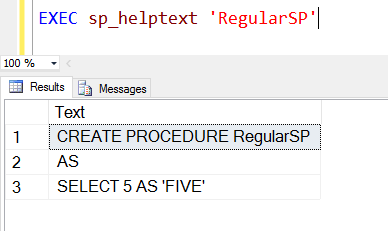
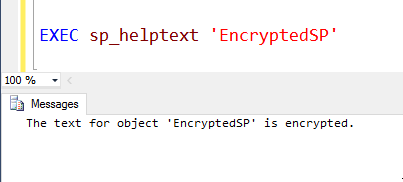
For another check, sys.sql_modules.definition is NULL for the encrypted procedure. For a nonencrypted object, NULL metadata can also mean you lack permission to view the definition, so check access before diagnosing encryption. Callers with execute permission can still run the encrypted routine:
SELECT OBJECT_NAME(object_id) AS ProcedureName, definition
FROM sys.sql_modules
WHERE object_id IN (OBJECT_ID(N'dbo.RegularSP'), OBJECT_ID(N'dbo.EncryptedSP'));
EXEC dbo.EncryptedSP;
Keep the original creation script somewhere controlled before using this option. You cannot rely on normal metadata to recover it later. Also, do not claim the text is impossible to retrieve: privileged access to database files or server internals can expose it. Use permissions to protect access, and use WITH ENCRYPTION only when hiding the ordinary definition view is the goal.
The interview answer is WITH ENCRYPTION. The production answer includes what that option does, and what it cannot promise.
Published by Pinal Dave on SQLAuthority. More of my work at pinaldave.com.
Discover more from SQL Authority with Pinal Dave
Subscribe to get the latest posts sent to your email.




9 Comments. Leave new
Everything we do these days is with a “security first” mindset, did not even think about the use-case for encrypting a stored procedure.
Just do not use this to hide confidential information. It can be decrypted in two seconds using the code that you can google.
There are many tools to decrypt stored procecure (even free, “decrypt all objects in db”…).
Cons is: Missing info (procedure name, statements) in permormance monitoring views/tools.
TL;DR: Don’t do it.
Very true Aaron!
How to update.
hi,
I know with “with encryption” option we are only obfuscate our procedures and function. then there are tools like dbforge that can decrypt them.
is there a way to encrypt stored procedure and functions with keys and password to block decryption (or make it really hard to decrypt).
Thanks,
Sami
CLR.
Hi Sami,
Did you get a solution for
“is there a way to encrypt stored procedure and functions with keys and password to block decryption (or make it really hard to decrypt)”
If yes please guide i too have a similar requirement.
Hi Sami,
Did you find any solution, i am also having similar requirement.