In this post SQL Server – 2016 – T-SQL Enhancement “Drop if Exists” clause, we have seen the new feature introduced in SQL Server version 2016. One of my friends recently asked me question that how to drop table if exists in MySQL database? It was not surprising to see that not many people know about the existence of this feature. MySQL already has this feature for a while and if you are MySQL DBA, you may find it interesting that SQL Server just introduced this feature.
Let us see this example in action now. First, we will create a sample table.
CREATE TABLE test(id INT,name VARCHAR(100));If we have to drop above table, we can execute following script and drop it.
DROP TABLE IF EXISTS test;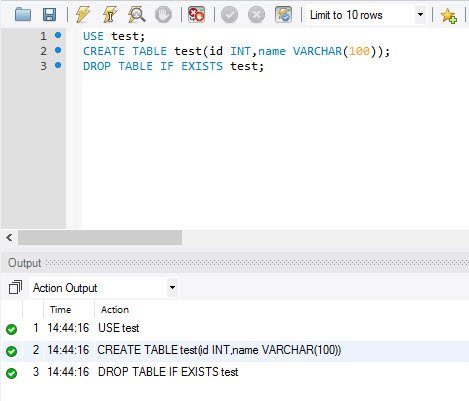
The above script drops the table named test if exists, otherwise it will display a warning and not an error. This is very important to understand that as it is not displaying error, we can easily work around the warning in our code. This is helpful if you are not sure the existence of the table in advance.
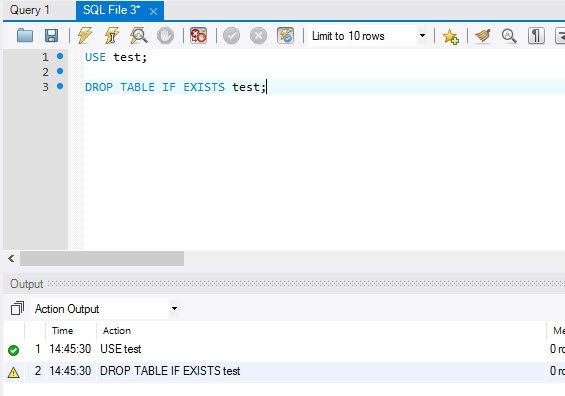
Not only tables, but MySQL has similar feature available for stored procedures as well. Let us see a quick example for the same.
Here is a script which you can use to create stored procedures.
CREATE PROCEDURE test_proc
AS
BEGIN
SELECT 1 AS number;
END;
After creating the above procedure you can use the following script to drop it.
DROP PROCEDURE IF EXISTS test_proc;Remember, just like table, it will drop the stored procedure if there is one exist, otherwise, it will just return a warning. It is really interesting to see MySQL already having this feature for a while, whereas SQL Server just introduced this feature in this year.
Published by Pinal Dave on SQLAuthority. More of my work at pinaldave.com.
Discover more from SQL Authority with Pinal Dave
Subscribe to get the latest posts sent to your email.