Last week I wrote a post where my friend faced problem because he changed the service account of SQL Server from services. mass rather than SQL Server Configuration Manager. Let us learn how to change service account using WMI/SMO.
SQL SERVER – Performance counter missing! DMV sys.dm_os_performance_counters is Empty
I am a strong advocate of using the tools which are designed for that purpose. When I told that same thing to my friend, he said “how can I manage 1000 SQL Servers like this? I need to automate things via script.” Here is a script which I use to change the service account for ALL SQL instances on my machine. There would be other possible ways to do what I am trying to do, but I am trying to build a foundation of standard scripts related to SQL using SMO and these examples are using just WMI.
Change Service Account
[System.Reflection.Assembly]::LoadWithPartialName('Microsoft.SqlServer.SqlWmiManagement') | out-null
$Server = 'SQL16NodeB'
$UserName='SQLAuthority\SQLSvc'
$Password='Sysadmin@1234'

$SMO = New-Object ('Microsoft.SqlServer.Management.Smo.Wmi.ManagedComputer') $Server
$Service = $SMO.Services | where {$_.type -like 'SQLServer'}
Write-Host 'Properties before Change'
$Service | select name, ServiceAccount, DisplayName, StartMode  | Format-Table
$Service.SetServiceAccount($UserName, $Password)
Write-Host 'Properties after Change'
$Service | select name, ServiceAccount, DisplayName, StartMode | Format-Table
The variations are declared at the top of the script. Here is the output on my machine.
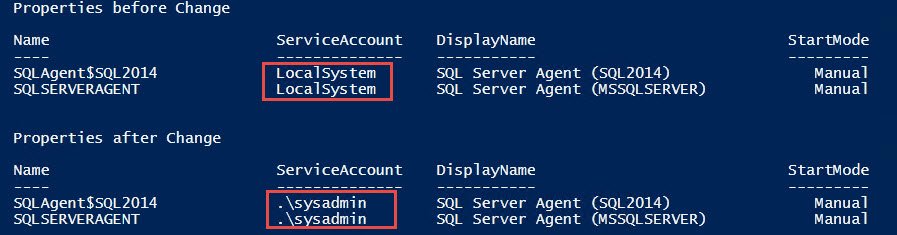
You would notice that script has picked only SQL Server account. My machine has two instances (default and named) and it has been changed for both. Notice that I have added below filter
where {$_.type -like "SQLServer"} due to that I am getting all SQL Services not SQL Agent Services.
How do you change service account or password in your environment?
Published by Pinal Dave on SQLAuthority. More of my work at pinaldave.com.
Discover more from SQL Authority with Pinal Dave
Subscribe to get the latest posts sent to your email.