
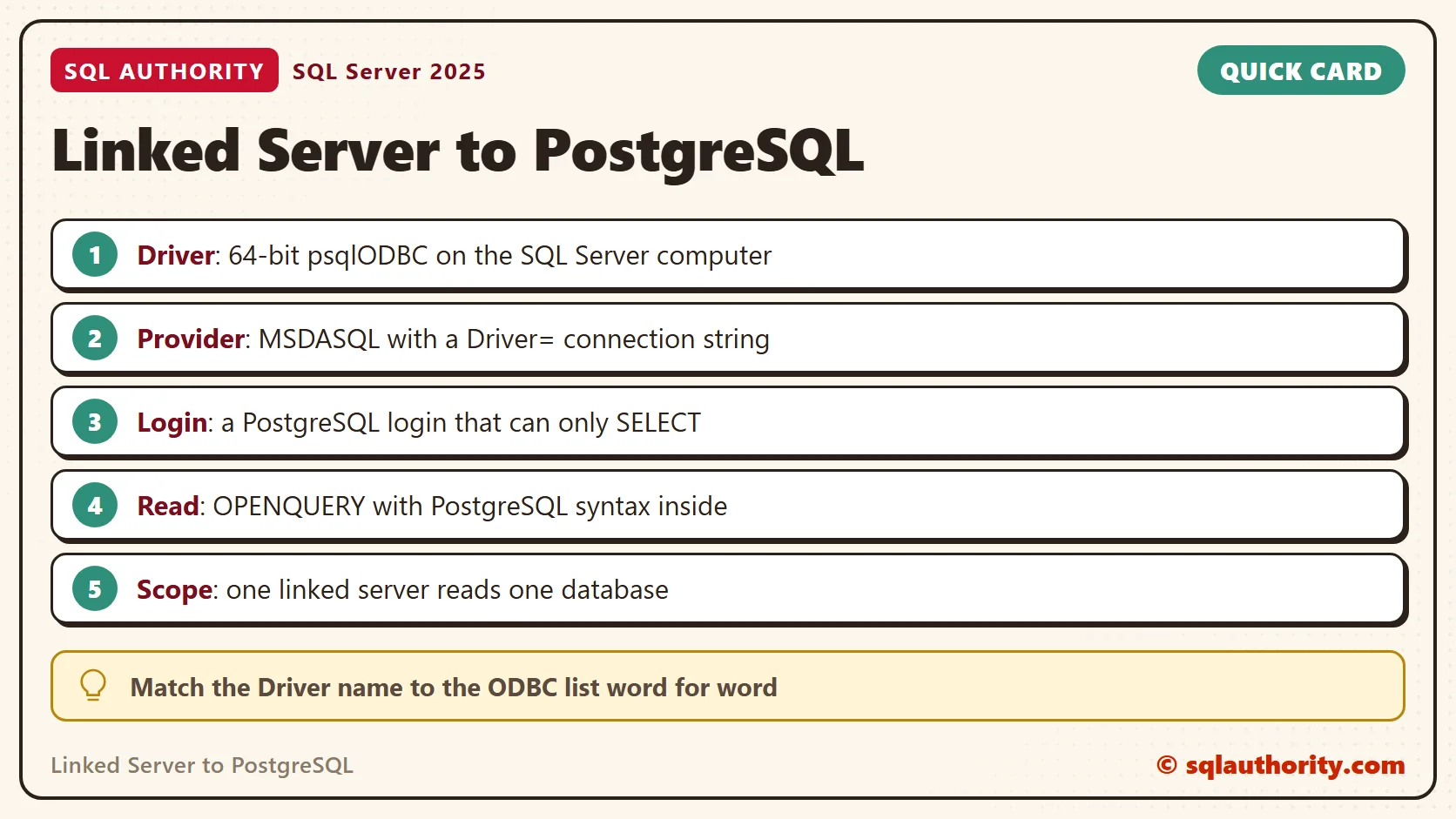
A linked server to PostgreSQL lets SQL Server read PostgreSQL tables with an ordinary query. It needs an ODBC driver on the SQL Server computer. That driver is the one piece I could not install. This post says clearly what ran and what did not.

What Was Tested and What Was Not
I tested the PostgreSQL side on PostgreSQL 18.6. I tested the SQL Server side on SQL Server 2025 (17.0.5005.3). No PostgreSQL ODBC driver is installed on that SQL Server computer. So the last step, a row coming back through the link, did not run. Every step before it did, and the text marks the rest as documented.
Older guides use a paid OLE DB provider called PGNP. Its evaluation copy returned only 100 rows, as several readers found. Today the free route is the official PostgreSQL ODBC driver, named psqlODBC. SQL Server reaches it through MSDASQL, the Microsoft OLE DB provider for ODBC drivers. Install the 64-bit driver on the SQL Server computer. MSDASQL was already on my machine.
Step 1: Prepare PostgreSQL
Make a database, a small table and a login that can only read. The linked server stores this login, so give it the least power it needs. In psql, the line that starts with a backslash is a client command.
CREATE DATABASE sqla_linkdemo;

\c sqla_linkdemo

CREATE TABLE fruit (
  id integer PRIMARY KEY,
  name varchar(40) NOT NULL,
  price numeric(6,2) NOT NULL
);

INSERT INTO fruit VALUES (1, 'mango', 2.50), (2, 'banana', 0.30), (3, 'apple', 0.80);

CREATE ROLE sqla_link_reader LOGIN PASSWORD 'Link-2026-x';

GRANT CONNECT ON DATABASE sqla_linkdemo TO sqla_link_reader;

GRANT USAGE ON SCHEMA public TO sqla_link_reader;

GRANT SELECT ON fruit TO sqla_link_reader;
My test cluster uses trust authentication, so it never checked the password. I tested the rights with SET ROLE, which acts as that login. A real server also needs listen_addresses set and a pg_hba.conf line that lets the SQL Server computer in. The default port is 5432, while my test cluster listens on port 5437.
SET ROLE sqla_link_reader;

SELECT current_user;

SELECT id, name FROM fruit WHERE price > 0.5 ORDER BY id;

INSERT INTO fruit VALUES (4, 'pear', 1.10);

UPDATE fruit SET price = 9 WHERE id = 1;

RESET ROLE;
sqla_link_reader

 id | name
----+-------
  1 | mango
  3 | apple

ERROR:  permission denied for table fruit
ERROR:  permission denied for table fruit
The login read the rows it was allowed to read. Both write attempts failed with permission denied. That is the safety net: even a wrong query through the link cannot change PostgreSQL data.
Step 2: Create the Linked Server
Now switch to SQL Server. The first call creates the linked server with the MSDASQL provider and a connection string that names the driver. The second call stores the PostgreSQL login. The Driver name must match the list in ODBC Data Sources (64-bit). Put your own host name after Server=, because localhost means the SQL Server computer itself.
EXEC master.dbo.sp_addlinkedserver @server = N'SQLA_PG', @srvproduct = N'PostgreSQL', @provider = N'MSDASQL', @provstr = N'Driver={PostgreSQL Unicode(x64)};Server=localhost;Port=5432;Database=sqla_linkdemo;';

EXEC master.dbo.sp_addlinkedsrvlogin @rmtsrvname = N'SQLA_PG', @useself = N'False', @locallogin = NULL, @rmtuser = N'sqla_link_reader', @rmtpassword = N'Link-2026-x';

SELECT name, provider, is_rpc_out_enabled, is_data_access_enabled FROM sys.servers WHERE name = N'SQLA_PG';
| name | provider | is_rpc_out_enabled | is_data_access_enabled |
|---|---|---|---|
| SQLA_PG | MSDASQL | 0 | 1 |
Both calls succeeded, even with no driver installed. SQL Server checks the driver only when the first query uses the link. The table also shows that rpc out is off by default. That setting matters for the EXEC … AT form later.
SQL Server stores that login and password with the linked server. Treat it like any stored credential. Give it one database and read rights only, and never reuse a real password in a test.
Step 3: Query It
OPENQUERY is the safest way to read the remote table. The text inside the quotes runs on PostgreSQL, so it must be PostgreSQL syntax. Only the matching rows travel back. To put a quote inside the text, double it, as in ”mango”. The four-part name is the other way, and it needs brackets, because public is a reserved word in T-SQL. OPENQUERY also lets you use PostgreSQL functions that T-SQL does not have, since PostgreSQL parses the text.
SELECT id, name FROM OPENQUERY(SQLA_PG, 'SELECT id, name FROM fruit WHERE price > 0.5 ORDER BY id');

SELECT id, name FROM SQLA_PG.sqla_linkdemo.[public].fruit;
The PostgreSQL half of the first query is tested. I ran that exact text in step 1, and it returned mango and apple. Through the link on my computer, both queries failed, because the driver is missing. SQL Server printed this pair of messages for each query. I removed the server name from the message header.
Msg 7399, Level 16, State 1, Line 1
The OLE DB provider "MSDASQL" for linked server "SQLA_PG" reported an error. The provider did not give any information about the error.
Msg 7303, Level 16, State 1, Line 1
Cannot initialize the data source object of OLE DB provider "MSDASQL" for linked server "SQLA_PG".
If you see this pair with the driver installed, check the Driver name first. It must match the ODBC list word for word. Also check that the driver is the 64-bit one. Without the brackets around public, the four-part name stopped earlier with Msg 156, Incorrect syntax near the keyword ‘public’.
The EXEC … AT form sends a whole statement to PostgreSQL. It needs rpc out. Before I turned that option on, SQL Server refused the call with Msg 7411. After the change, the call reached the same driver error as the queries.
EXEC ('SELECT 1') AT SQLA_PG;

EXEC master.dbo.sp_serveroption @server = N'SQLA_PG', @optname = N'rpc out', @optvalue = N'true';

EXEC ('SELECT 1') AT SQLA_PG;
Msg 7411, Level 16, State 1, Line 1
Server 'SQLA_PG' is not configured for RPC.
Traps on the PostgreSQL Side
PostgreSQL folds unquoted names to lowercase. A table made as MyTable is stored as mytable. A table made with quotes keeps its capital letter, and then every query must quote it too. Inside OPENQUERY, double quotes work, because the single quotes wrap the whole text.
CREATE TABLE "Orders" (id integer);

SELECT * FROM Orders;

SELECT * FROM "Orders";

CREATE TABLE MyTable (id integer);

SELECT table_name FROM information_schema.tables WHERE table_schema = 'public' ORDER BY table_name;
ERROR:  relation "orders" does not exist

 id
----
(0 rows)

 table_name
------------
 Orders
 fruit
 mytable
(3 rows)
The error is a PostgreSQL error, so it appears through the link too. A second trap is the materialized view. It is a stored query result, and it is missing from information_schema.tables. Tools that list tables from that view will not show it. Query it by name instead.
CREATE MATERIALIZED VIEW fruit_cheap AS SELECT id, name FROM fruit WHERE price < 1;

SELECT table_name FROM information_schema.tables WHERE table_schema = 'public' ORDER BY table_name;

SELECT matviewname FROM pg_matviews WHERE schemaname = 'public';

SELECT id, name FROM fruit_cheap ORDER BY id;
 table_name
------------
 Orders
 fruit
 mytable
(3 rows)

 matviewname
-------------
 fruit_cheap
(1 row)

 id |  name
----+--------
  2 | banana
  3 | apple
(2 rows)
The first list still shows three tables, and the second query finds the view. One more limit is worth knowing. A PostgreSQL connection belongs to one database, which the Database= part of the connection string sets. A linked server therefore reads one database. Create one linked server per database you need.
Is a Linked Server the Right Tool?
You could say copying the data into SQL Server is simpler than a link. Fair point. For a large or nightly load, copy the data instead. A linked server fits small lookups where fresh values matter. Pass the filter inside OPENQUERY so PostgreSQL does the filtering.
A Short Checklist
Run through this list before you build a linked server to PostgreSQL.
- Install the 64-bit PostgreSQL ODBC driver on the SQL Server computer.
- Create a PostgreSQL login that can only SELECT.
- Match the Driver name to the ODBC list and set Database= in the string.
- Read with OPENQUERY, and write PostgreSQL syntax inside it.
- Quote mixed-case names, and query materialized views by name.
When you finish testing, drop the linked server in SQL Server and the database and login in PostgreSQL.
EXEC master.dbo.sp_dropserver @server = N'SQLA_PG', @droplogins = 'droplogins';
\c postgres

DROP DATABASE sqla_linkdemo;

DROP ROLE sqla_link_reader;
A linked server is not a copy of PostgreSQL, it is a driver, a login and a remote query.
Published by Pinal Dave on SQLAuthority. More of my work at pinaldave.com.
Discover more from SQL Authority with Pinal Dave
Subscribe to get the latest posts sent to your email.


10 Comments. Leave new
Thanks this really helped…
That’s great to hear Jonathan.
Will this work the official PostgreSQL ODBC Driver?
I have not tried. Please try and let us know.
The trial version is limited to 100 rows. In short, inquiries are limited.
PGNP is paid version any freeware available?
Very helpful, thank you. I only downloaded a trial version though, is the licensed version available for free somewhere pls?
I’ve followed the above steps but materialized views are not displayed – can anyone advise?
Select only 100 records
Hi PD, Is there a way to get all catalog / databases of postgres servers in single linked server connection?
For example, a postgresql is hosting 10 databases/catalog. So, please how we will get all those listed under single Linked server connection…..Thanks!