Cloud is inevitable. With various innovations happenings in this area, SQL Server is not left behind. It is becoming a first class citizen when it comes to moving to cloud. In the past couple of releases, we have been seeing the enhancements of integrating with Azure getting stronger. Last year I wrote a blog about taking backup directly to Azure Storage.
SQL SERVER – Backup to Azure Blob using SQL Server 2014 Management Studio
As part of a demo environments, I configured it long back and recently I stated seeing failures of backup in ERRORLOG and found below error message.
2015-04-03 15:39:12.40 spid165 Error: 18210, Severity: 16, State: 1.
2015-04-03 15:39:12.40 spid165 BackupVirtualDeviceFile::DetermineFileSize: SetPosition(0,EOF) failure on backup device ‘https://sqlauth.blob.core.windows.net/backups/SQLATHTEST_da634d4074d9451591fe99d6e6981f83_20150331160324-07.log’. Operating system error Backup to URL received an exception from the remote endpoint. Exception Message: The remote server returned an error: (409) Conflict.
I searched for the ways to fix this error and landed across MSDN article which asked to enable trace flag 3051 to get additional details.
DBCC TRACEON (3051,-1)
Once I ran the command and ran the back-up again, it failed but there was an additional file generated in the same folder which has ERRORLOG. Here is the content
11/10/2015 3:39:15 PM: ======== BackupToUrl Initiated =========
11/10/2015 3:39:15 PM: Inputs: Backup = False, PageBlob= True, URI = , Acct= sqlauth, FORMAT= False, Instance Name = MSSQLSERVER, DBName = SQLAUTHTEST LogPath = D:\Program Files\Microsoft SQL Server\MSSQL12.MSSQLSERVER\MSSQL\Log
11/10/2015 3:39:15 PM: Process Id: 7384
11/10/2015 3:39:15 PM: Time for Initialization = 9.0003 ms
11/10/2015 3:39:15 PM: BackupToUrl Client is getting configuration from SqlServr
11/10/2015 3:39:15 PM: Time for Handshake and VDI config = 10.0001 ms
11/10/2015 3:39:15 PM: Time for Get BlobRef = 0.9949 ms
11/10/2015 3:39:16 PM: An exception occurred during communication with Azure Storage, exception information follows
11/10/2015 3:39:16 PM: Exception Info: The remote server returned an error: (409) Conflict.
11/10/2015 3:39:16 PM: Stack: at Microsoft.WindowsAzure.Storage.Core.Executor.Executor.ExecuteSync[T](StorageCommandBase`1 cmd, IRetryPolicy policy, OperationContext operationContext)
at Microsoft.WindowsAzure.Storage.Blob.CloudPageBlob.AcquireLease(Nullable`1 leaseTime, String proposedLeaseId, AccessCondition accessCondition, BlobRequestOptions options, OperationContext operationContext)
If we look at stack it talks about lease. 409 conflict – Indicates that the request could not be processed because of conflict in the request, such as an edit conflict in the case of multiple updates.
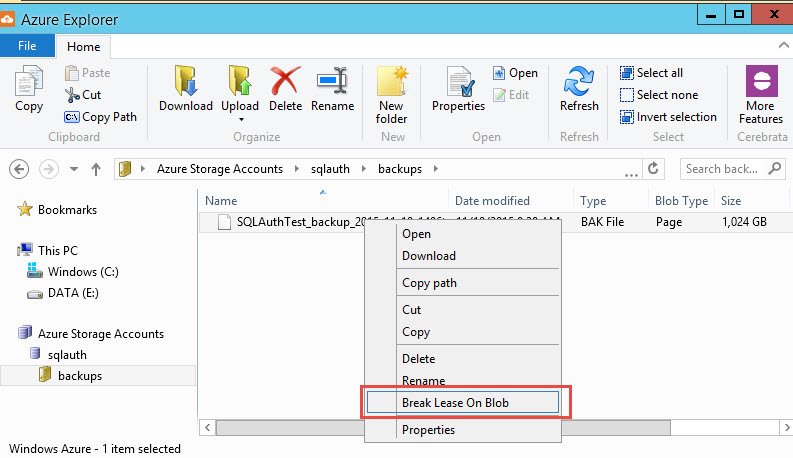
I downloaded Azure Explore tool from and using the tool I was able to break lease which was open. Below is the option in the UI called ‘Break Lease On Blob’ once you are connected to the Storage account.
Another way was to break the lease using the way documented in MSDN https://msdn.microsoft.com/en-us/library/jj919145.aspx (Deleting Backup Blob Files with Active Leases) and it needs coding which I am not an expert at.
Have you ever tried using backupToURL option with SQL Server? Will you be using these tools for your environments? Do let me know via comments.
Reference : Pinal Dave (https://blog.sqlauthority.com)