A weekly review beats a daily to-do list because it shows you seven days of work at once. A daily list shows you one day. By the time the collision appears on Thursday, you agreed to it on Monday.

Why the Daily List Keeps Failing
A daily to-do list gets built every morning from yesterday’s leftovers and whatever arrived overnight. It has no memory and no view of what’s coming. Tuesday’s list can’t warn you that Thursday already holds a deploy and a planning meeting.
So the list grows. Items slide from day to day, and each slide costs a little trust. After a few weeks you stop reading it, because you know it’s wrong. A tool you don’t trust is worse than no tool, since it still takes time to maintain.
Here’s how it plays out. On Monday you say yes to a review that looks like an hour. On Tuesday a production issue takes your morning. By Wednesday the daily list still shows the review, now overdue, next to three new items. Nothing on that list says the week no longer fits.
Think in a Rolling Window
In SQL Server, you rarely judge a metric from a single day. A daily count of closed tickets jumps around. A rolling seven-day total smooths the noise and shows the trend. This query adds up the current day and the six days before it, assuming one row per day.
SELECT WorkDate,
       TasksDone,
       SUM(TasksDone) OVER (ORDER BY WorkDate
                            ROWS BETWEEN 6 PRECEDING AND CURRENT ROW) AS Last7Days
FROM dbo.DailyWork
ORDER BY WorkDate;
Every row gets its own frame, and the frame slides forward one day at a time. Your work needs the same view. Seven days is long enough to hold a full cycle of deploys, reviews and on-call shifts. It’s short enough that you can still change the plan. A thirty-day frame is too slow to steer by, because the problem is over before the total shows it. A one-day frame jumps around too much to trust.

What the Review Looks Like
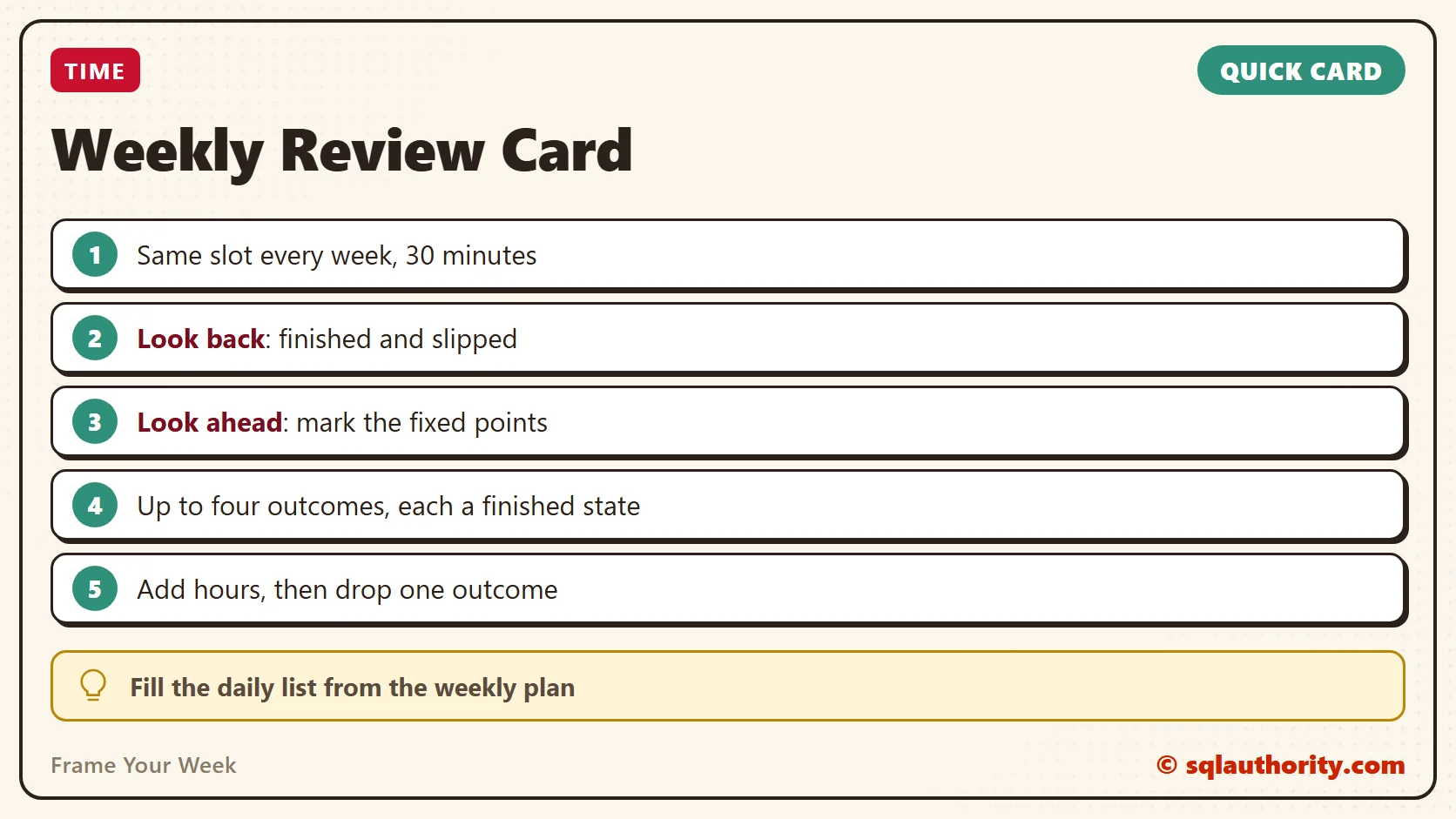
Block thirty minutes at the same time each week. I like Friday afternoon, when the week is still fresh and nobody schedules anything important. Monday morning works too, as long as it happens before you open email. The slot matters less than the habit. Keep the half hour for the review alone, with no email and no fixing. If you spot a task, write it down and move on.
Start with the window behind you. Open last week’s calendar and ticket list, then write down what finished and what slipped. For each slip, note one reason. Was it blocked, or was it too big? Some slips turn out to be unimportant, and those you can delete.
Next, look at the window ahead. Read the next seven days on your calendar and mark the fixed points: deploys, on-call shifts, reviews and deadlines. Whatever is left is your real capacity. This step is the one the daily list can’t do, because it only sees tomorrow.
Now choose the outcomes. Pick up to four results you want by next Friday, and write each as a finished state. “Reporting query tuned and reviewed” works. “Work on reporting” doesn’t, because you can never tell when it’s done. Four is a limit, not a target.
Count the Load, Not the Items
Ten small tasks and one large task can look the same on a list. They don’t look the same on a calendar. For each outcome, write a rough number of hours. Add them up and compare the total with the free time you found.
If the total is bigger, something leaves the week now, while it’s cheap to remove. A DBA checks capacity before adding a job to a full schedule for the same reason. The new job doesn’t run faster because it’s important. It makes everything else late.
A Sample Week
Here’s a made-up week for a DBA who looked at the calendar first. The fixed points were a deploy, two review meetings and an on-call handover. They used 24 hours of a 40-hour week, which left 16 hours free. Then came the outcomes and their estimates.
| Outcome for the week | Estimate |
|---|---|
| Nightly load finishes in under two hours | 6 hours |
| Index review for the Orders table signed off | 5 hours |
| Handover notes written for the next on-call | 2 hours |
| Quarterly access review sent out | 4 hours |
The total is 17 hours against 16 free. One outcome has to move, so the access review goes to next week. That leaves a few spare hours for the surprises every week brings.

What to Do With a Slip
An item that slips once is normal. An item that slips twice is telling you something. Decide on the spot. Either cut it into a smaller first step, or put it on the calendar at a fixed time. If it still doesn’t earn a slot, drop it.
Leaving it on the list unchanged is the one choice that never works. The list gets longer, and the item stays the same size.
Roll the Window Forward
Each week the frame moves one step. Finished outcomes fall out of the back. Unfinished ones move forward only if they pass the same test as everything else. They need an hour estimate and a place in the week. New requests that arrived during the week enter at the review, never straight into the plan. That keeps the plan steady while everything around it changes.
Send your outcomes to your team lead on Monday, in two lines. People who know your plan ask for things in a sensible order. A request that doesn’t fit is also easier to discuss when the plan is visible.
Then Use the Daily List Differently
You don’t have to give up the daily list. Keep it, but fill it from the weekly plan. Each morning, spend two minutes picking the piece of an outcome that fits today. Anything new that arrives during the day goes into one inbox and waits for the next review.
That changes what the list is. It stops being a record of everything you worry about. It becomes a slice of a plan you already made, so the morning takes two minutes instead of twenty.
The Fair Objection
A fair objection: a daily list takes seconds, and a weekly review takes half an hour. A busy week has no half hour to spare. I understand that, and busy weeks are when the review pays most. Thirty minutes costs less than one afternoon spent on a task that should have left the week on Monday. If a week is so full that thirty minutes is impossible, that’s the finding.
Try This Week
- Put a thirty-minute review on your calendar, in the same slot every week.
- Write down what finished last week and what slipped, with one reason for each slip.
- Mark every fixed point in the next seven days.
- Choose up to four outcomes, each written as a finished state.
- Add an hour estimate to each outcome and compare the total with your free time.
- Remove one outcome before the week starts if the total is too high.
- Keep one inbox for anything new, and empty it at the review.
A weekly review is not a longer to-do list, it is a wider view of the same work.
Published by Pinal Dave on SQLAuthority. More of my work at pinaldave.com.
Discover more from SQL Authority with Pinal Dave
Subscribe to get the latest posts sent to your email.