
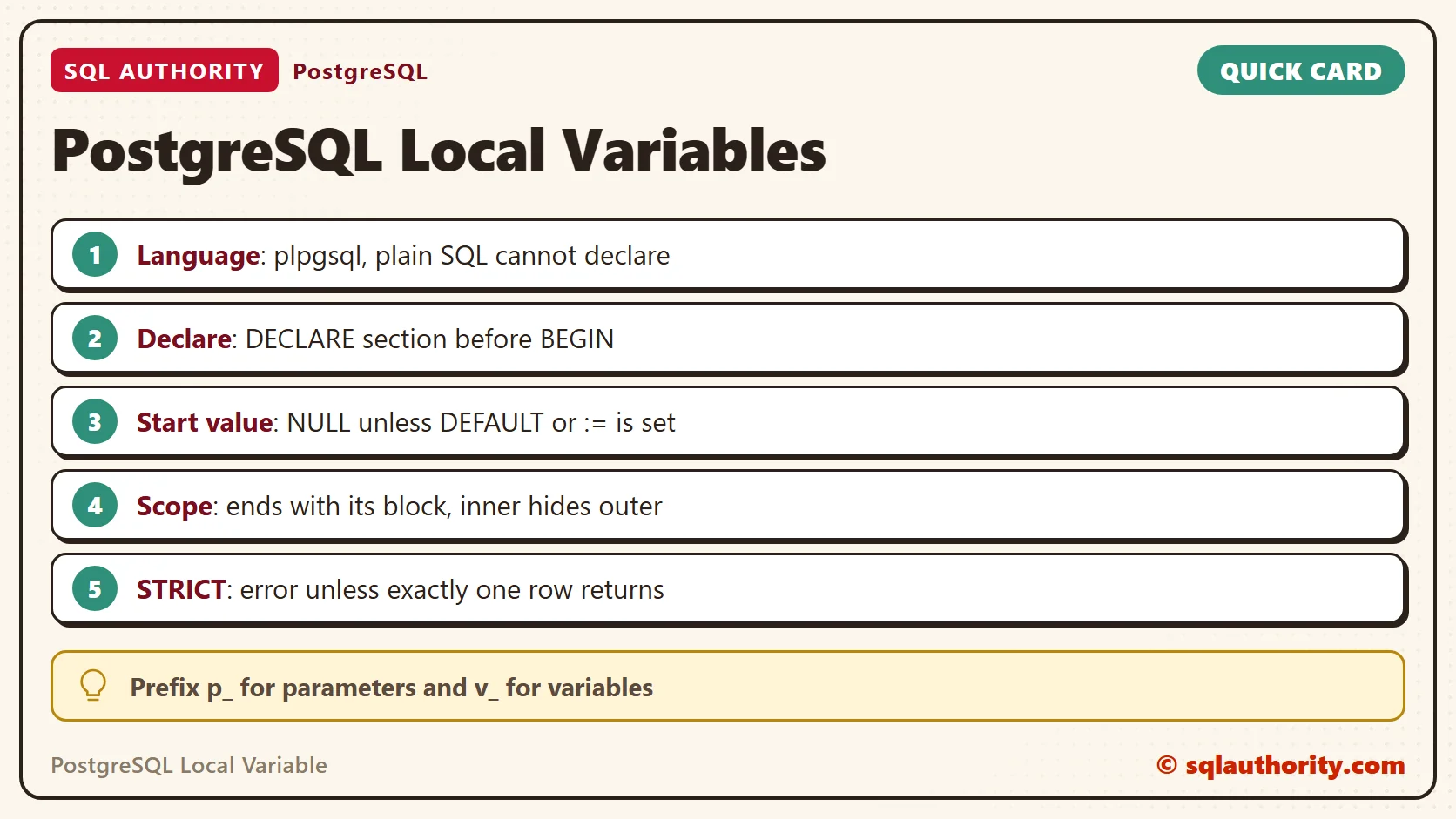
A PostgreSQL local variable lives inside a function or a DO block. You create it in a DECLARE section before BEGIN. Plain SQL has no variables, so the code needs the plpgsql language. I tested every example here on PostgreSQL 18.6.

The SQL Server Habit
In SQL Server you write DECLARE, give the variable a start value and use it in the next statement. The variable lives for the batch, which ends at GO. I ran this pair of batches on SQL Server 2025.
DECLARE @Int1 INT = 1;
SELECT @Int1 AS Col1;
GO
SELECT @Int1 AS Col1;
Col1
1

Msg 137, Level 15, State 2, Line 1
Must declare the scalar variable "@Int1".
The first batch returns 1. The second batch fails with Msg 137, because the variable died with the first batch. PostgreSQL has no loose variables like this. A variable belongs to a block of code inside a function, and it ends with that block.
Plain SQL Cannot Declare
The examples use one small table, the same six sales rows in every query. Create it first. In psql, the line that starts with a backslash is a client command, not SQL.
CREATE DATABASE sqla_plvar;

\c sqla_plvar

CREATE TABLE sales (
  id serial PRIMARY KEY,
  item text NOT NULL,
  qty integer NOT NULL,
  price numeric(6,2) NOT NULL
);

INSERT INTO sales (item, qty, price) VALUES
  ('mango', 3, 2.50),
  ('banana', 12, 0.30),
  ('mango', 5, 2.50),
  ('apple', 7, 0.80),
  ('mango', 2, 2.60),
  ('apple', 4, 0.80);
A PostgreSQL function names its language. With LANGUAGE sql, the body can hold only SQL statements. In SQL, the word DECLARE creates a cursor. The parser reads n as a cursor name and stops at integer.
CREATE FUNCTION bad_sql() RETURNS integer LANGUAGE sql AS $$
DECLARE n integer := 1;
SELECT n;
$$;
ERROR:  syntax error at or near "integer"
LINE 2: DECLARE n integer := 1;
                  ^
A Function With Local Variables
Switch the language to plpgsql and the body gets a DECLARE section, then BEGIN and END. This function finds the revenue of one item and adds tax. It has two local variables, v_net and v_rate. The dollar signs mark the start and end of the body. You need no escaping for quotes inside it.
CREATE FUNCTION item_revenue(p_item text, p_tax_pct numeric DEFAULT 8) RETURNS numeric
LANGUAGE plpgsql AS $$
DECLARE
  v_net numeric;
  v_rate numeric := p_tax_pct / 100;
BEGIN
  SELECT sum(qty * price) INTO v_net FROM sales WHERE item = p_item;
  RETURN round(coalesce(v_net, 0) * (1 + v_rate), 2);
END;
$$;

SELECT item_revenue('mango');

SELECT item_revenue('mango', 0);

SELECT item_revenue('durian');| Call | Result |
|---|---|
| item_revenue(‘mango’) | 27.22 |
| item_revenue(‘mango’, 0) | 25.20 |
| item_revenue(‘durian’) | 0.00 |
The sign := assigns a value. The statement SELECT … INTO stores a query result in a variable. Mango sold 3 and 5 units at 2.50 and 2 units at 2.60, which is 25.20 before tax. The default tax of 8 percent gives 27.22. Durian never sold, so the sum is NULL, and coalesce turns it into 0.
The parameter p_tax_pct has a default of 8, so a caller can leave it out. The second call passes 0 and switches the tax off. Parameters are variables too. They can be read inside the body like any other local variable.
You call a function with SELECT, and the value it returns joins the query like any other value. A procedure, made with CREATE PROCEDURE, is called with CALL and holds variables the same way. Both use the same DECLARE section.
Rules for Local Variables
A variable with no start value begins as NULL. A DO block is a function body that runs once and returns nothing. It is the quickest way to try a variable. The NOTICE lines are what RAISE NOTICE prints.
DO $$
DECLARE
  v_count integer;
  v_label text := 'mango';
BEGIN
  RAISE NOTICE 'count is %, label is %', v_count, v_label;
  v_count := 5;
  RAISE NOTICE 'count is now %', v_count;
END;
$$;
NOTICE:  count is <NULL>, label is mango
NOTICE:  count is now 5
A start value can follow DEFAULT or the := sign. Both work. Add NOT NULL and the variable refuses NULL.
DO $$
DECLARE
  v_a integer DEFAULT 3;
  v_b integer NOT NULL := 1;
BEGIN
  RAISE NOTICE 'a is %, b is %', v_a, v_b;
  v_b := NULL;
END;
$$;
NOTICE:  a is 3, b is 1
ERROR:  null value cannot be assigned to variable "v_b" declared NOT NULL
CONTEXT:  PL/pgSQL function inline_code_block line 7 at assignment
The first NOTICE ran, then the assignment of NULL failed. The word CONSTANT works the other way: it locks a variable after its first value. PostgreSQL catches an assignment to a constant when you create the function, so the function never exists.
CREATE FUNCTION const_demo() RETURNS numeric LANGUAGE plpgsql AS $$
DECLARE
  v_rate CONSTANT numeric := 0.08;
BEGIN
  v_rate := 0.1;
  RETURN v_rate;
END;
$$;
ERROR:  variable "v_rate" is declared CONSTANT
LINE 5:   v_rate := 0.1;
          ^
Scope is what makes a variable local. A block can sit inside another block and declare its own variable with the same name. The inner one hides the outer one until the inner block ends. Many variable bugs come from this hiding, so give every variable a name that no other block reuses.
CREATE FUNCTION scope_demo() RETURNS text LANGUAGE plpgsql AS $$
DECLARE
  v_n integer := 1;
  v_out text;
BEGIN
  v_out := 'outer ' || v_n;
  DECLARE
    v_n integer := 2;
  BEGIN
    v_out := v_out || ', inner ' || v_n;
  END;
  RETURN v_out || ', outer again ' || v_n;
END;
$$;

SELECT scope_demo();
outer 1, inner 2, outer again 1
Two Traps
The first trap is a name clash. Here the parameter is called item, and so is the table column. PostgreSQL creates the function without complaint. It fails when you call it.
CREATE FUNCTION clash(item text) RETURNS integer LANGUAGE plpgsql AS $$
BEGIN
  RETURN (SELECT sum(qty) FROM sales WHERE item = item);
END;
$$;

SELECT clash('mango');
ERROR:  column reference "item" is ambiguous
LINE 1: (SELECT sum(qty) FROM sales WHERE item = item)
                                          ^
DETAIL:  It could refer to either a PL/pgSQL variable or a table column.
QUERY:  (SELECT sum(qty) FROM sales WHERE item = item)
CONTEXT:  PL/pgSQL function clash(text) line 3 at RETURN
The fix is a naming habit. Start parameters with p_ and variables with v_, as the earlier functions do. No variable then shares a name with a column.
The second trap is the number of rows. SELECT … INTO stores the first row and ignores the rest. When no row comes back, it sets the variable to NULL. Add STRICT and PostgreSQL raises an error unless exactly one row comes back.
CREATE FUNCTION price_of(p_item text) RETURNS numeric LANGUAGE plpgsql AS $$
DECLARE
  v_price numeric;
BEGIN
  SELECT price INTO STRICT v_price FROM sales WHERE item = p_item;
  RETURN v_price;
END;
$$;

SELECT price_of('banana');

SELECT price_of('mango');

SELECT price_of('durian');
0.30
ERROR:  query returned more than one row
HINT:  Make sure the query returns a single row, or use LIMIT 1.
ERROR:  query returned no rows
Banana has one row, so it returns 0.30. Mango has three rows and durian has none, and both fail. Use STRICT when a wrong row count means a bug. Leave it off when NULL is a fair answer.
A Variable Outside a Function
Sometimes you want a variable in a script, not in a stored function. The psql client has its own variables. They live in the client, not on the server, and you read them with a colon. The form :’fruit’ puts the value in quotes for you.
\set fruit mango

SELECT item, sum(qty) AS total_qty FROM sales WHERE item = :'fruit' GROUP BY item;
 item  | total_qty
-------+-----------
 mango |        10
(1 row)
This works in psql only. A different client, such as an application driver, does not understand \set. For logic that must run on the server, use a DO block or a function.
The Same Ideas in SQL Server
| Idea | SQL Server | PostgreSQL |
|---|---|---|
| Declare | DECLARE @n INT = 1; | n integer := 1; inside DECLARE |
| Where it works | Anywhere in a batch | Only inside a plpgsql block |
| How long it lives | Until the batch ends | Until its block ends |
| Name prefix | @ is required | None, so choose a v_ prefix |
| Query into it | SELECT @n = col FROM t; | SELECT col INTO n FROM t; |
SQL Server sets a variable with SET @n = 5 or with SELECT @n = col. PostgreSQL has one assignment sign, :=, and a separate INTO clause for queries. A plain = also works for assignment, but := avoids confusion with comparison.
Is PostgreSQL Too Much Work?
You could say this is more work than SQL Server, where a variable needs one line. Fair point. For a quick test, a DO block is the closest match and takes five lines. The extra structure pays off later, because a function is stored once and every query can call it by name.
A Short Checklist
Keep these rules in mind for every PostgreSQL local variable you write.
- Use LANGUAGE plpgsql, because plain SQL cannot declare variables.
- Declare variables before BEGIN, and remember that they start as NULL.
- Prefix parameters with p_ and variables with v_ to avoid column clashes.
- Add STRICT when the query must return exactly one row.
- Use a DO block for a quick test and \set for a psql script.
When you finish, switch to another database and drop the test one.
\c postgres

DROP DATABASE sqla_plvar;
A PostgreSQL variable is not a loose name, it is a value that lives and dies inside one block.
Published by Pinal Dave on SQLAuthority. More of my work at pinaldave.com.
Discover more from SQL Authority with Pinal Dave
Subscribe to get the latest posts sent to your email.



1 Comment. Leave new
Puedes hacer algo similar a esto mediante dos opciones (Yo uso Postgresql 9.4) :
1) Usando PGSCRIPT que corre solamente desde el lado del cliente (PgAdmin) :
SET @INT = 1;
SET @DATOS = SELECT 1;
PRINT @DATOS;
2) Usando un bloque PLSQL anónimo :
DO $$
DECLARE
number INT = 1;
BEGIN
RAISE NOTICE ‘YOU NUMBER IS : %’, number;
END;
$$
Son alternativas a evitar construir funciones, obviamente el caso (1) es mas simple y parecido a SQL, pero es un avance :-) Suerte!