FIELDQUOTE tells BULK INSERT which character wraps a field, so a comma inside a quoted name stays inside one column. Use it with FORMAT = ‘CSV’, load into a plain text staging table, and check the values before they reach real tables.

The comma that breaks the load
A customer file arrives from a partner. Most rows are fine. Then you hit a name like “Smith, Alex”, and the load puts half of it in one column and half in the next. Nobody notices until the amounts look strange.
The cause is simple. A plain BULK INSERT with a comma terminator splits at every comma. It has no idea that quotes mean “keep this together.” Let me show it with a tiny file.
Create the sample file
BULK INSERT reads files from the SQL Server machine, not from the PC running SSMS. Create a folder named C:\Temp on that machine. Open Notepad, paste the lines below, and save the file as quoted-customers.csv in UTF-8 encoding.
CustomerCode,CustomerName,AmountText
C001,"Smith, Alex",12.50
C002,"The ""Quoted"" Store",20
C003,"Renée",not-a-number
,"Missing code",5
C004,"Valid customer",30
The file has a quoted comma, a quote doubled inside a quoted name, an accented letter, a bad amount and a missing code. A real partner file will have all of these by Tuesday.
Load it the plain way first
The staging table holds everything as text. That is on purpose. I convert to real types later, where I can see what fails.
DROP TABLE IF EXISTS #Plain;

CREATE TABLE #Plain
(CustomerCode nvarchar(40) NULL, CustomerName nvarchar(200) NULL, AmountText nvarchar(40) NULL);

BULK INSERT #Plain FROM 'C:\Temp\quoted-customers.csv'
WITH (FIELDTERMINATOR = ',', ROWTERMINATOR = '\n', FIRSTROW = 2, CODEPAGE = '65001');

SELECT CustomerCode, CustomerName, AmountText FROM #Plain;
Look at the first row. The name is “Smith, the quotes are still there, and the next column holds Alex”, 12.50 as one lump. The other rows keep their quotes too. Five rows loaded, all of them wrong in some way.
Load it with FORMAT = ‘CSV’ and FIELDQUOTE
Now tell the parser the file is CSV and say which character is the quote. SQL Server then strips the quotes, keeps the comma inside the name, and turns the doubled quote into one. CODEPAGE 65001 reads the file as UTF-8, so the accent survives.
DROP TABLE IF EXISTS #CsvStage;

CREATE TABLE #CsvStage
(CustomerCode nvarchar(40) NULL, CustomerName nvarchar(200) NULL, AmountText nvarchar(40) NULL);

BULK INSERT #CsvStage FROM 'C:\Temp\quoted-customers.csv'
WITH (FORMAT = 'CSV', FIELDQUOTE = '"', FIRSTROW = 2, CODEPAGE = '65001');
FIRSTROW = 2 skips the header line. Use it only when the file really has a header. BULK INSERT also has an ERRORFILE option for rows the parser itself cannot read. Our two bad rows are not parser failures. They load fine as text, so we catch them in T-SQL next.

Validate before you trust it
This block runs four checks. First, convert the amount with TRY_CONVERT, which gives NULL instead of an error. Second, prove the accent arrived: the fourth character of Renée should be code point 233. Third, list the rows that need attention. Fourth, move only the good rows into a typed table.
SELECT CustomerCode, CustomerName, AmountText,
       TRY_CONVERT(decimal(19,4), AmountText) AS amount_value
FROM #CsvStage
ORDER BY CustomerCode, CustomerName;

SELECT CustomerCode, UNICODE(SUBSTRING(CustomerName, 4, 1)) AS accent_codepoint
FROM #CsvStage
WHERE CustomerCode = N'C003';

SELECT CustomerCode, CustomerName, AmountText
FROM #CsvStage
WHERE CustomerCode IS NULL OR TRY_CONVERT(decimal(19,4), AmountText) IS NULL
ORDER BY CustomerCode, CustomerName;

DROP TABLE IF EXISTS #CsvAccepted;
CREATE TABLE #CsvAccepted
(CustomerCode nvarchar(40) PRIMARY KEY, CustomerName nvarchar(200), Amount decimal(19,4));

INSERT #CsvAccepted (CustomerCode, CustomerName, Amount)
SELECT CustomerCode, CustomerName, TRY_CONVERT(decimal(19,4), AmountText)
FROM #CsvStage
WHERE CustomerCode IS NOT NULL AND TRY_CONVERT(decimal(19,4), AmountText) IS NOT NULL;

SELECT CustomerCode, CustomerName, Amount FROM #CsvAccepted ORDER BY CustomerCode;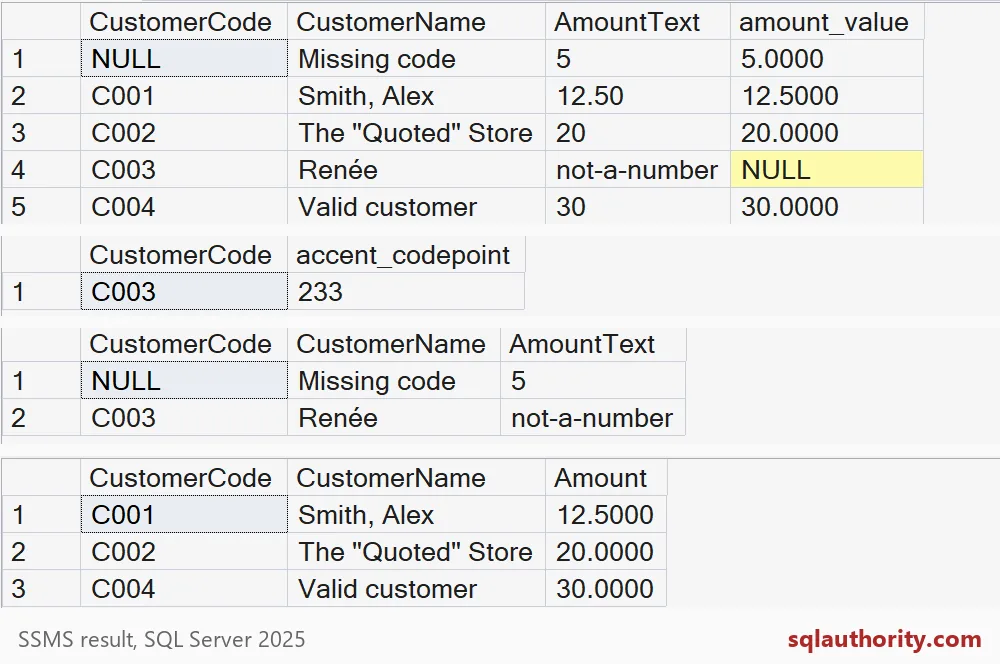
Smith, Alex is one name in one column. The Quoted Store has real quotes around Quoted. The accent is 233. The row with the missing code and the row with not-a-number are the two for a human. Three rows are accepted.
Make the retry safe
Files arrive twice. Someone reruns the job after a timeout. If the insert blindly adds rows, you get duplicates. A NOT EXISTS check makes the load safe to repeat. Run this block and the accepted count stays at three.
INSERT #CsvAccepted (CustomerCode, CustomerName, Amount)
SELECT s.CustomerCode, s.CustomerName, TRY_CONVERT(decimal(19,4), s.AmountText)
FROM #CsvStage AS s
WHERE s.CustomerCode IS NOT NULL
  AND TRY_CONVERT(decimal(19,4), s.AmountText) IS NOT NULL
  AND NOT EXISTS (SELECT 1 FROM #CsvAccepted AS a WHERE a.CustomerCode = s.CustomerCode);

SELECT COUNT(*) AS accepted_rows FROM #CsvAccepted;

DROP TABLE IF EXISTS #Plain, #CsvStage, #CsvAccepted;
When you are done, delete C:\Temp\quoted-customers.csv. In a real job, also keep the file name, the load time and the rejected rows, so you can explain the numbers later.
Before the next partner file, agree on the quote character in writing.
A parsed CSV is not validated data, it is input for the next checks.
Published by Pinal Dave on SQLAuthority. More of my work at pinaldave.com.
Discover more from SQL Authority with Pinal Dave
Subscribe to get the latest posts sent to your email.