
How do you flip bit field in SQL Server?
Well, if you search for this question on internet, you will find many different answers, today we will see my favorite method to flip value for the bit field.
Bit field can hold two different values zero (0) and one (1). When we change the value of zero (0) to one (1) or change the value of one (1) to zero (0) it is called as flipping the value of the bit field.
You can just flip the value of the bit field by prefixing it with ~ before it. Here is a simple script for the same.
DECLARE @field1 BIT
DECLARE @field2 BIT
SET @field1 = 0
SET @field2 = 1
SELECT @field1 Field1, @field2 Field2
SELECT @field1 = ~@field1, @field2 = ~@field2
SELECT @field1 Field1, @field2 Field2
You can see in above script the bit variable changes value with the help of ~ (tilda).
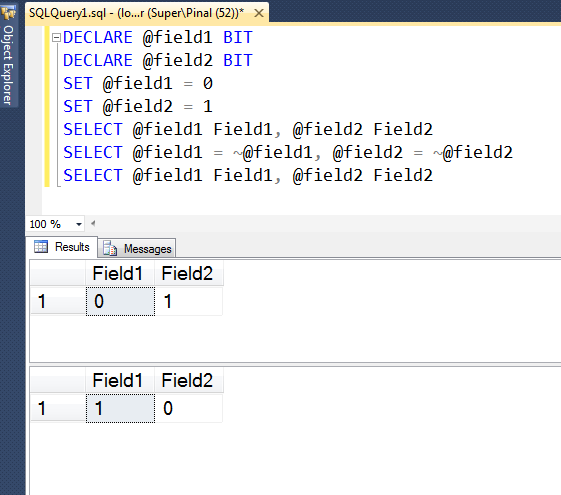
There are many different ways to flip the value of bit field. What is your favorite method?
What to Watch When You Flip a Bit Field
The ~ operator is short and clear, but it works this way only because the value uses the BIT data type. If the same value sits in an INT column, ~1 returns -2, not 0, because ~ flips every bit of the number. In that case, use 1 - Col or Col ^ 1 instead, or convert the value to BIT first.
NULL is the other thing to think about. ~NULL is still NULL, which is usually what you want. A CASE expression such as CASE WHEN Col = 1 THEN 0 ELSE 1 END is different: it turns every NULL into 1, which may quietly change data you did not mean to touch.
Also keep in mind how BIT converts other values. Any number other than 0 becomes 1, and the strings ‘TRUE’ and ‘FALSE’ become 1 and 0. So a stray value of 5 from an application is stored as 1. That is handy, but it can also hide a bug further up in the code.
To flip a whole column, UPDATE dbo.Settings SET IsActive = ~IsActive WHERE ... is all you need. Always run the WHERE clause as a SELECT first, because if you flip the wrong rows, you need to know exactly which ones to flip back.
Published by Pinal Dave on SQLAuthority. More of my work at pinaldave.com.
Discover more from SQL Authority with Pinal Dave
Subscribe to get the latest posts sent to your email.



1 Comment. Leave new
1 . if 100173953 status Pending to P
rocessing it should not be moved more than 10 minutes
2. if 100173953 status Processing to Out delivery it should not be moved more than 15 minutes
3. and 100173953 status more than 120 minutes
above conditions true means I need that increment_id’s for the below table