
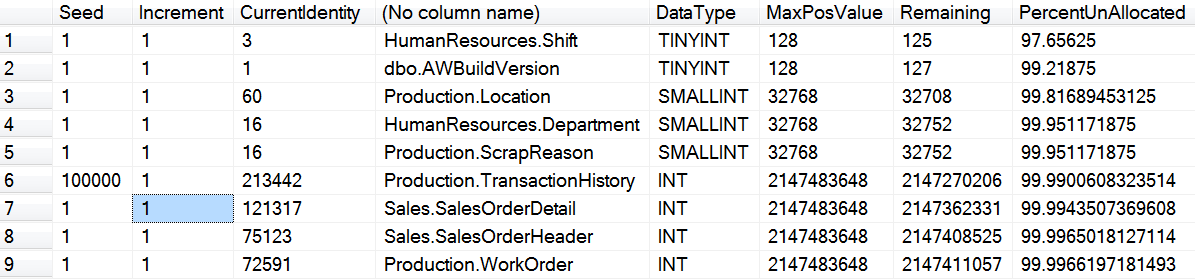
Seven years ago, I wrote a blog post about – Query to Find Seed Values, Increment Values and Current Identity Column value of the table. It is quite a popular blog post and lots of people like it as it gives immediate details about Identity Values. SQL expert Mark Hickin has further improved this query and posted an interesting modification where the query also display upper limits of the data type used in the query.
SELECT IDENT_SEED(TABLE_SCHEMA + '.' + TABLE_NAME) AS Seed ,
IDENT_INCR(TABLE_SCHEMA + '.' + TABLE_NAME) AS Increment ,
IDENT_CURRENT(TABLE_SCHEMA + '.' + TABLE_NAME) AS CurrentIdentity ,
TABLE_SCHEMA + '.' + TABLE_NAME ,
UPPER(c.DATA_TYPE) AS DataType ,
t.MaxPosValue,
t.MaxPosValue -IDENT_CURRENT(TABLE_SCHEMA + '.' + TABLE_NAME) AS Remaining,
((t.MaxPosValue -IDENT_CURRENT(TABLE_SCHEMA + '.' + TABLE_NAME))/t.MaxPosValue) 100 AS PercentUnAllocated
FROM INFORMATION_SCHEMA.COLUMNS AS c
INNER JOIN ( SELECT name AS Data_Type ,
POWER(CAST(2 AS VARCHAR), ( max_length  8 ) - 1) AS MaxPosValue
FROM sys.types
WHERE name LIKE '%Int'
) t ON c.DATA_TYPE = t.Data_Type
WHERE COLUMNPROPERTY(OBJECT_ID(TABLE_SCHEMA + '.' + TABLE_NAME), COLUMN_NAME,
'IsIdentity') = 1
ORDER BY PercentUnAllocated ASC
Here is the screenshot of the image. Thanks Mark – a very nice query.
How I Use the Current Identity Column Value Check
This query is one of my favorite early warning checks. An identity column does not care how many rows the table has; it only cares about the last number it handed out. Deleted rows, rolled back inserts and jumps after a restart all use up numbers, so a table with a few million rows can be much closer to its limit than you think. The row count alone can fool you.
For quick reference, these are the upper limits of the usual identity data types:
- TINYINT: 255
- SMALLINT: 32,767
- INT: 2,147,483,647
- BIGINT: 9,223,372,036,854,775,807
When the last value reaches the limit, every new insert fails with an arithmetic overflow error. The fix is usually to change the column to a bigger data type, and on a large table that is a big job, with indexes, keys and foreign keys to take care of. That is why it pays to catch it months ahead. A simple monthly check is enough for most systems.
If you only need one table, IDENT_CURRENT('dbo.TableName') returns the last value, and sys.identity_columns shows the seed, increment and last value for every table in the database. Compare the last value with the limit, and review any table that has already used a large part of its range.
Another quick check is DBCC CHECKIDENT('dbo.TableName', NORESEED), which reports the current identity value and the highest value actually stored in the column. Be sure to include NORESEED, because the other forms of the command can change the identity value instead of just reporting it.
Published by Pinal Dave on SQLAuthority. More of my work at pinaldave.com.
Discover more from SQL Authority with Pinal Dave
Subscribe to get the latest posts sent to your email.




4 Comments. Leave new
Script will work perfectly for Seed=1 and increment=1
For seed & Increment, other than 1 value, use this:
SELECT Seed,Increment,CurrentIdentity,TABLE_NAME,DataType,MaxPosValue ,
FLOOR((MaxPosValue -CurrentIdentity)/Increment) AS Remaining,
100-100*((CurrentIdentity-Seed)/Increment+1) / FLOOR((MaxPosValue – Seed) /Increment+1) AS PercentUnAllocated
FROM (
SELECT IDENT_SEED(TABLE_SCHEMA + ‘.’ + TABLE_NAME) AS Seed ,
IDENT_INCR(TABLE_SCHEMA + ‘.’ + TABLE_NAME) AS Increment ,
IDENT_CURRENT(TABLE_SCHEMA + ‘.’ + TABLE_NAME) AS CurrentIdentity ,
TABLE_SCHEMA + ‘.’ + TABLE_NAME AS TABLE_NAME ,
UPPER(c.DATA_TYPE) AS DataType ,
FLOOR(t.MaxPosValue/IDENT_INCR(TABLE_SCHEMA + ‘.’ + TABLE_NAME)) * IDENT_INCR(TABLE_SCHEMA + ‘.’ + TABLE_NAME) AS MaxPosValue
FROM INFORMATION_SCHEMA.COLUMNS AS c
INNER JOIN ( SELECT name AS Data_Type ,
POWER(CAST(2 AS VARCHAR), ( max_length * 8 ) – 1) AS MaxPosValue
FROM sys.types
WHERE name LIKE ‘%Int’
) t ON c.DATA_TYPE = t.Data_Type
WHERE COLUMNPROPERTY(OBJECT_ID(TABLE_SCHEMA + ‘.’ + TABLE_NAME), COLUMN_NAME,
‘IsIdentity’) = 1
)T1
ORDER BY PercentUnAllocated ASC
This is great script Harsh!
we can also add NextValue column by adding increment value in current value,
IDENT_CURRENT(TABLE_SCHEMA + ‘.’ + TABLE_NAME) + IDENT_INCR(TABLE_SCHEMA + ‘.’ + TABLE_NAME) AS NextValue,
Thanks Pinal and Harsh… one additional refinement… due to rules of precedence, need to enclose Increment+1 within parenthesis to get the correct PercentUnAllocated value:
SELECT
Seed
,Increment
,CurrentIdentity
,TABLE_NAME
,DataType
,MaxPosValue
,FLOOR((MaxPosValue -CurrentIdentity)/Increment) AS Remaining
,100-100*((CurrentIdentity-Seed)/(Increment+1.)) / FLOOR((MaxPosValue – Seed) /(Increment+1.)) AS PercentUnAllocated
FROM (
SELECT
IDENT_SEED(TABLE_SCHEMA + ‘.’ + TABLE_NAME) AS Seed
,IDENT_INCR(TABLE_SCHEMA + ‘.’ + TABLE_NAME) AS Increment
,IDENT_CURRENT(TABLE_SCHEMA + ‘.’ + TABLE_NAME) AS CurrentIdentity
,TABLE_SCHEMA + ‘.’ + TABLE_NAME AS TABLE_NAME
,UPPER(c.DATA_TYPE) AS DataType
,FLOOR(t.MaxPosValue/IDENT_INCR(TABLE_SCHEMA + ‘.’ + TABLE_NAME)) * IDENT_INCR(TABLE_SCHEMA + ‘.’ + TABLE_NAME) AS MaxPosValue
FROM INFORMATION_SCHEMA.COLUMNS AS c
INNER JOIN (
SELECT
name AS Data_Type
,POWER(CAST(2 AS VARCHAR), ( max_length * 8 ) – 1) AS MaxPosValue
FROM sys.types
WHERE name LIKE ‘%Int’
) t ON c.DATA_TYPE = t.Data_Type
WHERE COLUMNPROPERTY(OBJECT_ID(TABLE_SCHEMA + ‘.’ + TABLE_NAME), COLUMN_NAME,’IsIdentity’) = 1
) AS T1
ORDER BY PercentUnAllocated ASC