Object Explorer Details in SSMS lets you select many objects at once and script them in one go. It also puts useful metadata, such as row counts, next to the names. It saves you from a lot of right-clicking.

Why click twelve times
A developer asks you for the CREATE scripts of twelve tables. You open Object Explorer, right-click the first table, choose Script Table as, and pick a destination. Then you do it eleven more times. By table six you have forgotten what you were doing.
There is a faster way, and it sits behind one key. Let me set up two small tables to practice on. Use a test database. The demo creates two tables, and the last block drops them.
Create two tables to practice on
The first table gets 2 rows and the second gets 3. The numbers will matter when we compare the grid with a query.
DROP TABLE IF EXISTS dbo.UiDetailAlpha, dbo.UiDetailBeta;

CREATE TABLE dbo.UiDetailAlpha (ItemId int NOT NULL PRIMARY KEY);
CREATE TABLE dbo.UiDetailBeta (ItemId int NOT NULL PRIMARY KEY);

INSERT dbo.UiDetailAlpha (ItemId) VALUES (1), (2);
INSERT dbo.UiDetailBeta (ItemId) VALUES (1), (2), (3);
Open the grid and choose your columns
In Object Explorer, expand your database and click the Tables folder. Press F7. The Object Explorer Details pane opens with one row per table. Click the Stored Procedures folder instead, and you get a grid of procedures.
Right-click a column heading to see which fields you can add. For tables, that includes metadata such as row count and space used. Click a heading to sort. Sort tables by size and the review candidates float to the top.
Select and script in bulk
Click one table, then hold Ctrl and click another. Or click the first, hold Shift, and click the last to take a whole range. The bar at the bottom shows how many items you picked.
Right-click the selection, choose Script Table as, then CREATE To, then New Query Editor Window. You get one window with all the scripts. Read it before you run anything. That review step is the whole point of using a new window.
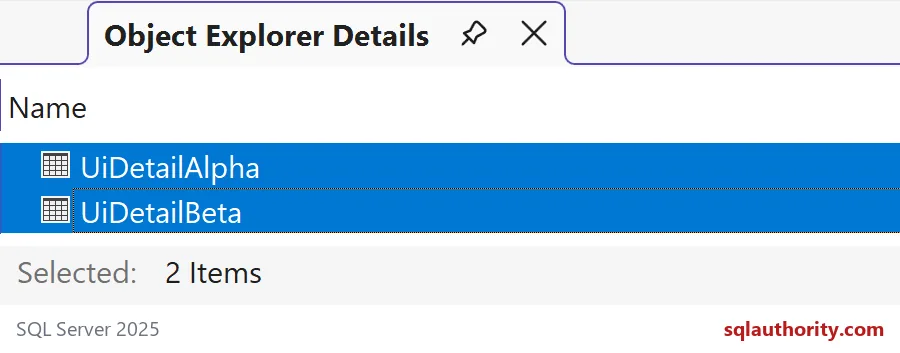
The picture shows UiDetailAlpha and UiDetailBeta selected, with Selected: 2 Items underneath. Those are the two tables from the block above.

Cross-check the grid with SQL
A grid is easy to trust and easy to misread, so check it with a query. First, the catalog view. It lists the tables with their dates. Refresh the folder in SSMS after you create or drop anything, then compare again.
SELECT SCHEMA_NAME(t.schema_id) AS schema_name,
       t.name AS table_name, t.create_date, t.modify_date
FROM sys.tables AS t
WHERE t.name LIKE N'UiDetail%'
ORDER BY t.create_date DESC, t.schema_id, t.name;
Both tables come back with their dates. The dates are different on your server, of course.
Next, the counts. Row counts in a grid come from metadata, and sys.dm_db_partition_stats gives you the same kind of number. Sum only the heap or clustered index rows, which means index_id 0 or 1. That is the row count of the table itself.
SELECT OBJECT_SCHEMA_NAME(object_id) AS schema_name,
       OBJECT_NAME(object_id) AS table_name,
       SUM(row_count) AS metadata_rows,
       SUM(used_page_count) * 8.0 / 1024 AS used_mb
FROM sys.dm_db_partition_stats
WHERE index_id IN (0, 1)
  AND OBJECTPROPERTY(object_id, 'IsUserTable') = 1
GROUP BY object_id
ORDER BY metadata_rows DESC, object_id;
UiDetailBeta shows 3 rows and UiDetailAlpha shows 2, each using a small fraction of a megabyte. In a real database this lists every table, so the big ones come first.
Know when you need an exact count
Metadata counts are quick, and they are meant for working inventories. If a number goes into an audit or a reconciliation, count the rows yourself. COUNT_BIG(*) reads the table, so on a big table do it on purpose, and not for every table at once.
SELECT N'UiDetailAlpha' AS table_name, COUNT_BIG(*) AS exact_rows FROM dbo.UiDetailAlpha
UNION ALL
SELECT N'UiDetailBeta', COUNT_BIG(*) FROM dbo.UiDetailBeta
ORDER BY table_name;
Exact counts of 2 and 3 agree with the metadata here. Pick the one that fits the job. Before you select everything in the grid, decide the action. Copy names for an inventory, or script CREATE to a new window and save it. The last block drops the practice tables.
DROP TABLE IF EXISTS dbo.UiDetailAlpha, dbo.UiDetailBeta;Next time someone asks for a dozen scripts, press F7 and do it once.
A details grid is not an exact audit, it is a fast working inventory.
Published by Pinal Dave on SQLAuthority. More of my work at pinaldave.com.
Discover more from SQL Authority with Pinal Dave
Subscribe to get the latest posts sent to your email.