Unicode lost in a varchar conversion stays lost: the question marks are all that is left. Widening the column afterward changes nothing. The only cure is to reload the text from an intact source.

The customer whose name became ??
Picture a support ticket. A customer’s name was entered in Japanese. On the order screen it shows two question marks. Someone says, “Make the column nvarchar.” You do, and the name is still two question marks.
The damage happened earlier, at the moment the text went through a varchar. Let me reproduce it, so you can see exactly where the characters die. I use an explicit legacy collation for this demo. A database or column with a UTF-8 collation can keep Unicode in varchar, so not every conversion loses text.
Watch the conversion happen
The source is the two-character word 漢字 as nvarchar. I build it with NCHAR so the script survives any copy, paste or file encoding. I convert the word to varchar with a collation that uses a Western code page. Then I show the code points and the byte count.
DECLARE @Source nvarchar(100) = NCHAR(28450) + NCHAR(23383);
DECLARE @Legacy varchar(100) = CONVERT(varchar(100), @Source COLLATE Latin1_General_100_CI_AS);

SELECT @Source AS source_text,
       @Legacy AS legacy_text,
       UNICODE(SUBSTRING(@Source, 1, 1)) AS source_first_codepoint,
       UNICODE(SUBSTRING(@Source, 2, 1)) AS source_second_codepoint,
       DATALENGTH(@Legacy) AS legacy_bytes;
The source shows the two code points 28450 and 23383. The legacy text is two question marks, stored in 2 bytes. Each character had no place in that code page, so each one became a question mark.
Keep literals Unicode too
The same thing happens with literals. In this block the dynamic SQL is just a way to type the word 漢字 twice, once as N’漢字’ and once as plain ‘漢字’. A string without the N prefix is read through the code page of the database, before it ever reaches your nvarchar column. A Unicode column cannot repair a literal that was damaged on the way in.
DECLARE @Word nvarchar(10) = NCHAR(28450) + NCHAR(23383);
DECLARE @Sql nvarchar(max) =
    N'SELECT N''' + @Word + N''' AS unicode_literal, ''' + @Word + N''' AS character_literal;';

EXEC (@Sql);
In SSMS with a legacy code page, the first column keeps the characters and the second shows question marks. Some tools show question marks for both, because of their own font or output settings. So check the code points instead of the glyphs.
DECLARE @Word nvarchar(10) = NCHAR(28450) + NCHAR(23383);
DECLARE @Sql nvarchar(max) =
    N'SELECT UNICODE(N''' + @Word + N''') AS unicode_literal_codepoint, UNICODE(''' + @Word + N''') AS character_literal_codepoint;';

EXEC (@Sql);
The N literal starts with 28450, the real character. The plain literal starts with 63, a question mark. Always type the N.
Find the question marks
Now a table that mimics a damaged load. SourceText is the intact original, and StoredText is what a legacy conversion left behind.
DROP TABLE IF EXISTS #UnicodeLoss;

CREATE TABLE #UnicodeLoss (id int PRIMARY KEY, SourceText nvarchar(100), StoredText nvarchar(100));

DECLARE @Source nvarchar(100) = NCHAR(28450) + NCHAR(23383);

INSERT #UnicodeLoss (id, SourceText, StoredText)
VALUES (1, @Source, CONVERT(nvarchar(100), CONVERT(varchar(100), @Source COLLATE Latin1_General_100_CI_AS)));

SELECT id, UNICODE(SUBSTRING(StoredText, 1, 1)) AS stored_first_codepoint FROM #UnicodeLoss;
The stored value starts with code point 63, so it is already a question mark. Search for it with CHARINDEX, then compare with the source in a binary collation. The last two statements reload the value from the intact source and show the table again.
SELECT id, SourceText, StoredText
FROM #UnicodeLoss
WHERE CHARINDEX(N'?', StoredText) > 0
  AND StoredText COLLATE Latin1_General_100_BIN2 <> SourceText COLLATE Latin1_General_100_BIN2
ORDER BY id;

UPDATE #UnicodeLoss SET StoredText = SourceText WHERE id = 1;

SELECT id, SourceText, StoredText FROM #UnicodeLoss ORDER BY id;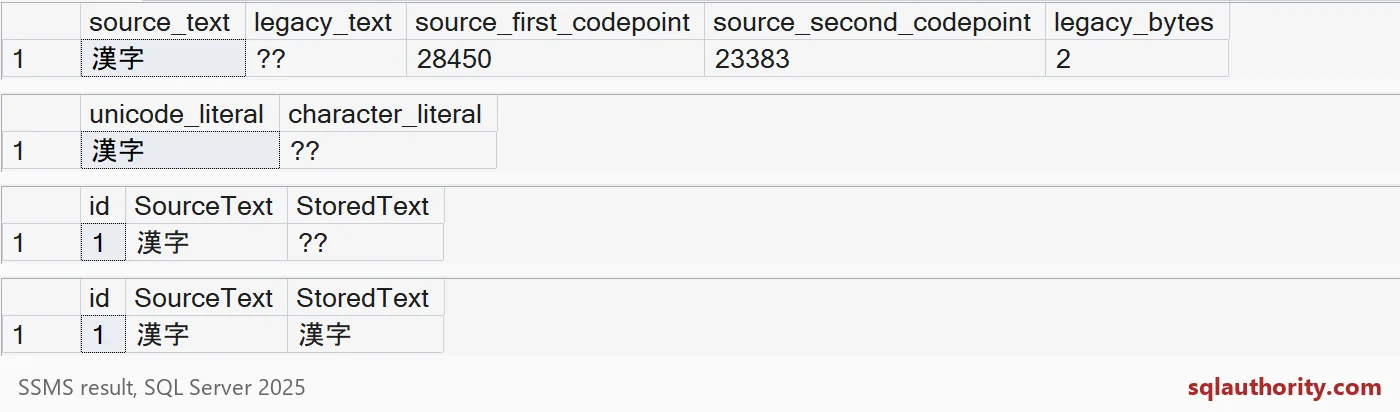
The picture shows four result grids, top to bottom. The conversion, the two literals, the damaged row and the repaired row. The repair worked only because the original text was still there. Keep it until the fix is confirmed. One more check, on the code points:
SELECT id, UNICODE(SUBSTRING(StoredText, 1, 1)) AS stored_first_codepoint,
       UNICODE(SUBSTRING(SourceText, 1, 1)) AS source_first_codepoint
FROM #UnicodeLoss;
Both say 28450. The stored value is the real character again.
Not every question mark is damage
People type question marks on purpose. A search for question marks alone would flag “What?” as damaged. The comparison with the source is what tells the two apart.
DECLARE @Rows TABLE (id int, SourceText nvarchar(100), StoredText nvarchar(100));

INSERT @Rows (id, SourceText, StoredText)
VALUES (1, N'What?', N'What?'),
       (2, NCHAR(28450) + NCHAR(23383), N'??'),
       (3, N'Cafe', N'Cafe');

SELECT id, StoredText,
       CASE WHEN StoredText COLLATE Latin1_General_100_BIN2 = SourceText COLLATE Latin1_General_100_BIN2
            THEN 'legitimate' ELSE 'damaged' END AS verdict
FROM @Rows
WHERE CHARINDEX(N'?', StoredText) > 0
ORDER BY id;
Two candidates came back. “What?” is legitimate and 漢字 is damaged. Without the original, you cannot know. So call them candidates until the source says otherwise.
Fix the whole path, not only the last column
The usual culprit is a staging table. The final column is nvarchar, but an earlier step used varchar. The damage happens at the first varchar, and nothing downstream can undo it.
DROP TABLE IF EXISTS #Staging, #Final;

CREATE TABLE #Staging (Name varchar(100) COLLATE Latin1_General_100_CI_AS);
CREATE TABLE #Final (Name nvarchar(100));

INSERT #Staging (Name) VALUES (NCHAR(28450) + NCHAR(23383));
INSERT #Final (Name) SELECT Name FROM #Staging;

SELECT s.Name AS staging_value, f.Name AS final_value, UNICODE(SUBSTRING(f.Name, 1, 1)) AS first_codepoint
FROM #Staging AS s
CROSS JOIN #Final AS f;
The final column is Unicode, yet it holds two question marks. The first code point is 63, which is the question mark itself. Check every column, parameter and staging table in your path. The last block drops the temporary tables.
DROP TABLE IF EXISTS #UnicodeLoss, #Staging, #Final;
Test your own load with a few multilingual values before the real data arrives.
A wider column is not text repair, it is protection for the next input.
Published by Pinal Dave on SQLAuthority. More of my work at pinaldave.com.
Discover more from SQL Authority with Pinal Dave
Subscribe to get the latest posts sent to your email.