
To attach a database, run CREATE DATABASE … FOR ATTACH and name the data file and the log file. A detach is the other half. It closes the database cleanly and leaves its files on disk, ready to be moved or attached somewhere else.

When Attach and Detach Fit
Attach and detach move a database without a backup and a restore. You detach the database, copy or move its files, and attach them in the new place. That’s fast for a large database, because nothing is read and written twice. It’s also how you move files to another disk on the same server.
It has costs. While the database is detached, nobody can use it. The files are the only copy, so a lost file is a lost database. Logins, jobs and the backup history stay behind on the old server. The database attaches to the same SQL Server version or a newer one, never an older one. An attach to a newer version upgrades the database, and you can’t return to the old version afterward.
In SSMS 22, right-click the database and choose Tasks, Detach. The dialog has three boxes: Drop Connections, Update Statistics and Keep Full-text Catalogs. A status column tells you when other connections block the detach. To attach, right-click Databases, choose Attach, and add the data file. The same steps in T-SQL follow.
Build a Demo Database
The first script creates a database named AttachDetachDemo with one table and three notes. It saves the file paths into a temporary table, because the catalog forgets them after the detach. Keep the same query window open for the whole post.
IF DB_ID(N'AttachDetachDemo') IS NULL CREATE DATABASE AttachDetachDemo;
GO
USE AttachDetachDemo;
GO
DROP TABLE IF EXISTS dbo.Notes;
CREATE TABLE dbo.Notes (NoteID int NOT NULL PRIMARY KEY, NoteText nvarchar(100) NOT NULL);
INSERT INTO dbo.Notes (NoteID, NoteText) VALUES (1, N'First note'), (2, N'Second note'), (3, N'Third note');
SELECT type_desc AS FileType, name AS LogicalName, physical_name AS PhysicalPath INTO #files FROM sys.database_files;
SELECT FileType, LogicalName FROM #files ORDER BY FileType DESC;
| FileType | LogicalName |
|---|---|
| ROWS | AttachDetachDemo |
| LOG | AttachDetachDemo_log |
Why a Detach Fails
The window is still inside the database, and a database in use can’t be detached. The first attempt below runs from that window.
EXEC master.dbo.sp_detach_db @dbname = N'AttachDetachDemo';
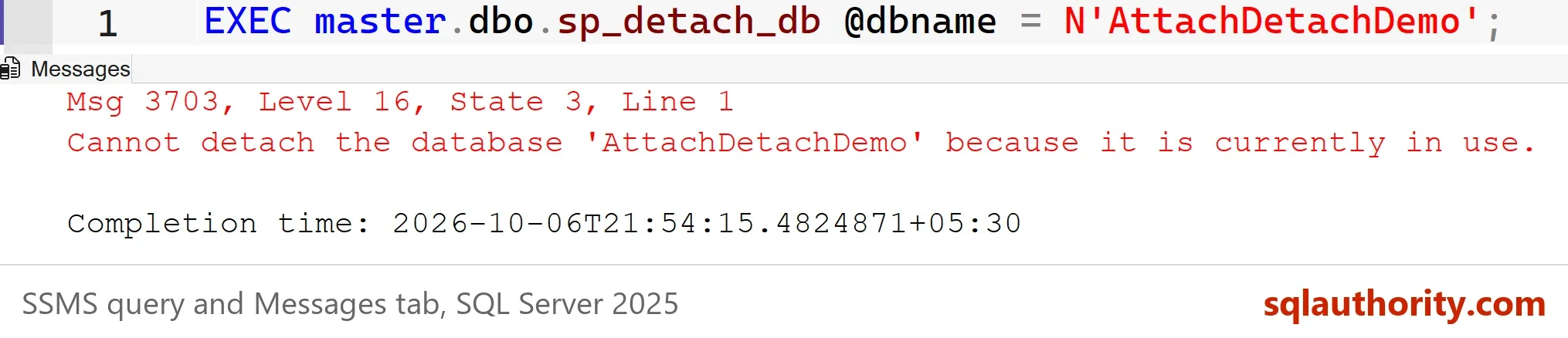
Msg 3703, Level 16, State 3, Line 1
Cannot detach the database 'AttachDetachDemo' because it is currently in use.
Your own session counts as a user. Move to master first. For other sessions, use the Drop Connections box in the dialog, or its T-SQL twin, SINGLE_USER WITH ROLLBACK IMMEDIATE. That option rolls back open transactions, so use it when you know nobody’s work is at risk.
USE master;
GO
ALTER DATABASE AttachDetachDemo SET SINGLE_USER WITH ROLLBACK IMMEDIATE;
EXEC sp_detach_db @dbname = N'AttachDetachDemo';
SELECT DB_ID(N'AttachDetachDemo') AS DatabaseId;
| DatabaseId |
|---|
| NULL |
The database is gone from the server, and its two files still sit on disk. NULL means SQL Server no longer knows the name. This is the moment to move the files, if you intend to. Copy them to the new folder, and make sure the SQL Server service account has permission there. A detach can reset the file permissions, so check them before you attach.
Attach a Database With CREATE DATABASE
The current way is CREATE DATABASE ... FOR ATTACH. You list every file with its full path. The data file comes first, then the log file. The script builds the statement from the paths we saved. In real life you type them, and a moved file gets its new path. STRING_AGG needs SQL Server 2017 or later.
DECLARE @sql nvarchar(max) = N'CREATE DATABASE AttachDetachDemo ON ' + (SELECT STRING_AGG(N'(FILENAME = N''' + PhysicalPath + N''')', N', ') FROM #files) + N' FOR ATTACH;';
EXEC (@sql);
SELECT name, state_desc FROM sys.databases WHERE name = N'AttachDetachDemo';
SELECT COUNT(*) AS Notes FROM AttachDetachDemo.dbo.Notes;
| name | state_desc |
|---|---|
| AttachDetachDemo | ONLINE |
| Notes |
|---|
| 3 |
The database is online, and the three notes survived. The statement has options the old procedure never had. FOR ATTACH_REBUILD_LOG builds a new log file when the old one is missing. It works only for a database that was shut down cleanly. Treat it as a last resort.
The Old Way, and Why to Stop Using It
Many scripts still call sp_attach_db. It works, and the next script proves it. It detaches the demo again and attaches it with the old procedure.
ALTER DATABASE AttachDetachDemo SET SINGLE_USER WITH ROLLBACK IMMEDIATE;
EXEC sp_detach_db @dbname = N'AttachDetachDemo';
DECLARE @f1 nvarchar(260) = (SELECT PhysicalPath FROM #files WHERE FileType = N'ROWS'), @f2 nvarchar(260) = (SELECT PhysicalPath FROM #files WHERE FileType = N'LOG');
EXEC sp_attach_db @dbname = N'AttachDetachDemo', @filename1 = @f1, @filename2 = @f2;
SELECT name, state_desc FROM sys.databases WHERE name = N'AttachDetachDemo';
SELECT COUNT(*) AS Notes FROM AttachDetachDemo.dbo.Notes;
| name | state_desc |
|---|---|
| AttachDetachDemo | ONLINE |
| Notes |
|---|
| 3 |
The result is the same database in the same state, so the old procedure isn’t wrong today. It is deprecated, which means Microsoft plans to remove it. It also accepts only sixteen files, and the new statement has no such limit. A script that breaks on an upgrade is a bad surprise, and the fix is one statement. Change it now, while nothing is on fire.
Moving Files and Staying Safe
The usual reason to attach a database is a move. Detach, move both files with File Explorer or PowerShell, and attach with the new paths. If the attach fails with an operating system error 5, the service account can’t read the new folder. Fix the folder permissions and run the statement again.
You could argue that a backup and a restore is safer than a detach. For a production database it is. A backup leaves the database online and keeps the original files. A detach doesn’t. Use attach for development copies, for sample databases, and for moves you have planned and rehearsed.
Attach only files you trust. A database file is not a document. Don’t attach an unknown one on a server that holds real data.
What to Remember
Move out of the database before you detach it, drop other connections, and save the file paths. To attach a database, use CREATE DATABASE ... FOR ATTACH and check the state afterward. Keep a backup before any move, because the detached files are your only copy. When you finish with the demo, run the cleanup script.
USE master;
GO
IF DB_ID(N'AttachDetachDemo') IS NOT NULL
BEGIN
    ALTER DATABASE AttachDetachDemo SET SINGLE_USER WITH ROLLBACK IMMEDIATE;
    DROP DATABASE AttachDetachDemo;
END;
A detach is not a backup, it is a move that leaves you holding the only copy.
Published by Pinal Dave on SQLAuthority. More of my work at pinaldave.com.
Discover more from SQL Authority with Pinal Dave
Subscribe to get the latest posts sent to your email.


5 Comments. Leave new
Hi Pinal,
Can you please let me know how to solve following task.
I have a XML as follows
14
XYZ
32
12
Marketing
Hyderabad
040—
i need to get the above data into Excel as
Employee
Totalcount 0
Basic Details
ID 14
Name XYZ etc i.e.. all the elements, properties of elements and attributes(child nodes) into one column and their corresponding values into one column.
2013-07-11T00:01:00-00:00
N
NONE
4
2013-07-12T07:14:48-00:00
Hi Pinal ,
Sorry , the XML structure not getting properly if i paste that in the comment area. Please let me know how to read XML data into Excel such a way that all the all the elements, properties of elements and attributes(child nodes) into one column and their corresponding values into one column.
Pinal, Is there a practical difference here other than using a deprecated stored procedure that may go away in a future release? I understand that it’s just better to use what is intended by the vendor, but want to know if there is a different result here when using the old vs new method. Is the resulting database different in any way?
You can do Attach/Detach with right click on the database to Attach/Detach too. These options are under the right click menu Tasks.