
SQL Server Agent fails to start because of the error 15281 is a very common error. The fix is to enable Agent XPs with sp_configure.
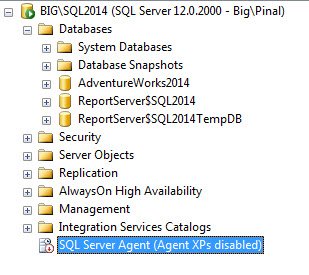
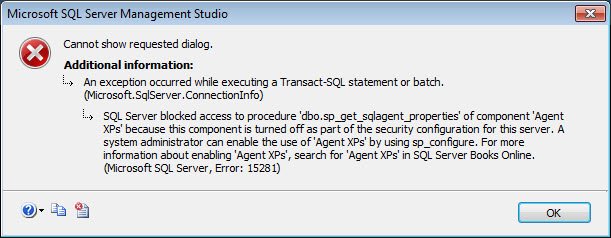
When you start to restart SQL Agent sometimes it will give following error.
SQL Server blocked access to procedure ‘dbo.sp_get_sqlagent_properties’ of component ‘Agent XPs’ because this component is turned off as part of the security configuration for this server. A system administrator can enable the use of ‘Agent XPs’ by using sp_configure. For more information about enabling ‘Agent XPs’, search for ‘Agent XPs’ in SQL Server Books Online. (Microsoft SQL Server, Error: 15281)
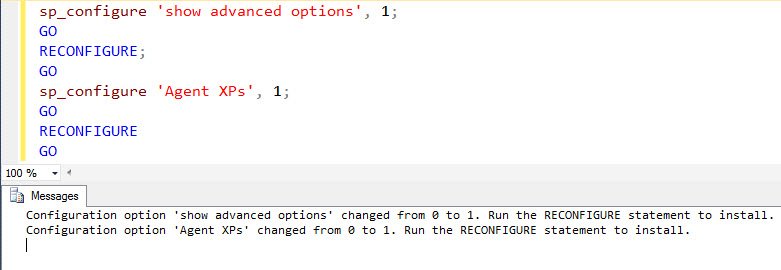
To resolve this error, following script has to be executed on the server.
sp_configure 'show advanced options', 1;
GO
RECONFIGURE;
GO
sp_configure 'Agent XPs', 1;
GO
RECONFIGURE
GO
When you run above script, it will give a very similar output as following on the screen.
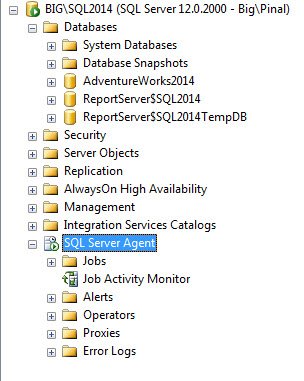
Now, if you try to restart SQL Agent it will just work fine.
That’s it! Sometimes there is a simpler solution to complicated error.
How to Confirm Agent XPs Are Really On
Before you change anything, check the current value. Run SELECT name, value, value_in_use FROM sys.configurations WHERE name = 'Agent XPs'. If value_in_use is 0, the component is off and the error makes sense.
This is an advanced option, so on many servers sp_configure will not show it until show advanced options is set to 1 and RECONFIGURE has run. You also need enough permission to change server settings, which usually means a sysadmin or serveradmin login. If the script runs but nothing changes, permission is the first thing I look at.
After the change, run the same query again and make sure both value columns show 1. Then start the service and open the SQL Server Agent node in SSMS to confirm your jobs are visible again.
If the error keeps coming back, find out what is switching the option off. A security script or a hardening checklist can set it back to 0 without anyone noticing. Also keep in mind that SQL Server Express does not include SQL Server Agent, so on that edition there is nothing to start.
Published by Pinal Dave on SQLAuthority. More of my work at pinaldave.com.
Discover more from SQL Authority with Pinal Dave
Subscribe to get the latest posts sent to your email.



10 Comments. Leave new
Where you execute this Script please ?
Really you save my one day..Thank you very much Dev sir.
Md. Haidar Ali Khan – I am glad that it helped you.
I didn’t need this “workaround”, cluster managed to shutdown and reconfigure itselfs.
After a 1AM to 4AM agent’s failure to start.
Needed to reply here, because the problem occured when the server’s team applied newest patchs from Microsoft on both nodes. (july – august KB’s)
great thx for help
Great post. Thanks!
we are stumped. We tried the fix and it still is not starting. Any other suggestions?
Thank’s for your help!
Thanks for this tip that I needed!
But why does the Agent XP suddenly became disabled?