Assertion queries are checks written so that a healthy database returns zero rows. Each query describes one impossible situation, such as an order with no lines. When it returns rows, those rows are your repair list.

Why customers should not find your bad data
Picture a support call. A customer opens an invoice and sees an order with no items. Your team looks in the database and finds it was true for three weeks. Nobody noticed because no query ever asked.
You do not need a big framework to prevent that. A handful of short queries, run on a schedule, will do. The trick is to write each one so that a good database returns nothing at all. Silence means healthy.
The demo below builds four tiny temp tables, each with one deliberate flaw. Orders, order lines, stock and date terms.
DROP TABLE IF EXISTS #OrderLines, #Orders, #Stock, #Terms;

CREATE TABLE #Orders     (OrderId int PRIMARY KEY);
CREATE TABLE #OrderLines (LineId int PRIMARY KEY, OrderId int NOT NULL);
CREATE TABLE #Stock      (ProductId int PRIMARY KEY, Quantity int NOT NULL);
CREATE TABLE #Terms      (TermId int PRIMARY KEY, StartDate date NOT NULL, EndDate date NOT NULL);

INSERT #Orders     VALUES (1);
INSERT #OrderLines VALUES (1, 99);
INSERT #Stock      VALUES (1, -1);
INSERT #Terms      VALUES (1, '20260403', '20260402');
Return the failing keys, not a count
Each query below returns the key of the broken row. That matters at 2 AM. A message that says “1 problem found” starts a hunt. A message that says order 1 has no lines starts a fix.
Order 1 has no lines, because the only line points at order 99. Product 1 has stock of minus one. Term 1 ends the day before it starts. Line 1 points at order 99, which does not exist, so it is an orphan.
SELECT o.OrderId AS OrderWithoutLines
FROM #Orders AS o
WHERE NOT EXISTS (SELECT 1 FROM #OrderLines AS l WHERE l.OrderId = o.OrderId)
ORDER BY o.OrderId;

SELECT ProductId AS NegativeStockProduct
FROM #Stock WHERE Quantity < 0 ORDER BY ProductId;

SELECT TermId AS ReversedTerm
FROM #Terms WHERE EndDate < StartDate ORDER BY TermId;

SELECT l.LineId, l.OrderId AS MissingOrderId
FROM #OrderLines AS l
WHERE NOT EXISTS (SELECT 1 FROM #Orders AS o WHERE o.OrderId = l.OrderId)
ORDER BY l.LineId;
Let constraints do the simple jobs
Two of these rules fit in one row, so a CHECK constraint can stop them for good. A foreign key would stop the orphan line in a real schema. But look what happens when you add a constraint to a table that already has a bad row. SQL Server refuses, with error 547.
That is why you run the assertions first. They find the rows to repair. After the repair, the constraint goes on, and the next bad write fails at the door. The last result in the block shows error 547 again, this time for a new bad row.
BEGIN TRY
    ALTER TABLE #Stock ADD CHECK (Quantity >= 0);
END TRY
BEGIN CATCH
    SELECT ERROR_NUMBER() AS ConstraintRefusedWithError;
END CATCH;

INSERT #Orders VALUES (99);
INSERT #OrderLines VALUES (2, 1);
UPDATE #Stock SET Quantity = 0 WHERE ProductId = 1;
UPDATE #Terms SET EndDate = StartDate WHERE TermId = 1;

ALTER TABLE #Stock ADD CHECK (Quantity >= 0);
ALTER TABLE #Terms ADD CHECK (EndDate >= StartDate);

BEGIN TRY
    INSERT #Stock VALUES (2, -5);
END TRY
BEGIN CATCH
    SELECT ERROR_NUMBER() AS NewBadRowRefusedWithError;
END CATCH;
Notice the repairs. Order 99 now exists, and a new line 2 gives order 1 its item. Stock is back to zero and the term ends the same day it starts. Those are repairs for this demo. In real life, a person decides what the correct repair is.

Prove the repair with counts
For alerts, counts are handy. Run the same four rules as counts and every one should be zero. The result below shows four separate grids, each with a single zero.
SELECT COUNT_BIG(*) AS OrdersWithoutLines
FROM #Orders AS o
WHERE NOT EXISTS (SELECT 1 FROM #OrderLines AS l WHERE l.OrderId = o.OrderId);

SELECT COUNT_BIG(*) AS NegativeStock FROM #Stock WHERE Quantity < 0;

SELECT COUNT_BIG(*) AS ReversedTerms FROM #Terms WHERE EndDate < StartDate;

SELECT COUNT_BIG(*) AS OrphanLines
FROM #OrderLines AS l
WHERE NOT EXISTS (SELECT 1 FROM #Orders AS o WHERE o.OrderId = l.OrderId);

DROP TABLE IF EXISTS #OrderLines, #Orders, #Stock, #Terms;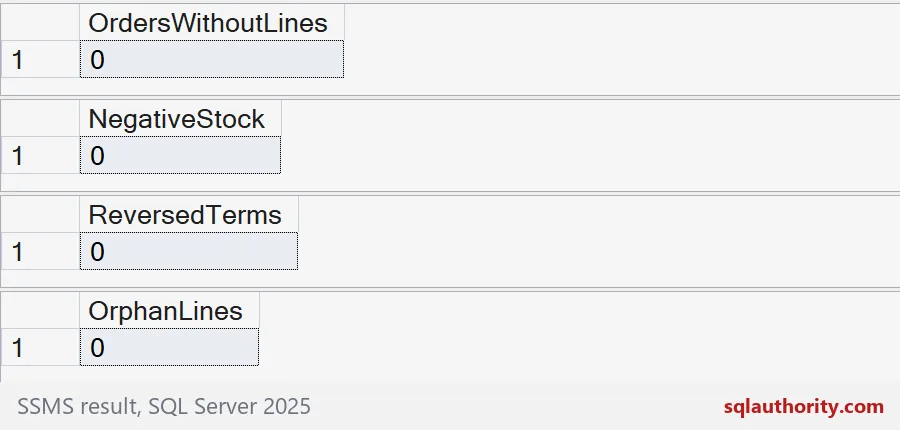
Run them at a calm moment
Timing matters. A check that runs in the middle of a load can report a state that is temporary and harmless. Schedule your assertions after the load finishes, when the data should be settled. Zero rows only reassures you if the check looked at the right moment.
If you store the queries in a table with a name and a severity, treat that table like code. Only trusted maintainers should edit it, because running stored SQL is a privileged act. Never run query text that came from a user.
Also keep the list short. A catalog of every rule you can imagine becomes noise nobody reads. Pick the rules whose failure would embarrass you in front of a customer.
Start with one rule that has bitten you before, and add the rest as you go.
An assertion is not a constraint, it is a detector for data that is already there.
Published by Pinal Dave on SQLAuthority. More of my work at pinaldave.com.
Discover more from SQL Authority with Pinal Dave
Subscribe to get the latest posts sent to your email.