
Here is a follow up blog post of my earlier blog post on very similar subject Listing Foreign Key Relationships of Table with Stored Procedure sp_fkeys. In previous blog post we listed foreign keys and now we will list the primary key of the table with the help of Stored Procedure sp_fkeys. The stored procedure to use for primary keys is actually sp_pkeys.
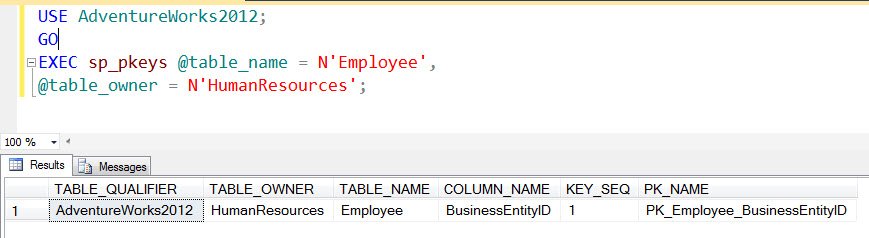
Here is a quick script how you can use stored procedure sp_pkeys to list the primary key. This stored procedure takes a minimum of two parameters a) name of the table, b) name of the schema.
USE AdventureWorks2012;

GO

EXEC sp_pkeys @table_name = N'Employee',

@table_owner = N'HumanResources';
Here is the output generated from the script listed above:
Here is an alternate way to list the keys as well – Two Methods to Retrieve List of Primary Keys and Foreign Keys of Database.
Published by Pinal Dave on SQLAuthority. More of my work at pinaldave.com.
Discover more from SQL Authority with Pinal Dave
Subscribe to get the latest posts sent to your email.



1 Comment. Leave new
How do i get operating system information in sql server 2008?