Unsigned integers need a type that preserves their full source range. A larger SQL Server type also needs boundaries. Validate the original input before conversion can change its meaning.

Choose a destination for the complete range
SQL Server tinyint already represents 0 through 255. Its other integer types are signed. Use the permitted source maximum, rather than today’s largest sample, when choosing a destination.
| Unsigned source | Maximum | SQL Server type |
|---|---|---|
| 8-bit | 255 | tinyint |
| 16-bit | 65535 | int |
| 32-bit | 4294967295 | bigint |
| 64-bit | 18446744073709551615 | decimal(20,0) |
A signed int cannot hold the entire unsigned 32-bit range. Likewise, bigint cannot hold the unsigned 64-bit maximum. The wider destination must still reject negative values and values above the source maximum.
DROP TABLE IF EXISTS #UnsignedDestination;
CREATE TABLE #UnsignedDestination
(
    Unsigned32 bigint NOT NULL
        CHECK (Unsigned32 BETWEEN 0 AND 4294967295),
    Unsigned64 decimal(20,0) NOT NULL
        CHECK (Unsigned64 BETWEEN 0 AND 18446744073709551615)
);
INSERT #UnsignedDestination
VALUES (0,0),(4294967295,18446744073709551615);
SELECT * FROM #UnsignedDestination;
The two endpoint rows should load, and the table stays open for the rejection tests further down. A negative 32-bit value or a value above either maximum should fail the range constraint. This checks the stored number, after SQL Server has converted the input.
Reject fractions before unsigned integer conversion
Converting text directly to decimal(20,0) can round a fraction. A CHECK constraint cannot recover that original fraction afterward. For example, 0.1 becomes zero, which passes a nonnegative range check.
SELECT TRY_CONVERT(decimal(20,0),N'4294967295.5') AS RoundedValue,
       TRY_CONVERT(decimal(20,0),N'0.1') AS RoundedFraction;
The first expression yields 4294967296; the second yields 0. Neither proves that the original text was an integer. Keep the raw input and validate its syntax before accepting the converted value.
For this example, the import contract allows only nonempty ASCII digits. It rejects signs, whitespace, decimal points, scientific notation and NULL. Leading zeros are allowed; change that rule if they carry meaning in your identifiers.
WITH Input(TestId,SourceText) AS
(
    SELECT * FROM (VALUES
      (1,N'0'),(2,N'255'),(3,N'65535'),(4,N'4294967295'),
      (5,N'4294967296'),(6,N'18446744073709551615'),
      (7,N'18446744073709551616'),(8,N'-1'),
      (9,N'4294967295.5'),(10,N'invalid'),(11,N''),(12,NULL),
      (13,N' 1'),(14,N'+1'),(15,N'1e3'),(16,N'00042'),
      (17,N'9999999999999999999999999999999999999999')
    ) AS v(TestId,SourceText)
), Parsed AS
(
    SELECT TestId,SourceText,CASE
        WHEN DATALENGTH(SourceText)>0
         AND SourceText COLLATE Latin1_General_100_BIN2
             NOT LIKE N'%[^0-9]%'
        THEN TRY_CONVERT(decimal(20,0),SourceText)
    END AS ParsedValue
    FROM Input
)
SELECT TestId,SourceText,ParsedValue,
       CASE WHEN ParsedValue BETWEEN 0 AND 4294967295
            THEN 1 ELSE 0 END AS FitsUnsigned32,
       CASE WHEN ParsedValue BETWEEN 0 AND 18446744073709551615
            THEN 1 ELSE 0 END AS FitsUnsigned64
FROM Parsed ORDER BY TestId;
The binary collation makes the digit test explicit. TRY_CONVERT returns NULL when an otherwise digit-only value exceeds the decimal destination. Both range flags remain zero for a failed parse or a prohibited value.
The 32-bit maximum passes both flags; the next integer passes only the 64-bit flag. The 64-bit maximum passes its own flag, while the next integer fails both. The fractional, negative and invalid-text samples also fail both.

Test the contract across the application
The 17 inputs in the query above cover both endpoints and the values just past them. The table should also reject out-of-range inserts with constraint error 547. This block tries three of them, then drops the temporary table.
BEGIN TRY
    INSERT #UnsignedDestination VALUES (-1,0);
END TRY
BEGIN CATCH
    SELECT N'Negative 32-bit value' AS Attempt, ERROR_NUMBER() AS ErrorNumber;
END CATCH;
BEGIN TRY
    INSERT #UnsignedDestination VALUES (4294967296,0);
END TRY
BEGIN CATCH
    SELECT N'Above the 32-bit maximum' AS Attempt, ERROR_NUMBER() AS ErrorNumber;
END CATCH;
BEGIN TRY
    INSERT #UnsignedDestination VALUES (0,18446744073709551616);
END TRY
BEGIN CATCH
    SELECT N'Above the 64-bit maximum' AS Attempt, ERROR_NUMBER() AS ErrorNumber;
END CATCH;
DROP TABLE #UnsignedDestination;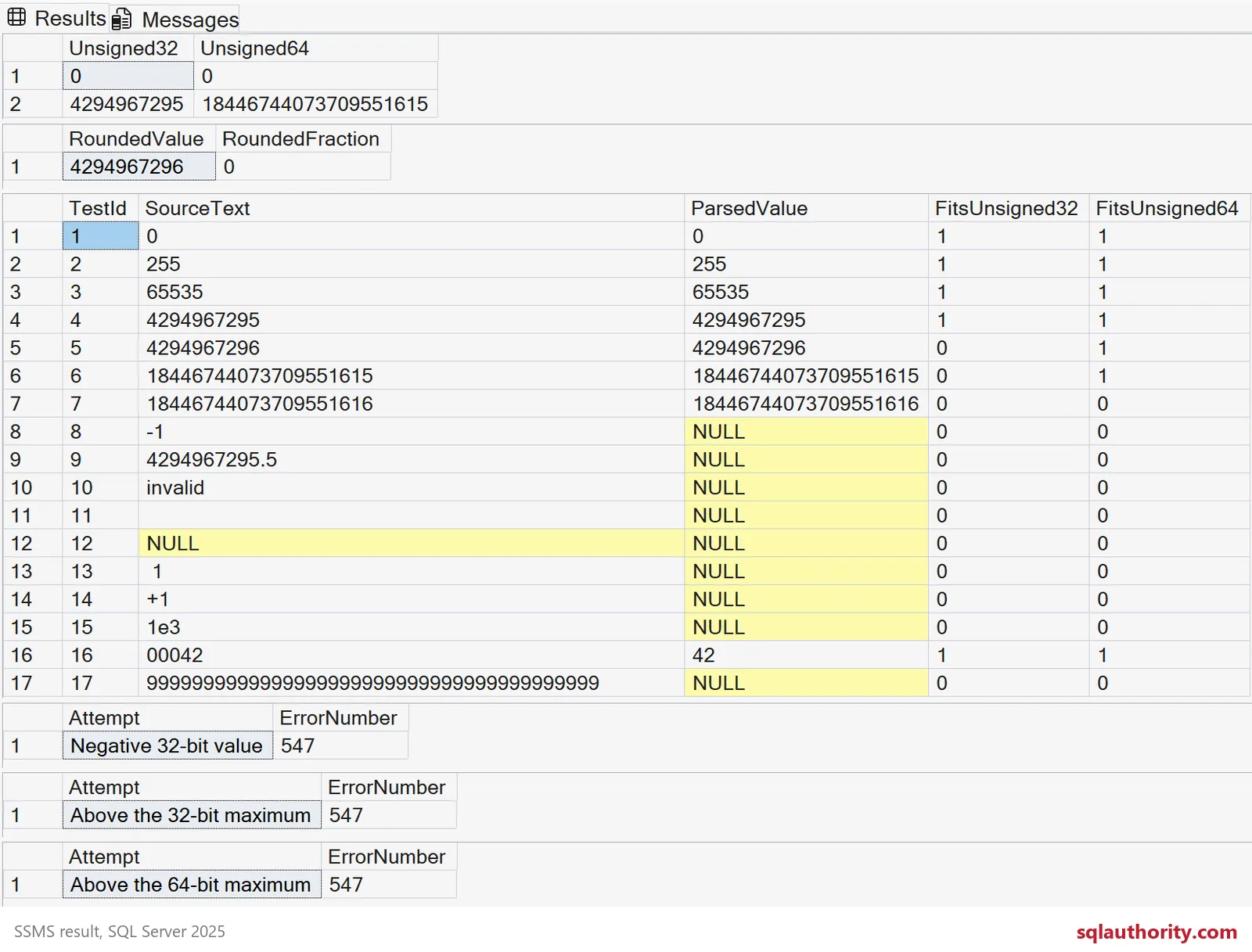
The examples use SQL Server 2012 or later syntax.
Carry the same range through procedure parameters, staging columns, related keys and application bindings. A correct table cannot rescue a narrower parameter that rejects the value first. Preserve large identifiers as exact values throughout serialization.
An uncompressed bigint uses eight bytes; decimal(20,0) uses thirteen. These widths are not a measured migration saving. Review dependent indexes and keys before changing a production column.
If leading zeros distinguish identifiers, a numeric column loses that distinction. Preserve the original text or define a separate canonical identifier. Choose the type from the data contract, then prove both acceptance and rejection.
Map the range first and the rest of the migration gets easier.
Unsigned is not a SQL Server integer family, it is a range you map and defend.
Published by Pinal Dave on SQLAuthority. More of my work at pinaldave.com.
Discover more from SQL Authority with Pinal Dave
Subscribe to get the latest posts sent to your email.