
To allow only alphabets in a SQL Server column, first define which letters are allowed. A reader asked for a database error when other characters are inserted. This example accepts only English letters A-Z and a-z. It rejects digits, spaces, punctuation, empty strings, and NULL.

Create the constraint and test an insert
Run this complete example in a new SSMS query window. It uses a local temporary table and removes that table afterward. No existing application table is changed.
CREATE TABLE #LetterValues
(
    ValueID int NOT NULL,
    LetterText nvarchar(100) NOT NULL,
    CHECK
    (
        DATALENGTH(LetterText) > 0
        AND LetterText COLLATE Latin1_General_100_BIN2
            NOT LIKE N'%[^A-Za-z]%'
    )
);
INSERT INTO #LetterValues (ValueID, LetterText)
VALUES (1, N'SQLAuthority'), (2, N'ABC'), (3, N'abc');
BEGIN TRY
    INSERT INTO #LetterValues (ValueID, LetterText)
    VALUES (4, N'SQLAuthority 1');
END TRY
BEGIN CATCH
    SELECT ERROR_NUMBER() AS ErrorNumber,
           ERROR_MESSAGE() AS ErrorMessage;
END CATCH;
SELECT ValueID, LetterText
FROM #LetterValues
ORDER BY ValueID;
DROP TABLE #LetterValues;
The first three values are inserted. The attempt to insert SQLAuthority 1 raises error 547, which the demo catches and displays. The final result contains only the three valid rows.
The TRY...CATCH block lets the demonstration continue after the expected error. Your application should handle a rejected write and report it clearly. Do not silently treat that failure as a successful insert.
Why the constraint has three parts
| Part | What it does |
|---|---|
NOT NULL | Rejects a missing value. |
DATALENGTH(LetterText) > 0 | Rejects an empty string. |
NOT LIKE N'%[^A-Za-z]%' with BIN2 collation | Rejects any character outside the two allowed letter ranges. |
Inside the brackets, ^ means a character outside the listed ranges. The surrounding percent signs allow that character to occur anywhere in the value. NOT LIKE requires that no such character exists.
An empty string contains no forbidden character, so the pattern alone accepts it. Also, a CHECK rejects FALSE, but an unknown result from NULL can pass. That is why the example handles empty strings and missing values separately.
The binary Latin1_General_100_BIN2 comparison makes the allowed ranges explicit. The original [A-Z] example depended on the column collation. Linguistic sorting rules can include characters outside the English alphabet, and case sensitivity changes lowercase handling.
This COLLATE applies to the constraint expression. It does not change the database collation or the column’s normal sorting behavior. Both uppercase and lowercase ranges are listed deliberately.
Contains a letter is different from contains only letters
LIKE N'%[A-Za-z]%' asks whether at least one letter exists. It accepts ABC123 and ABC!. The column needs the opposite test: reject any character that is not an allowed letter.
SELECT v.Sample,
       CASE WHEN v.Sample COLLATE Latin1_General_100_BIN2
                 LIKE N'%[A-Za-z]%'
            THEN 'Yes' ELSE 'No' END AS ContainsALetter,
       CASE WHEN DATALENGTH(v.Sample) > 0
                 AND v.Sample COLLATE Latin1_General_100_BIN2
                     NOT LIKE N'%[^A-Za-z]%'
            THEN 'Yes' ELSE 'No' END AS OnlyLetters
FROM (VALUES (N'ABC'), (N'ABC123'), (N'ABC!'), (N'123')) AS v(Sample);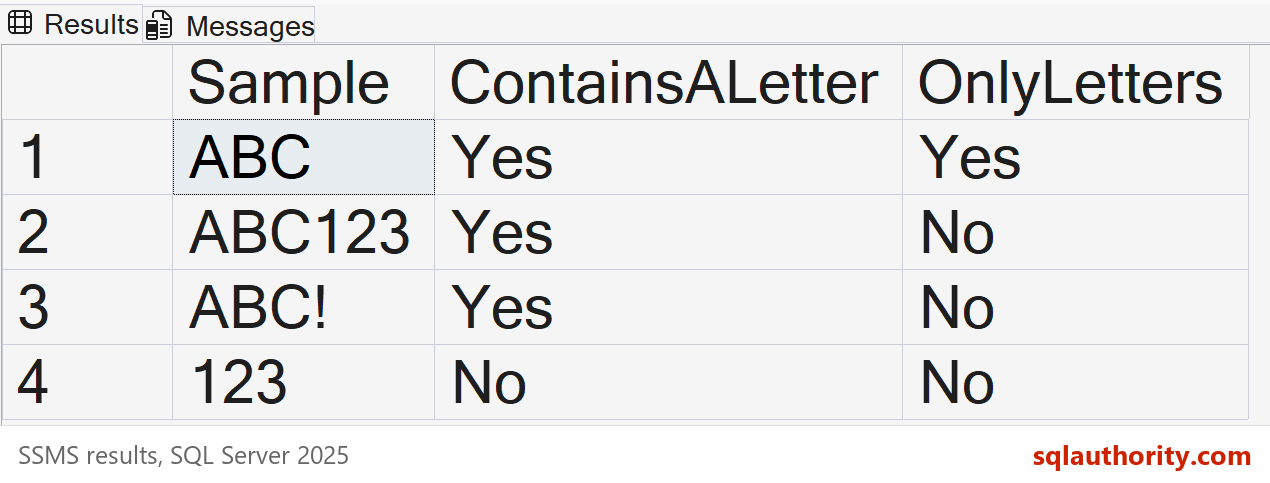
Rejecting only digits is also insufficient. NOT LIKE N'%[0-9]%' still allows punctuation and other unwanted characters. Define the allowed set instead of trying to list every forbidden character.
Why use nvarchar and the N prefix?
The example keeps incoming Unicode characters intact until the constraint evaluates them. An accented letter is then rejected by the stated ASCII-only rule. A conversion into a non-Unicode type before validation can change the input you intended to check.
Keep the N prefix on the pattern and string literals. With this nvarchar comparison, a trailing space is significant and is rejected. Test leading spaces, trailing spaces, and tabs separately instead of treating them as one case.
This rule is suitable only when the business requirement is that narrow. Personal names can contain accents, spaces, apostrophes, hyphens, and letters from other writing systems. I would not use this constraint as a general name validator.
Add the rule to an existing table
Inspect existing values before adding a constraint. This runnable example uses a temporary table with two valid rows. The first query returns any values that would violate the new rule.
CREATE TABLE #ExistingLetterValues
(
    ValueID int NOT NULL,
    LetterText nvarchar(100) NULL
);
INSERT INTO #ExistingLetterValues (ValueID, LetterText)
VALUES (1, N'Alpha'), (2, N'Beta');
SELECT ValueID, LetterText
FROM #ExistingLetterValues
WHERE LetterText IS NULL
   OR DATALENGTH(LetterText) = 0
   OR LetterText COLLATE Latin1_General_100_BIN2
      LIKE N'%[^A-Za-z]%';
ALTER TABLE #ExistingLetterValues WITH CHECK
ADD CHECK
(
    LetterText IS NOT NULL
    AND DATALENGTH(LetterText) > 0
    AND LetterText COLLATE Latin1_General_100_BIN2
        NOT LIKE N'%[^A-Za-z]%'
);
SELECT ValueID, LetterText
FROM #ExistingLetterValues
ORDER BY ValueID;
DROP TABLE #ExistingLetterValues;
In this example, the inspection returns no rows and the constraint is added successfully. For your own table, adapt the inspection query and ALTER TABLE statement. The temporary-table creation, sample inserts, and cleanup belong only to the demonstration.
The existing column is nullable, so this constraint includes LetterText IS NOT NULL explicitly. Its metadata remains nullable, but the enabled constraint rejects null values. For a new table, declaring the column NOT NULL makes that requirement clearer.
WITH CHECK validates the rows already stored. If the inspection finds invalid values, review and correct them before adding the constraint. Do not use WITH NOCHECK to hide the existing violations.
Adding and validating a constraint on a large table requires planned deployment time. It can scan data and take locks. Test that operation before applying it to a busy production table.
Test more than one rejected value
The same rule applies to updates of this column. I tested accepted letters, invalid inserts, a rejected update, and validation of existing rows. The update failed with error 547 and left the original value unchanged.
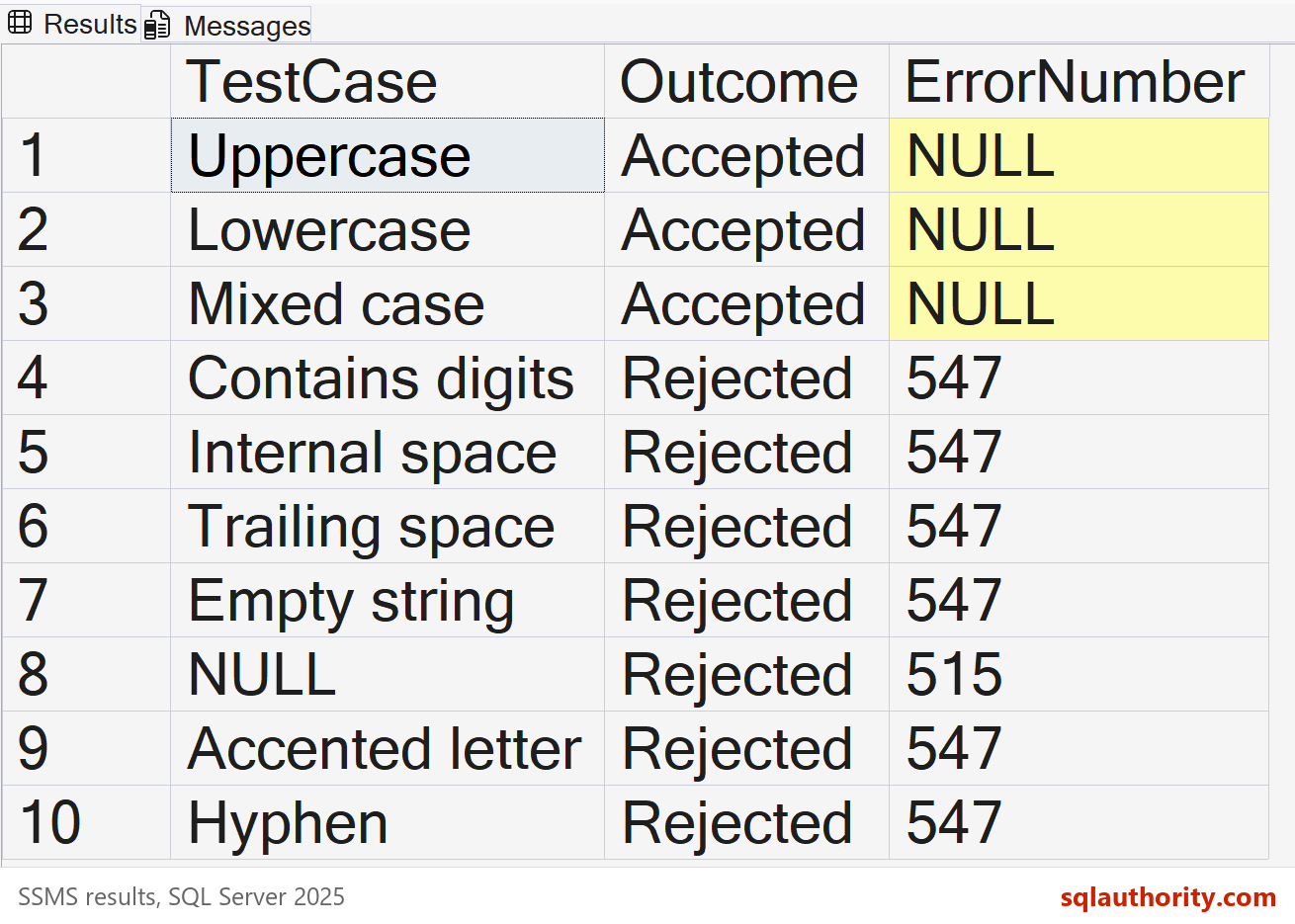
Additional tests rejected an apostrophe, a tab, a NUL character, a nonbreaking space, a fullwidth letter, and a combining accent. These results were measured on SQL Server 2025. Keep the same cases when testing your own version and data flow.
Run all 16 input tests
SET NOCOUNT ON;
CREATE TABLE #AcceptedLetters
(
    LetterText nvarchar(100) NOT NULL,
    CHECK (DATALENGTH(LetterText) > 0
       AND LetterText COLLATE Latin1_General_100_BIN2
           NOT LIKE N'%[^A-Za-z]%')
);
DECLARE @Cases TABLE
(
    CaseID int, TestCase varchar(30), Sample nvarchar(100), Expected varchar(8)
);
INSERT INTO @Cases
VALUES (1, 'Uppercase', N'ABC', 'Accepted'),
       (2, 'Lowercase', N'abc', 'Accepted'),
       (3, 'Mixed case', N'SQLAuthority', 'Accepted'),
       (4, 'Contains digits', N'ABC123', 'Rejected'),
       (5, 'Internal space', N'SQL Authority', 'Rejected'),
       (6, 'Trailing space', N'ABC ', 'Rejected'),
       (7, 'Empty string', N'', 'Rejected'),
       (8, 'NULL', NULL, 'Rejected'),
       (9, 'Accented letter', N'Jos'+NCHAR(233), 'Rejected'),
       (10, 'Hyphen', N'ABC-DEF', 'Rejected'),
       (11, 'Apostrophe', N'O''Neil', 'Rejected'),
       (12, 'Tab', N'A'+NCHAR(9), 'Rejected'),
       (13, 'NUL character', N'A'+NCHAR(0)+N'B', 'Rejected'),
       (14, 'Nonbreaking space', N'A'+NCHAR(160), 'Rejected'),
       (15, 'Fullwidth letter', NCHAR(65313), 'Rejected'),
       (16, 'Combining accent', N'e'+NCHAR(769), 'Rejected');
DECLARE @Results TABLE
(
    CaseID int, TestCase varchar(30), Expected varchar(8), Outcome varchar(8), ErrorNumber int
);
DECLARE @CaseID int = 1, @Sample nvarchar(100), @TestCase varchar(30), @Expected varchar(8);
WHILE @CaseID <= 16
BEGIN
    SELECT @Sample = Sample, @TestCase = TestCase, @Expected = Expected
    FROM @Cases WHERE CaseID = @CaseID;
    BEGIN TRY
        INSERT INTO #AcceptedLetters (LetterText) VALUES (@Sample);
        INSERT INTO @Results VALUES (@CaseID, @TestCase, @Expected, 'Accepted', NULL);
    END TRY
    BEGIN CATCH
        INSERT INTO @Results VALUES (@CaseID, @TestCase, @Expected, 'Rejected', ERROR_NUMBER());
    END CATCH;
    SET @CaseID += 1;
END;
SELECT TestCase, Expected, Outcome, ErrorNumber
FROM @Results ORDER BY CaseID;
DROP TABLE #AcceptedLetters;
Client-side validation can give an immediate, friendly message. The database constraint protects ordinary writes from other applications and scripts too. Keep both rules consistent, and do not disable the constraint during normal writes.
Define the allowed characters, handle empty and missing values, and test the exact input your database receives.
Published by Pinal Dave on SQLAuthority. More of my work at pinaldave.com.
Discover more from SQL Authority with Pinal Dave
Subscribe to get the latest posts sent to your email.




11 Comments. Leave new
Pinal, this solution is deceptively simple, can you explain why “WHERE FirstCol LIKE ‘%[A-Z]%’ ” is not the correct solution
CREATE TABLE TestTable
(ID INT, FirstCol VARCHAR(100),
CONSTRAINT FirstCol CHECK (FirstCol NOT LIKE ‘%’ +’[^A-Z]‘+’%’))
GO
– This will be successful
INSERT INTO TestTable (ID, FirstCol)
VALUES (1, ‘SQLAuthority’)
GO
– This will throw an error
INSERT INTO TestTable (ID, FirstCol)
VALUES (1, ‘SQLAuthority 1′)
GO
– Clean up
DROP TABLE TestTable
GO
Hi,
Normally i validate such thing in front end,or before insert in proc.
Suppose I create such constraint then what will be its impact in performance.Like I use that table in select as column or i use that column in where condition.
Thanks
I do agree with you Kumar Harsh. These sort of validations would be better to be handled in front end. But what if someone updates or insert the records directly on the database? In some cases, it is not avoidable to have a constraint like this.
Hi,Andrew G
WHERE FirstCol LIKE ‘%[A-Z]%’ will look for existence of alphabets, but it will not check if there is any non-alphabets
example
select col from
(
select ‘AG12’ as col union all select ‘test’
) as t
WHERE col LIKE ‘%[A-Z]%’
“WHERE FirstCol NOT LIKE ‘%[0-9]%’ ”
:)
Hi,
This accepts only Alphabets in Column
USE tempdb
GO
— Create Test table
CREATE TABLE TestTable
(ID INT, FirstCol VARCHAR(100),
CONSTRAINT FirstCol CHECK (FirstCol LIKE ‘[A-Z]’))
GO
— This will be successful
INSERT INTO TestTable (ID, FirstCol)
VALUES (1, ‘S’)
GO
— This will throw an error
INSERT INTO TestTable (ID, FirstCol)
VALUES (1, ‘SQLAuthority’)
GO
— This will throw an error
INSERT INTO TestTable (ID, FirstCol)
VALUES (1, ‘1’)
GO
— Clean up
DROP TABLE TestTable
GO
if i don’t want none english letter such as : Ònchann, how to protect?
can you please elaborate how not like is working with \%[^a-z]%’
This is due your “collation” settings that dictates that small and capital abc should be assumed same character.
ALTER TABLE table_users
ADD CONSTRAINT username_char_integer
CHECK(username LIKE ‘%[^a-zA-Z0-9]%’);
— CHECK(username LIKE ‘^[^a-zA-Z0-9]*$’);
I am add constraint for table_users[username] but not work. I still insert abc%#$$ .. Could you help, How do I add ?
Regards