
Open Table Formats turn a folder of data files into a real table, with transactions, history and safe schema changes. Delta Lake and Apache Iceberg are the two names you’ll meet most. They look like new products, but each one is a small, careful idea about keeping a list.

The Problem With a Folder of Files
A data lake keeps data as files on object storage. Object storage is a cheap service that holds files by name and knows nothing else about them. The files are usually Parquet, a column based file format. Parquet files are written once and never edited in place. Columnar File Formats: Why Parquet Changed Big Data explains the format.
Cheap storage is a real gain, but a folder isn’t a table. A reader that opens the folder during a load can see half the new files. Two jobs that write at once can overwrite each other. Fixing one wrong row means rewriting a whole file by hand. Renaming a column breaks every reader. And once a file is replaced, yesterday’s data is gone.
The Hadoop era had a partial answer. The Hive metastore gave folders table names. It didn’t give most tables transactions, and the problems above stayed.
The Idea: A List of Files
Open table formats add one thing: a metadata layer. It’s a small, careful record of exactly which files belong to the table right now. The data files never change. A change to the table means writing new files, and then writing a new version of the list.
The list is the table. A file that sits in the folder but isn’t on the list doesn’t exist as far as readers are concerned. That one rule explains almost everything these formats can do.
Delta Lake keeps its list as a transaction log, a folder of numbered commit files beside the data. Apache Iceberg keeps it as metadata files that point to manifests. A manifest is a file that lists data files. In both, every version of the table is a complete answer to the question of which files are in it.
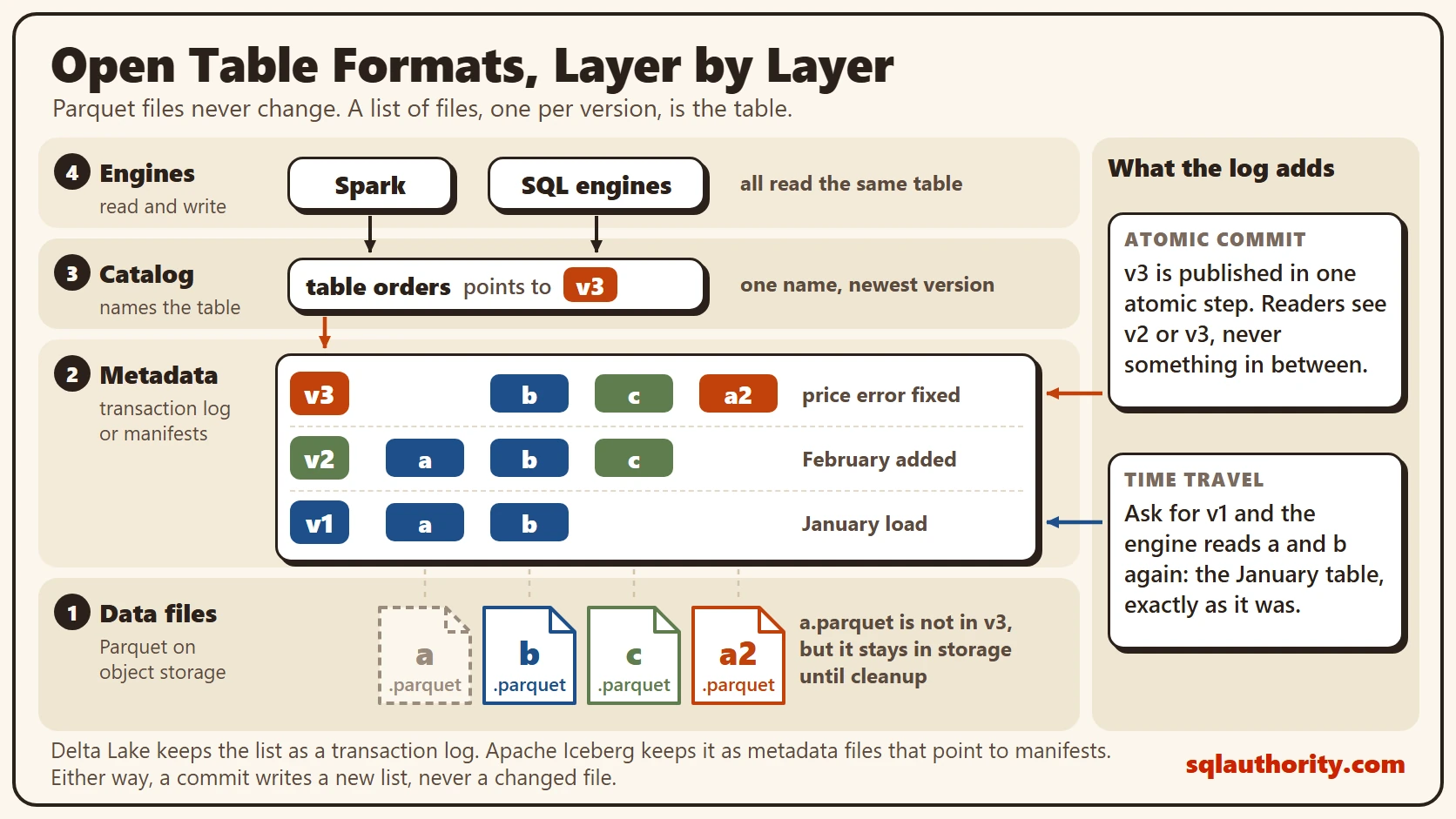
The diagram shows the layers from the bottom up. At the base sit Parquet data files on object storage. Above them is the metadata layer, which lists which files make up each version. Above that, a catalog gives the table a name, such as orders, and points to its current metadata. Engines like Spark and many SQL engines sit on top and read through the catalog.
A Table in Three Versions
Take an orders table. Version 1 is a January load that wrote two files, a.parquet and b.parquet. The list for v1 names both.
Version 2 adds February. The job writes c.parquet, then commits a new list: a, b and c. Version 3 fixes a price error in a.parquet. The job writes a corrected copy, a2.parquet, and commits a list of b, c and a2. The old a.parquet stays on storage, but the current list no longer names it.
Rewriting a whole file for one price is the simple way. Newer versions can also mark deleted rows in a small side file instead. Delta Lake calls these deletion vectors, and Iceberg calls them delete files.
| Version | Files in the list | What happened |
|---|---|---|
| v1 | a, b | January load |
| v2 | a, b, c | February added |
| v3 | b, c, a2 | Price error fixed |
Why a Commit Is Safe
A write has two steps. First it writes the data files. No list names them yet, so no reader can see them. Then it commits by publishing the new version of the list in one atomic step. Atomic means it either happens in full or not at all.
A reader therefore sees v2 or v3, never something in between. If a job dies halfway, its files are never named by any list. A later cleanup removes them. When two writers commit at the same moment, one wins. The other checks whether its change conflicts, then retries or fails.
What You Get From the List
Transactions come first, as above. Time travel comes next. Because v2 is still a complete list, you can ask for the table as it was at v2. A timestamp works as well. The old files stay on storage until a cleanup removes them. In Delta Lake that cleanup is called VACUUM. In Iceberg it’s expiring snapshots.
Schema changes are safe too. Adding a column is a change to the metadata. Old files aren’t rewritten. They have no value for the new column. The metadata also keeps statistics for every file, such as the lowest and highest value of a column. A query for February can skip every file that holds only January.
Delta Lake and Apache Iceberg
Both formats make the same promises. Both keep their rules in a public specification, and both store data in open file formats. That’s what “open” means here. Spark and many other engines can read the same table, so you aren’t locked to the tool that wrote it.
The difference is in how each one lays out its metadata. Delta Lake reads a log of commits. Iceberg follows a chain from a metadata file to manifests, and its catalog points to the current one. For a first project, the safer choice is the format your engine and your catalog already support well.
The Case for Plain Parquet
Plain files have a case of their own. A warehouse database already gives you transactions and history. And plain Parquet is fine for data that’s written once and never touched again. A table format isn’t free, either. Many small commits create many small files, and someone has to compact them. Old versions fill storage until a cleanup runs. You take on that care in return for the guarantees.
What to Remember
Open table formats keep a list of files and treat that list as the table. Data files never change. A commit publishes a new list in one step. Everything else follows from that: safe reads, history and schema changes.
Before you trust a lake table, find out where the list is kept. Find out who’s allowed to write to it, and when old files are removed. If nobody can answer the last question, the storage bill will.
Open table formats are not new file types, they are a promise about which files make up the table.
Published by Pinal Dave on SQLAuthority. More of my work at pinaldave.com.
Discover more from SQL Authority with Pinal Dave
Subscribe to get the latest posts sent to your email.


3 Comments. Leave new
Good…i liked the post & also all data is very useful
Nice to hear that Sachin.
Hi Pinal Dave, I just stumbled on your blog while searching to understand HIVE. I am a software testing professional and aspiring to have career in Big Data. Can you please spare couple for minutes for me to guide what and from where should i start?