
How Apache Spark works comes down to three ideas: the driver, the executors and the partitions. The driver plans the job, the executors run it, and a partition is one slice of the data. A Spark job is a plan that many machines carry out at the same time.

Why Spark Took Over
Hadoop gave the industry its first open-source engine for big jobs. That engine, MapReduce, ran a pipeline as a chain of jobs. Each job wrote its full output to replicated storage before the next could start. Spark builds a plan for the whole chain instead, called a DAG. It pipelines the steps inside a stage, so no step has to save its full output to replicated storage first.
That’s the main reason most new projects reach for Spark today. I walked through the older idea in MapReduce Explained: Map, Shuffle and Reduce Step by Step.
The Three Words: Driver, Executor, Partition
The driver is the program you write and start. It reads your code, builds a plan and hands out the work. It’s the one place that sees the whole job, and it doesn’t crunch the big data itself.
Executors are worker processes that run on the machines of the cluster. A cluster manager, such as YARN or Kubernetes, gives the driver its executors when the application starts. Each executor has a few cores, and each core runs one task at a time.
A partition is one slice of the data. Spark creates one task for each partition in a stage. Cut a file into three partitions and you get three tasks that can run side by side.
One more habit explains a lot. Spark is lazy. When you write a filter or a join, nothing runs. Spark only builds the plan. Work starts when you ask for a result, such as showing rows, counting them or writing a file.
In Spark’s own words, your program is an application. Each action, such as a count or a write, starts a job, so one application can run many jobs. Each job splits into stages and tasks.
One Small Example: Sales by Product
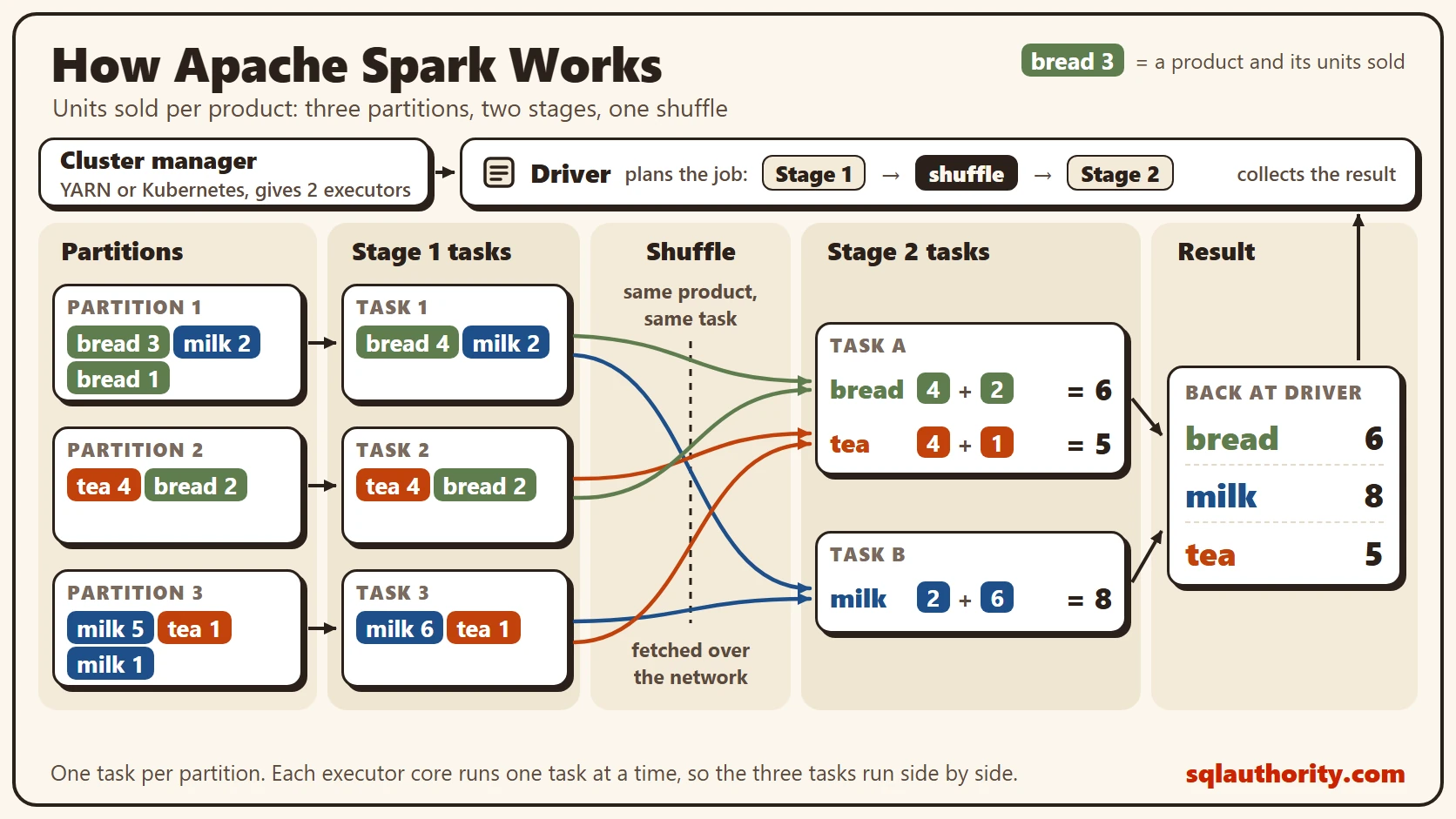
Say a shop’s sales file is cut into three partitions, and we want the total units sold for each product. Partition 1 holds bread 3, milk 2 and bread 1. Partition 2 holds tea 4 and bread 2. Partition 3 holds milk 5, tea 1 and milk 1.
The right answer is easy to check by eye: bread 6, milk 8 and tea 5. Every stage below has to land on those totals. The picture shows the whole job on one page.
Stage 1: One Task for Each Partition
The driver turns your code into a plan, a graph of steps. Spark cuts that graph into stages. A new stage starts wherever data has to move between machines. The cluster manager gives the driver two executors, and stage 1 has three tasks, one for each partition.
Each task reads only its own slice and adds up its own products. Task 1 produces bread 4 and milk 2. Task 2 produces tea 4 and bread 2. Task 3 produces milk 6 and tea 1. With a few cores on each of the two executors, all three tasks run at the same time.
Adding up before the move is called partial aggregation, and Spark SQL does it for you. It plays the same role as the combiner in MapReduce. Fewer rows have to travel, and the final answer doesn’t change.
The Shuffle Splits the Job in Two
Look at bread. Its pieces sit in task 1 and task 2, and nobody has the full total. The pieces have to meet in one place. That move is the shuffle. Spark hashes the product name. Every piece with the same product goes to the same task in the next stage.
Stage 1 tasks write their pieces to local disk, and stage 2 tasks fetch them over the network. That’s why stage 2 can’t begin until stage 1 has finished. Disk has other uses too. Spark spills to it when memory runs short, and cached or checkpointed data can live there.
A filter or a column calculation stays inside one stage. Spark calls these narrow transformations. A GROUP BY, like our sales total, is wide: it needs a shuffle and starts a new stage. Many joins need one too. A broadcast join, or data already partitioned the right way, can skip it.
Stage 2 and the Result
Our example uses two tasks in stage 2. The hash sends bread and tea to task A and milk to task B. Task A adds bread 4 and 2 to get 6, and tea 4 and 1 to get 5. Task B adds milk 2 and 6 to get 8.
Spark SQL starts a shuffle with 200 partitions by default, and adaptive query execution can merge the small ones. When you ask for the result, the answer comes back to the driver, or Spark writes it to storage. We end with bread 6, milk 8 and tea 5, the same totals we checked by eye.
What a SQL Server Person Already Knows
A fair objection: Spark is a data engineering tool, so a DBA can skip it. The vocabulary says otherwise. SQL Server’s own parallel plans cut work into pieces, run them on several threads and regroup the rows between steps. Spark does that across machines, and its plans show the same operators: scans, joins and aggregates.
Knowing how Apache Spark works helps most when a job runs slowly. A slow job usually has a big shuffle or a skewed key, one with far more rows than the rest. Spark has two answers built in. A broadcast join copies a small table to every executor, so the big table never shuffles. Adaptive query execution splits a skewed partition into smaller tasks while the job runs.
What to Remember
The driver plans, the executors work, and a partition is the slice of data one task reads. A shuffle moves rows by key and cuts the job into stages. If you can follow the sales example above, you can explain how Apache Spark works and read most Spark plans.
In any parallel job, find the data movement first, in SQL Server or in Spark. Then ask whether less data could cross it. Partial aggregation before the move is the cheapest answer.
A Spark job is not a black box, it is a plan of stages and tasks that you can read.
Published by Pinal Dave on SQLAuthority. More of my work at pinaldave.com.
Discover more from SQL Authority with Pinal Dave
Subscribe to get the latest posts sent to your email.



6 Comments. Leave new
Hello Sir,
Its a nice introduction of hadoop to start with…
Hard to digest for RDBMS guys, but informative!
Too good Pinal..
i want to know one thing. As everyone saying Big data is the next big thing in data management.. Does it have potential to replace RDBMS? If yes ,how ?and if not, how these two(RDBMS and BIG DATA) are different?
Thanks in advance for your answers.
can we have any practical demo kind of thing
Very nice blog. will big data fully supported by MSSQL since Hadoop is java based, any one implemented bigdata using MSSQL?
Good one Pinal, Are you planning to cover the testing side of Big Data as well?
– Rajaraman R