Read-only filegroups lock old data in place, so no query can change it until you say so. They can also shrink your nightly backup, once the job uses partial backups. The idea fits a table that holds history and never changes.

Why Use Read-Only Filegroups
Last year’s sales don’t change. Yet they sit beside live rows, and one careless UPDATE or DELETE can reach them. A read-only filegroup closes that door. Every table and index stored on it refuses inserts, updates and deletes. Reads work as usual.
Think of it as a seal, not as security. Anyone with enough permission can break the seal. It protects you from accidents, such as a missing WHERE clause or a script run against the wrong table.
It only works if the old rows are on their own filegroup. A filegroup is the unit that gets locked. An ordinary table sits on one filegroup, so it can’t be half locked. A partitioned table can keep old partitions on a locked filegroup, but that’s a separate topic. The first step is to split the data.
A read-only filegroup is narrower than a read-only database. Only the objects on that filegroup are locked. The rest of the database keeps taking writes. That makes it a good fit for a system that must stay open all day while its history stays fixed.
Set Up an Archive Filegroup
The first script creates a database named SqlBasicsArchive if it’s missing. The database is used only for this example. The script then adds a filegroup called FG_Archive with one file. Run it on a test instance. Edit the folder on the first line before you run it. The folder must exist, and the SQL Server service account needs permission to write there.
USE master;
GO
-- Edit this folder first. It must exist, end with a backslash, and be writable by the SQL Server service account.
DECLARE @DataFolder nvarchar(260) = N'C:\SqlBasicsArchiveFiles\';
DECLARE @sql nvarchar(max);
IF DB_ID(N'SqlBasicsArchive') IS NULL
BEGIN
  SET @sql = N'CREATE DATABASE SqlBasicsArchive ON PRIMARY (NAME = SqlBasicsArchive_Data, FILENAME = N''' + @DataFolder + N'SqlBasicsArchive_Data.mdf'', SIZE = 16MB) LOG ON (NAME = SqlBasicsArchive_Log, FILENAME = N''' + @DataFolder + N'SqlBasicsArchive_Log.ldf'', SIZE = 8MB);';
  EXEC (@sql);
END;
SET @sql = N'IF NOT EXISTS (SELECT 1 FROM SqlBasicsArchive.sys.filegroups WHERE name = N''FG_Archive'') ALTER DATABASE SqlBasicsArchive ADD FILEGROUP FG_Archive;';
EXEC (@sql);
IF NOT EXISTS (SELECT 1 FROM sys.master_files WHERE database_id = DB_ID(N'SqlBasicsArchive') AND name = N'SqlBasicsArchive_Archive1')
BEGIN
  SET @sql = N'ALTER DATABASE SqlBasicsArchive ADD FILE (NAME = SqlBasicsArchive_Archive1, FILENAME = N''' + @DataFolder + N'SqlBasicsArchive_Archive1.ndf'', SIZE = 16MB) TO FILEGROUP FG_Archive;';
  EXEC (@sql);
END;
GO
Now create two tables. Run this block after the first script. It drops and rebuilds both demo tables inside SqlBasicsArchive. SalesLive uses the default filegroup. SalesArchive is stored on FG_Archive. One DELETE with an OUTPUT clause moves every row older than 2026 into the archive table. The move is one statement, so rows can’t be lost halfway.
USE SqlBasicsArchive;
GO
DROP TABLE IF EXISTS dbo.SalesLive;
DROP TABLE IF EXISTS dbo.SalesArchive;
CREATE TABLE dbo.SalesLive (SaleID int NOT NULL CONSTRAINT PK_SalesLive PRIMARY KEY, SaleDate date NOT NULL, Item nvarchar(60) NOT NULL, Amount decimal(10,2) NOT NULL);
CREATE TABLE dbo.SalesArchive (SaleID int NOT NULL CONSTRAINT PK_SalesArchive PRIMARY KEY, SaleDate date NOT NULL, Item nvarchar(60) NOT NULL, Amount decimal(10,2) NOT NULL) ON FG_Archive;
INSERT INTO dbo.SalesLive (SaleID, SaleDate, Item, Amount)
VALUES (1, '20240312', N'Tea sampler', 18.50), (2, '20240921', N'Notebook', 6.25), (3, '20251130', N'Green tea', 12.00), (4, '20260214', N'Masala chai', 9.75), (5, '20260302', N'Mango juice', 4.50);
DELETE FROM dbo.SalesLive
OUTPUT deleted.SaleID, deleted.SaleDate, deleted.Item, deleted.Amount INTO dbo.SalesArchive (SaleID, SaleDate, Item, Amount)
WHERE SaleDate < '20260101';
SELECT N'SalesLive' AS table_name, COUNT(*) AS row_count FROM dbo.SalesLive
UNION ALL
SELECT N'SalesArchive', COUNT(*) FROM dbo.SalesArchive;
The last query should show two rows left in SalesLive and three in SalesArchive. If you stop here and run the script again, it rebuilds both tables from scratch. That works only while FG_Archive is still read-write.
Make the Filegroup Read-Only
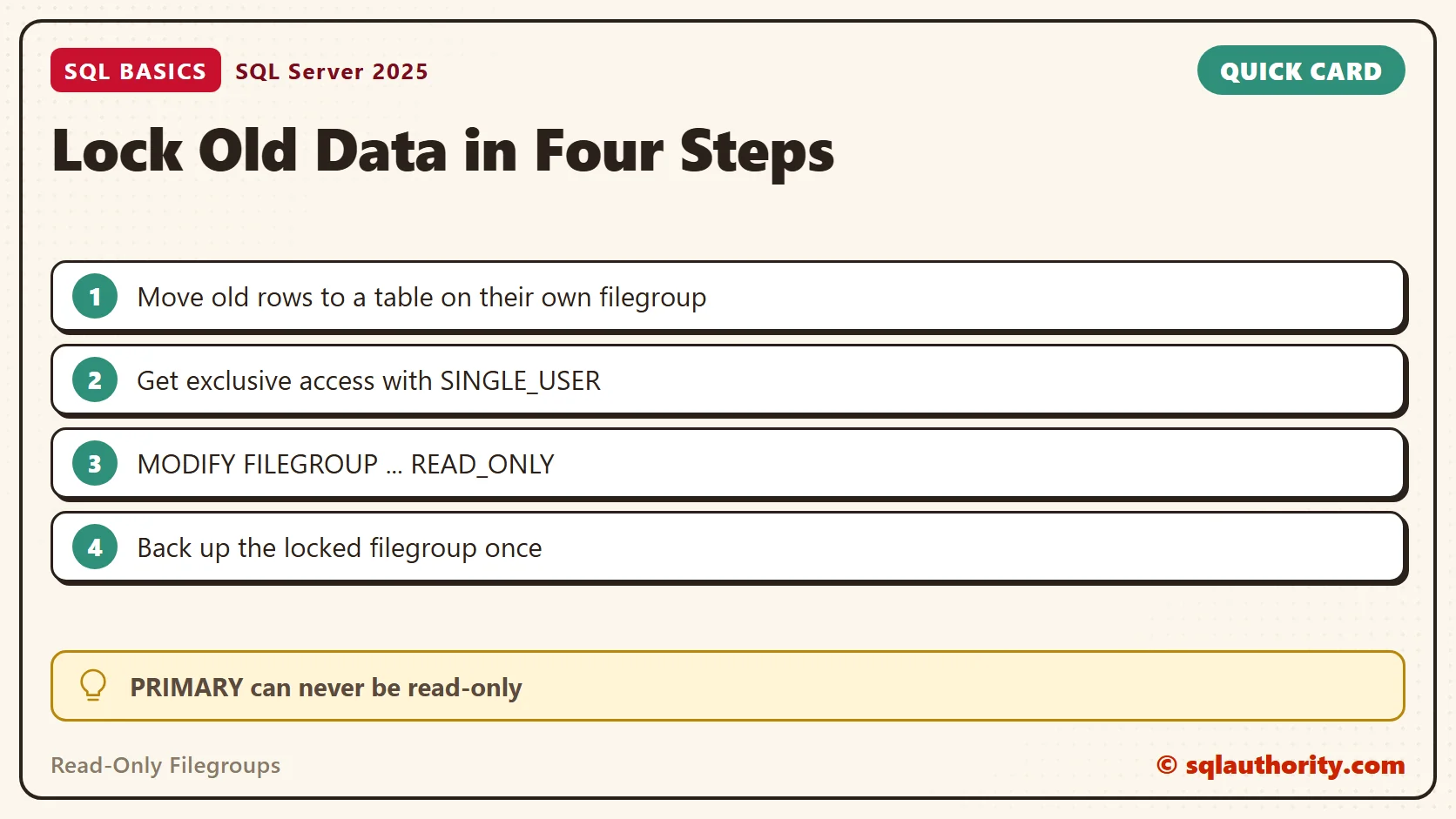
Changing a filegroup to read-only needs exclusive access to the database. The script puts the database in single-user mode, makes the change and returns it to multi-user mode. If a step fails, the CATCH block restores multi-user mode and then rethrows the original error. Run it from master. WITH ROLLBACK IMMEDIATE disconnects other sessions at once. Never run this against a database you don’t own without checking who is connected.
USE master;
GO
BEGIN TRY
  ALTER DATABASE SqlBasicsArchive SET SINGLE_USER WITH ROLLBACK IMMEDIATE;
  ALTER DATABASE SqlBasicsArchive MODIFY FILEGROUP FG_Archive READ_ONLY;
  ALTER DATABASE SqlBasicsArchive SET MULTI_USER;
END TRY
BEGIN CATCH
  DECLARE @ErrorText nvarchar(2048) = N'Error ' + CAST(ERROR_NUMBER() AS nvarchar(10)) + N': ' + ERROR_MESSAGE();
  BEGIN TRY
    ALTER DATABASE SqlBasicsArchive SET MULTI_USER;
  END TRY
  BEGIN CATCH
    SET @ErrorText = @ErrorText + N' Also could not restore MULTI_USER mode.';
  END CATCH;
  THROW 50000, @ErrorText, 1;
END CATCH;
GO
IF (SELECT is_read_only FROM SqlBasicsArchive.sys.filegroups WHERE name = N'FG_Archive') <> 1
  THROW 50001, N'FG_Archive is not read-only. Do not rely on the lock yet.', 1;
SELECT name AS filegroup_name, is_read_only FROM SqlBasicsArchive.sys.filegroups;
The last batch checks the result. It raises an error if FG_Archive is not read-only, and otherwise lists every filegroup with its flag. Don’t trust a lock you haven’t checked.
The PRIMARY filegroup can never be made read-only, because it holds the system objects. That is one more reason to keep your own data on a separate filegroup.
What Works and What Fails
Reading works. Writing fails. Run this block after the lock is in place. It reads the archive. Then it tries an insert inside TRY and CATCH, so you see the real error number and message.
USE SqlBasicsArchive;
GO
SELECT SaleID, SaleDate, Item, Amount FROM dbo.SalesArchive ORDER BY SaleID;

BEGIN TRY
  INSERT INTO dbo.SalesArchive (SaleID, SaleDate, Item, Amount) VALUES (99, '20240101', N'Test row', 1.00);
END TRY
BEGIN CATCH
  SELECT ERROR_NUMBER() AS error_number, ERROR_MESSAGE() AS error_message;
END CATCH;
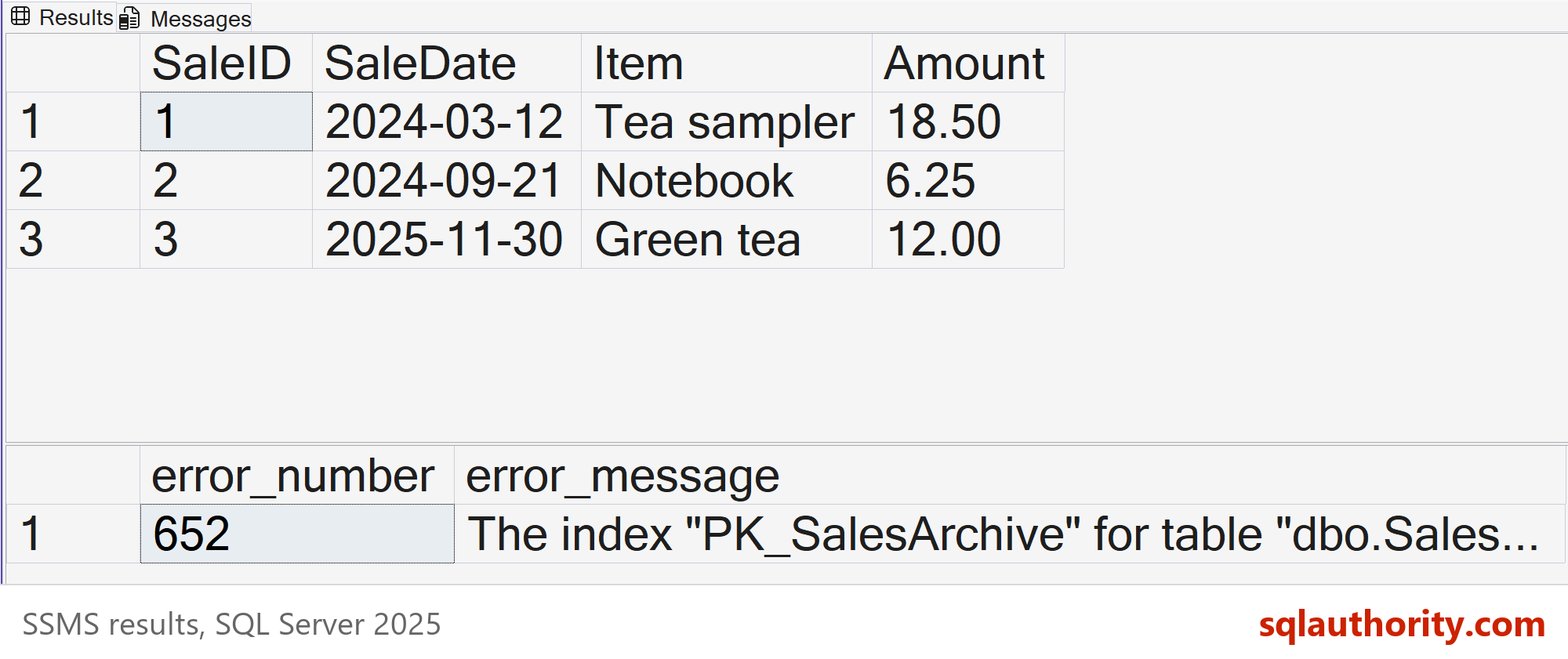
Read the message the CATCH block returns. It names the object and the filegroup. If the write was meant to happen, you know what to unlock. A failure like this is the seal doing its job.
UPDATE and DELETE fail the same way. Changes to the table itself also need a writable filegroup. To drop the table, add a column or rebuild an index, switch the filegroup back first.
Back Up Less With Partial Backups
A read-only filegroup does not shrink a regular full backup. A full backup copies every filegroup, locked or not. The saving comes from a different routine: one backup of the locked filegroup, then nightly partial backups.
A partial backup contains the PRIMARY filegroup and every read-write filegroup. It leaves out read-only filegroups unless you name them. Picture one small live table and ten years of locked history. Each nightly partial backup then holds far less data. If you keep taking full backups, each one still copies the whole history.
The script below does both backups. Edit the folder first. Run it after the filegroup is read-only. If you change the locked data later, take a fresh backup of that filegroup.
USE master;
GO
-- Edit this folder first. It must exist and be writable by the SQL Server service account.
DECLARE @BackupFolder nvarchar(260) = N'C:\SqlBasicsBackups\';
DECLARE @ArchiveFile nvarchar(300) = @BackupFolder + N'SqlBasicsArchive_Archive.bak';
DECLARE @PartialFile nvarchar(300) = @BackupFolder + N'SqlBasicsArchive_Partial.bak';
BACKUP DATABASE SqlBasicsArchive FILEGROUP = N'FG_Archive' TO DISK = @ArchiveFile;
BACKUP DATABASE SqlBasicsArchive READ_WRITE_FILEGROUPS TO DISK = @PartialFile;
A backup that finished is not a backup you can restore. Before you rely on this routine, rehearse a restore on a test instance. Use the partial backup and the filegroup backup. Check that the archive rows come back.
Unlock It When You Must
Sooner or later a bad row turns up in the archive. Switch the filegroup back to read-write, fix the row, lock it again and take a new backup. This script is the reverse of the earlier one, with the same multi-user restore and the same check. It also leaves the demo ready to run again from the top.
USE master;
GO
BEGIN TRY
  ALTER DATABASE SqlBasicsArchive SET SINGLE_USER WITH ROLLBACK IMMEDIATE;
  ALTER DATABASE SqlBasicsArchive MODIFY FILEGROUP FG_Archive READ_WRITE;
  ALTER DATABASE SqlBasicsArchive SET MULTI_USER;
END TRY
BEGIN CATCH
  DECLARE @ErrorText nvarchar(2048) = N'Error ' + CAST(ERROR_NUMBER() AS nvarchar(10)) + N': ' + ERROR_MESSAGE();
  BEGIN TRY
    ALTER DATABASE SqlBasicsArchive SET MULTI_USER;
  END TRY
  BEGIN CATCH
    SET @ErrorText = @ErrorText + N' Also could not restore MULTI_USER mode.';
  END CATCH;
  THROW 50000, @ErrorText, 1;
END CATCH;
GO
IF (SELECT is_read_only FROM SqlBasicsArchive.sys.filegroups WHERE name = N'FG_Archive') <> 0
  THROW 50001, N'FG_Archive is still read-only. The unlock did not work.', 1;
SELECT name AS filegroup_name, is_read_only FROM SqlBasicsArchive.sys.filegroups;
In my own planning, I lock a filegroup only after a final check of its rows. I also write down which filegroup is locked and why. A seal nobody remembers is the next person’s surprise.
Plan the Yearly Routine
The habit works best as a yearly routine. Name a filegroup after the period it holds, such as FG_Sales2025. When the year closes, run a final check on its rows, back it up and lock it. Next year gets a new filegroup, and the old one stays untouched.
Keep the routine small. A short checklist, with the row counts you expect and the date you locked the filegroup, is enough. When someone asks if the 2025 figures can still change, answer with a query on is_read_only, not a promise.
Related reading
The basics of filegroups are in What Are Filegroups in SQL Server and When to Use Them. Backups get a full explanation in What Is a Database Backup? Full, Differential, Log. For the files behind a database, read Data Files and Log Files: What Each One Does in SQL Server.
A read-only filegroup is not a vault, it is a lock against accidents.
Published by Pinal Dave on SQLAuthority. More of my work at pinaldave.com.
Discover more from SQL Authority with Pinal Dave
Subscribe to get the latest posts sent to your email.