
Joining Tables lets one query combine rows from two tables that share a value. Customers live in one table and orders in another. A join lines them up again so you can read them side by side.

Why Joining Tables Matters
A bookshop keeps each customer’s name and city in a Customers table. An order row stores only the CustomerID, not the whole customer. If a customer moves, you change one row. Every order then shows the new city automatically.
The cost is that no single table has the full picture. A join pays that cost. In a finished design, a foreign key also stops an order from pointing at a customer who doesn’t exist. It matches the CustomerID in Orders with the CustomerID in Customers and returns the two rows as one.
The Two Demo Tables
The script creates a database named SqlBasicsJoins if it’s missing, used only for this example. It then drops and rebuilds both demo tables inside it, orders first, so a second run works. Run it on a test instance. There are five customers and five orders, built to show every kind of match. I left out a foreign key to keep the script short.
IF DB_ID(N'SqlBasicsJoins') IS NULL CREATE DATABASE SqlBasicsJoins;
GO
USE SqlBasicsJoins;
GO
DROP TABLE IF EXISTS dbo.Orders;
DROP TABLE IF EXISTS dbo.Customers;
CREATE TABLE dbo.Customers (
    CustomerID int           NOT NULL PRIMARY KEY,
    FullName   nvarchar(100) NOT NULL,
    City       nvarchar(60)  NOT NULL
);
CREATE TABLE dbo.Orders (
    OrderID    int           NOT NULL PRIMARY KEY,
    CustomerID int           NULL,
    OrderDate  date          NOT NULL,
    Total      decimal(8,2)  NOT NULL
);
INSERT INTO dbo.Customers (CustomerID, FullName, City)
VALUES (1, N'Ananya Rao', N'Austin'),
       (2, N'Marcus Lee', N'Denver'),
       (3, N'Priya Shah', N'Boston'),
       (4, N'Tomas Novak', N'Seattle'),
       (5, N'Elena Cruz', N'Portland');
INSERT INTO dbo.Orders (OrderID, CustomerID, OrderDate, Total)
VALUES (101, 1, '2026-09-01', 25.00),
       (102, 1, '2026-09-03', 18.00),
       (103, 2, '2026-09-03', 27.00),
       (104, 3, '2026-09-04', 50.00),
       (105, NULL, '2026-09-05', 9.00);
Orders 101 to 104 belong to customers 1, 2 and 3. Order 105 is a guest checkout, so its CustomerID is NULL. That’s intentional data, not a mistake. Customers 4 and 5 haven’t ordered yet. Those three rows are what make the join types look different.
INNER JOIN Keeps Only the Matches
An INNER JOIN returns a row only when the ON condition is true on both sides. The letters c and o after the table names are aliases, short names that keep the query readable.
SELECT c.FullName, c.City, o.OrderID, o.Total
FROM dbo.Customers AS c
INNER JOIN dbo.Orders AS o
    ON o.CustomerID = c.CustomerID
ORDER BY c.CustomerID, o.OrderID;
You get four rows: two for Ananya Rao, one for Marcus Lee and one for Priya Shah. The guest order is gone, and so are Tomas and Elena. The guest order disappears because NULL never equals anything, not even another NULL. An INNER JOIN is the right choice when you only care about matched pairs.
Notice that every column in the query starts with its alias. Both tables have a CustomerID column. If you wrote CustomerID alone, SQL Server would stop with an “ambiguous column name” error. Prefixing every column costs a few keystrokes and saves that error.
LEFT JOIN Keeps Every Row From the Left Table
Change one word and the picture changes. A LEFT JOIN keeps every row from the table written before the word JOIN, matched or not.
SELECT c.FullName, c.City, o.OrderID, o.Total
FROM dbo.Customers AS c
LEFT JOIN dbo.Orders AS o
    ON o.CustomerID = c.CustomerID
ORDER BY c.CustomerID, o.OrderID;
Now there are six rows. The four matches are still there. Tomas Novak and Elena Cruz have joined them, with NULL in the OrderID and Total columns. Those NULLs mean “no matching order”. They don’t mean an order of zero. The guest order is still missing, because the left table is Customers.
Find the Customers Who Never Ordered
The NULL rows are useful. Filter for them, and you get every customer with no order. Test the key column of the right table, because a real order row can never have a NULL key.
SELECT c.FullName, c.City
FROM dbo.Customers AS c
LEFT JOIN dbo.Orders AS o
    ON o.CustomerID = c.CustomerID
WHERE o.OrderID IS NULL;
The result is two rows, Tomas Novak and Elena Cruz. Be careful with any other WHERE test on the right table. A condition such as o.Total > 20 removes the NULL rows. Your LEFT JOIN then behaves like an INNER JOIN.
FULL OUTER JOIN Keeps Both Sides
A FULL OUTER JOIN keeps every row from both tables. Matches line up, and anything without a partner gets NULL on the missing side.
SELECT c.FullName, o.OrderID, o.Total
FROM dbo.Customers AS c
FULL OUTER JOIN dbo.Orders AS o
    ON o.CustomerID = c.CustomerID
ORDER BY c.CustomerID, o.OrderID;
The result has seven rows. The guest order comes first, with NULL in FullName, because NULL sorts lowest. Then come the four matches and the two customers without orders. A FULL join is a quick way to look for rows that have no partner on either side.
Read the Missing Rows
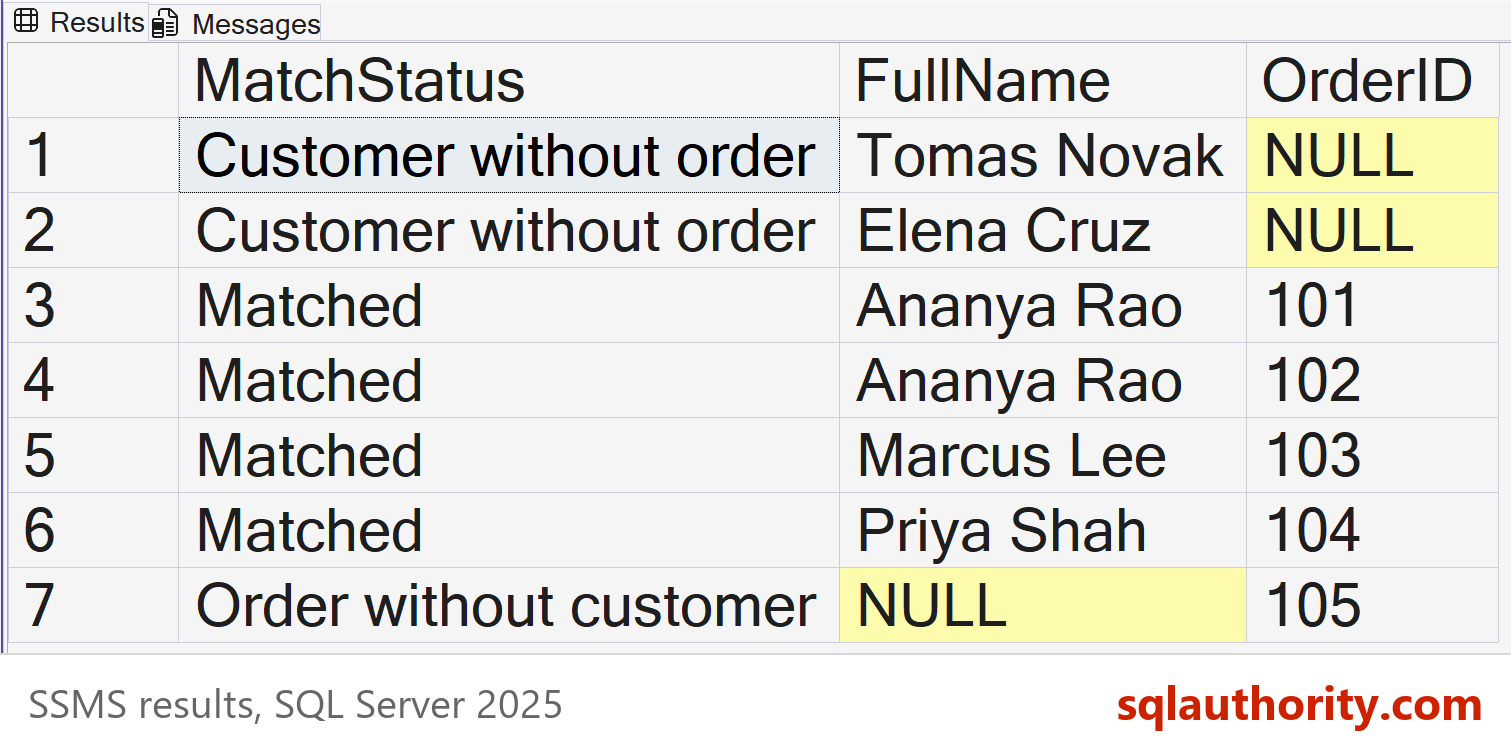
A join result tells you where a row had no partner, if you know where to look. NULL in the customer columns means an order had no customer. NULL in the order columns means a customer had no order. A small CASE expression can label each row for you. Run the setup script first.
SELECT CASE WHEN c.CustomerID IS NULL THEN N'Order without customer'
            WHEN o.OrderID IS NULL THEN N'Customer without order'
            ELSE N'Matched' END AS MatchStatus,
       c.FullName, o.OrderID
FROM dbo.Customers AS c
FULL OUTER JOIN dbo.Orders AS o
    ON o.CustomerID = c.CustomerID
ORDER BY MatchStatus, c.CustomerID, o.OrderID;
The result has seven rows: two customers without orders, four matched rows and one order without a customer. That report shows where rows have no partner, and it takes one query. Whether a row needs fixing is a separate question. The guest order here is intentional.
What a Missing Condition Does
The ON condition is what makes joining tables safe. A modern INNER JOIN without ON is a syntax error, so SQL Server stops you. Pairing every row with every row takes a CROSS JOIN, or the old comma style with no WHERE. With five customers and five orders, that gives 25 rows, and none of them mean anything.
SELECT COUNT(*) AS PairedRows
FROM dbo.Customers
CROSS JOIN dbo.Orders;
The answer is 25. Run the same pairing on a million customers and a million orders, and you ask for a trillion pairs. When a query is slow and the result looks huge, check the join condition first.
Count the Rows After Every Join
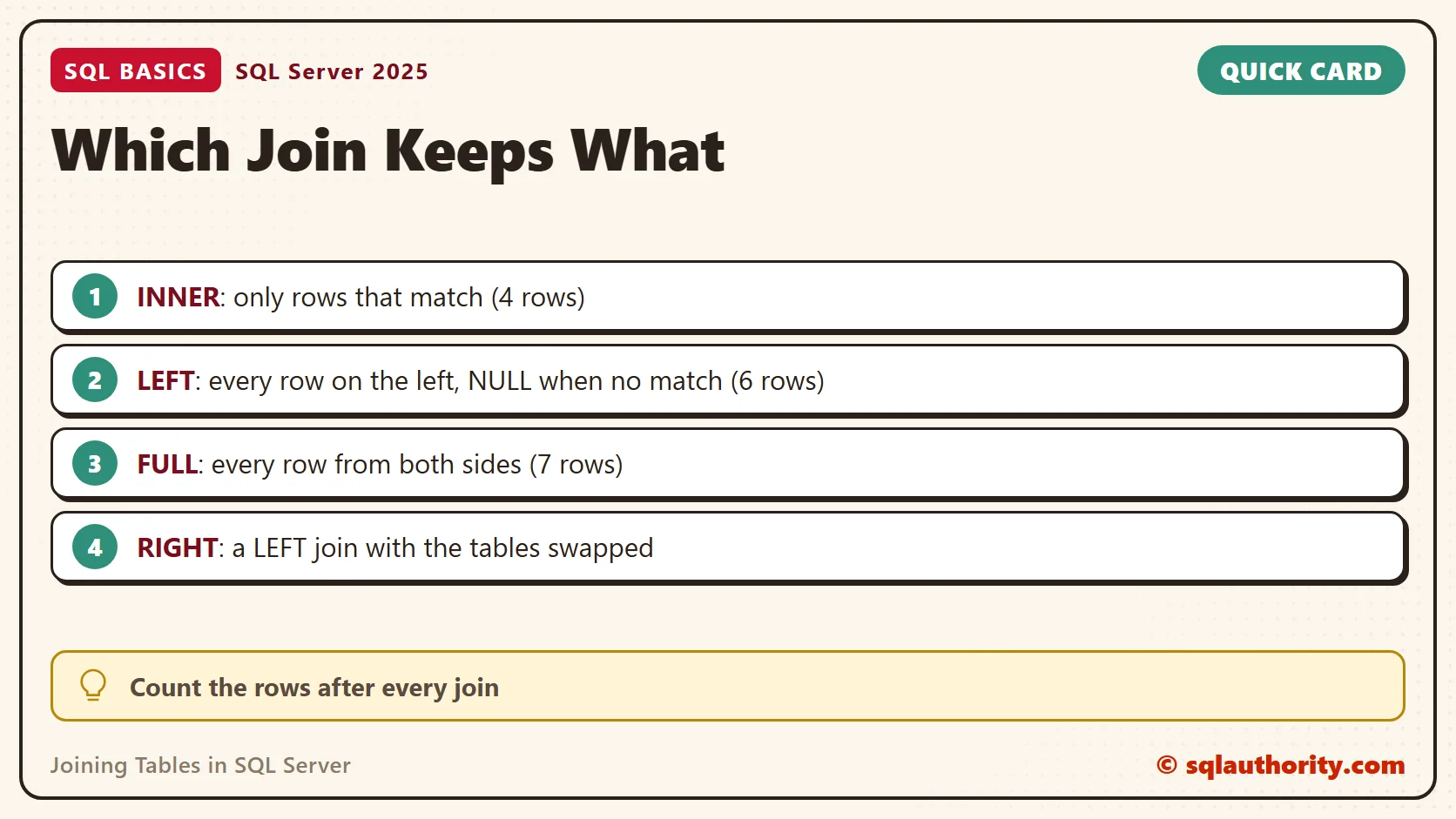
Row counts tell you whether a join did what you meant. Here they are for the demo data. A RIGHT JOIN is a LEFT JOIN with the tables swapped, and I rarely write one. I put the table I want to keep on the left instead.
Choose the join by the question you’re asking. Do you need unmatched rows at all? If not, use INNER. If you need them from one table, put that table on the left and use LEFT. If you need them from both, use FULL.
| Join | Rows returned | What it keeps |
|---|---|---|
| INNER JOIN | 4 | Only matched pairs |
| LEFT JOIN (Customers first) | 6 | All customers, with orders where they exist |
| FULL OUTER JOIN | 7 | All customers and all orders |
If an INNER JOIN returns more rows than either table holds, the join column isn’t unique on one side. Each match produces its own result row. Check the counts before you trust any total built on top of a join.
Related Reading
- A WHERE Filter That Turns Your LEFT JOIN Into an INNER JOIN
- LEFT JOIN ON Clause: Conditions Decide Matches, Not Rows
- Join Duplicates: Stop Hiding Extra Rows With SELECT DISTINCT
- CROSS JOIN: Duplicate Inputs Multiply the Result
A join is not a way to merge tables, it is a way to ask which rows belong together.
Published by Pinal Dave on SQLAuthority. More of my work at pinaldave.com.
Discover more from SQL Authority with Pinal Dave
Subscribe to get the latest posts sent to your email.




3 Comments. Leave new
Hello Pinal,
I needed some advise on implementing a solution to support advance search functionality in a relational database.
Our team is developing a new .Net application and my responsibility is to architect a relational db (SQL Server 2008). We have around 80 tables and mostly all of them are related to each other through foreign key constraints. We have tried our best to keep it in 3NF with a few exceptions, so it looks more like a snowflake schema.
The business needs advanced search capabilities on .Net app screen. They could have up to 20 filters to search for related data across multiple tables. We need to implement a solution that would allow us to join 20-25 tables based on selected filter criteria. We were thinking of creating a view (by joining multiple tables) or creating a stored procedure that allows dynamic queries but we are not sure about how this will impact performance as some of the tables may have million rows.
It would help us greatly if you could please shed some light.
Thanks in advance,
-Purvi
Thank you sir. :)
sir.. how to add third table into it.. :(