Record checkout is a lock you can see: a name and an expiry time stored on the row. A screen can then show that Asha is editing a note. This post builds it with one UPDATE and proves it with two sessions that race for 2,000 rows. It also covers the lock someone forgets to release.
Why Not Another Kind of Lock
SQL Server already has other tools. An application lock belongs to a connection. It can’t show another user a name on a screen. Read Application Locks With sp_getapplock: One Job at a Time for that tool.
A rowversion check finds a clash only when someone saves, after the work is done. Read Lost Updates: Optimistic Concurrency With a rowversion Column for that one. A checkout row shows the owner before anyone starts typing.
The Sample Table
Document holds 2,000 notes. LockedBy and LockExpires start empty, and a row is free when LockedBy is NULL or the expiry time has passed. RaceLog will record what each session was granted. Every result in this post comes from SQL Server 2025.
CREATE TABLE dbo.Document (
  DocID int NOT NULL PRIMARY KEY,
  Title varchar(40) NOT NULL,
  Body varchar(200) NOT NULL,
  LockedBy varchar(20) NULL,
  LockExpires datetime2(3) NULL
);
INSERT INTO dbo.Document (DocID, Title, Body)
SELECT value, CONCAT('Garden note ', value), 'First draft' FROM GENERATE_SERIES(1, 2000);
CREATE TABLE dbo.RaceLog (
  LogID int IDENTITY PRIMARY KEY,
  UserName varchar(20) NOT NULL,
  DocID int NOT NULL,
  Granted int NOT NULL
);
The Wrong Way: Check, Then Update
The first version most of us write reads the row and then updates it. Between the SELECT and the UPDATE, a second session can read the same free row. Both sessions then decide the row is theirs.
CREATE PROCEDURE dbo.CheckOutNaive @DocID int, @User varchar(20), @Seconds int = 300
AS
BEGIN
  SET NOCOUNT ON;
  DECLARE @Holder varchar(20), @Expires datetime2(3);
  SELECT @Holder = LockedBy, @Expires = LockExpires FROM dbo.Document WHERE DocID = @DocID;
  IF @Holder IS NULL OR @Expires <= SYSUTCDATETIME() OR @Holder = @User
  BEGIN
    UPDATE dbo.Document
    SET LockedBy = @User, LockExpires = DATEADD(SECOND, @Seconds, SYSUTCDATETIME())
    WHERE DocID = @DocID;
    RETURN 1;
  END;
  RETURN 0;
END;
The Right Way: One UPDATE
The condition and the claim become one statement. SQL Server locks the row while the UPDATE runs. A second session waits, then sees the new owner and matches nothing. The procedure returns the number of rows changed: 1 means you hold the lock, and 0 means you don’t.
Three cases let the UPDATE through. The row has no owner. The old lock has expired. Or the caller already owns the lock and is renewing it. The expiry time matters, because a closed browser can’t lock a note forever.
CREATE PROCEDURE dbo.CheckOut @DocID int, @User varchar(20), @Seconds int = 300
AS
BEGIN
  SET NOCOUNT ON;
  DECLARE @Now datetime2(3) = SYSUTCDATETIME();
  UPDATE dbo.Document
  SET LockedBy = @User, LockExpires = DATEADD(SECOND, @Seconds, @Now)
  WHERE DocID = @DocID
    AND (LockedBy IS NULL OR LockExpires <= @Now OR LockedBy = @User);
  RETURN @@ROWCOUNT;
END;
Save and Check In
Saving needs a lock that still belongs to the caller and hasn’t expired. Checking in clears the lock, and only the owner can do it. Both return 1 on success and 0 otherwise.
CREATE PROCEDURE dbo.SaveDocument @DocID int, @User varchar(20), @Body varchar(200)
AS
BEGIN
  SET NOCOUNT ON;
  UPDATE dbo.Document
  SET Body = @Body
  WHERE DocID = @DocID AND LockedBy = @User AND LockExpires > SYSUTCDATETIME();
  RETURN @@ROWCOUNT;
END;
CREATE PROCEDURE dbo.CheckIn @DocID int, @User varchar(20)
AS
BEGIN
SET NOCOUNT ON;
UPDATE dbo.Document SET LockedBy = NULL, LockExpires = NULL
WHERE DocID = @DocID AND LockedBy = @User;
RETURN @@ROWCOUNT;
END;Race Two Sessions
Open two query windows. Put a time a few seconds ahead in WAITFOR TIME. Use the same time in both windows, so both loops start together. Each loop asks for all 2,000 documents and records its answer. The second window uses the name Ravi.
WAITFOR TIME '21:05:07';
SET NOCOUNT ON;
DECLARE @id int = 1, @ok int;
WHILE @id <= 2000
BEGIN
  EXEC @ok = dbo.CheckOut @DocID = @id, @User = 'Asha';
  INSERT INTO dbo.RaceLog (UserName, DocID, Granted) VALUES ('Asha', @id, @ok);
  SET @id += 1;
END;
To see the wrong way fail, run the same loops with CheckOutNaive in place of CheckOut. Clear the locks and the log between runs. Then count the winners for each document.
SELECT Winners, COUNT(*) AS Documents
FROM (SELECT DocID, SUM(Granted) AS Winners FROM dbo.RaceLog GROUP BY DocID) AS d
GROUP BY Winners ORDER BY Winners;
SELECT UserName, SUM(Granted) AS DocumentsWon FROM dbo.RaceLog GROUP BY UserName ORDER BY UserName;
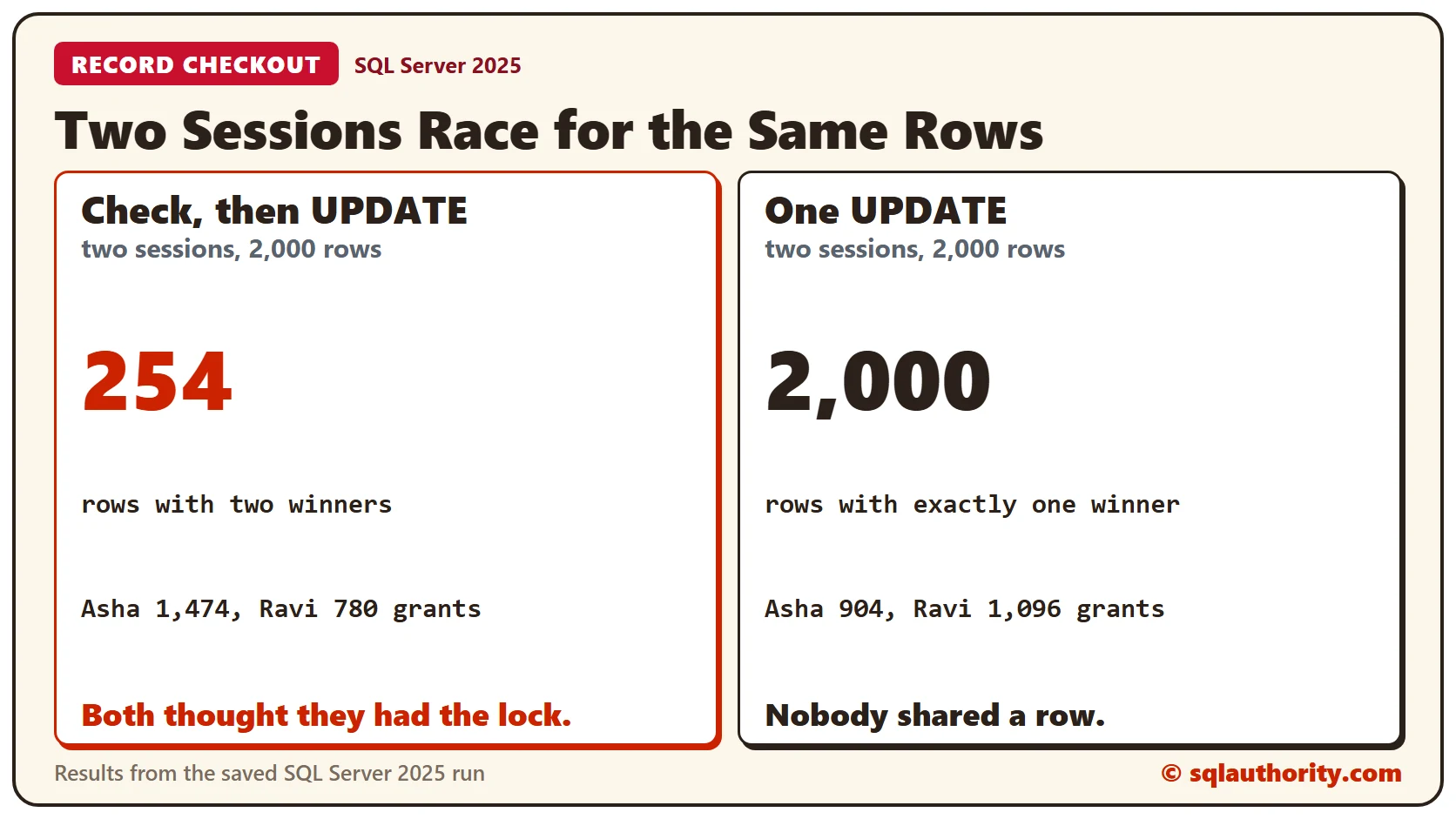
With CheckOutNaive, 254 documents had two winners and 1,746 had one. The two sessions were granted 1,474 and 780 documents, which is 254 more grants than there are documents. Both sessions believed they owned those rows.
With CheckOut, all 2,000 documents had exactly one winner. Asha was granted 904 documents and Ravi 1,096. Both sessions won rows, so the race was real, and nobody shared a row. The counts change from run to run, and the one-winner result doesn’t.
A Lock That Expires
The next script uses a lock of 2 seconds so the expiry is quick to see. Asha checks out document 1, and Ravi is refused. After 3 seconds, the script reads the row. Then Ravi tries again, and Asha tries to save.
DECLARE @ok int;
EXEC @ok = dbo.CheckOut @DocID = 1, @User = 'Asha', @Seconds = 2;
SELECT 'Asha checks out' AS Step, @ok AS Result;
EXEC @ok = dbo.CheckOut @DocID = 1, @User = 'Ravi', @Seconds = 2;
SELECT 'Ravi tries at once' AS Step, @ok AS Result;
WAITFOR DELAY '00:00:03';
SELECT DocID, LockedBy, CASE WHEN LockExpires > SYSUTCDATETIME() THEN 'locked' ELSE 'free' END AS State
FROM dbo.Document WHERE DocID = 1;
EXEC @ok = dbo.CheckOut @DocID = 1, @User = 'Ravi', @Seconds = 300;
SELECT 'Ravi tries after expiry' AS Step, @ok AS Result;
EXEC @ok = dbo.SaveDocument @DocID = 1, @User = 'Asha', @Body = 'Asha edit';
SELECT 'Asha saves late' AS Step, @ok AS Result;
EXEC @ok = dbo.SaveDocument @DocID = 1, @User = 'Ravi', @Body = 'Ravi edit';
SELECT 'Ravi saves' AS Step, @ok AS Result;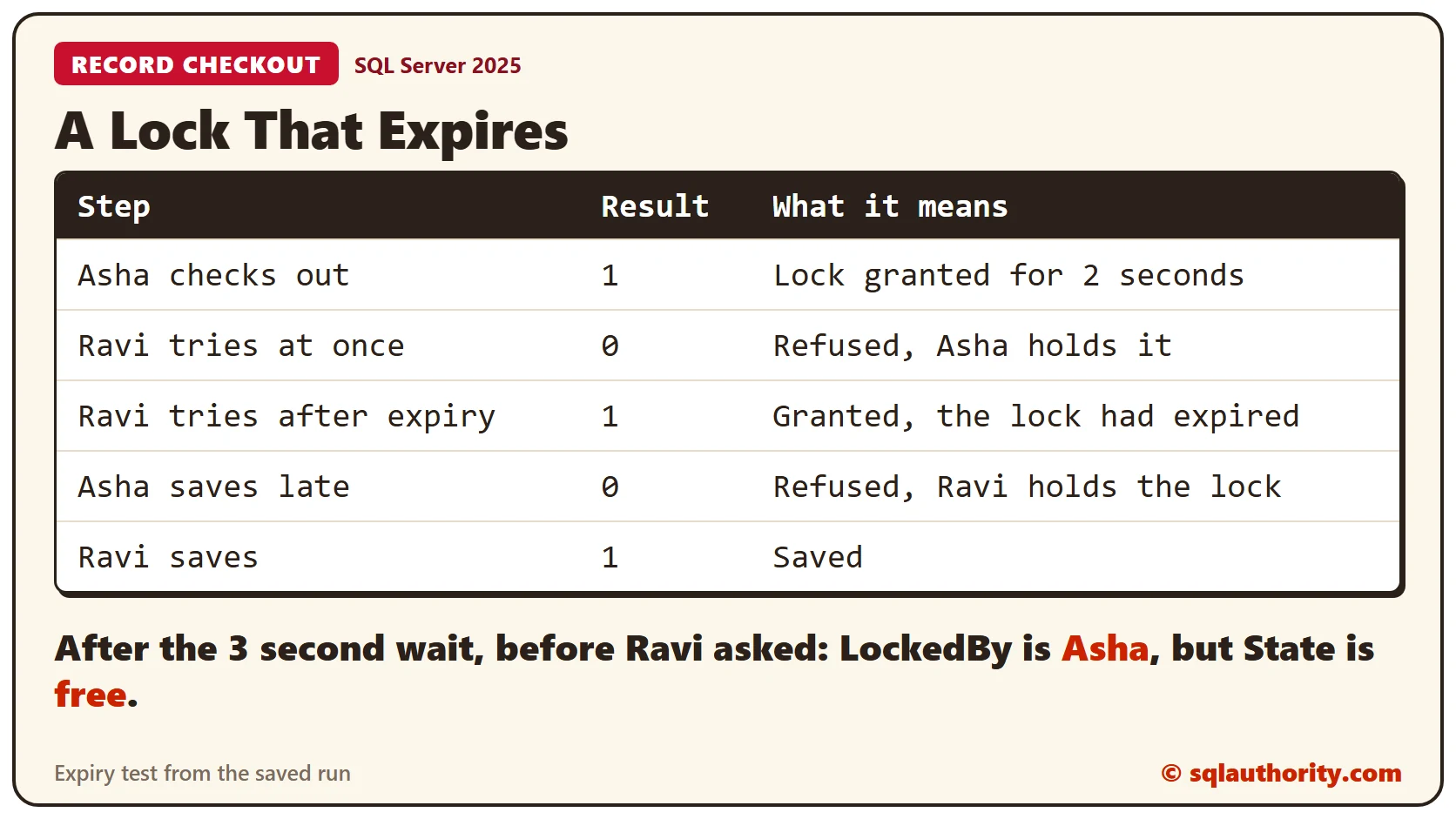
Asha’s late save returns 0, so Asha can’t overwrite Ravi’s work. Look at the row after the wait. LockedBy still says Asha, because nothing cleared it, but State says free. A screen must test the expiry time, not the name alone.
Checking In
Asha takes document 2 for the default 300 seconds. Ravi tries to release it, and then Asha does.
EXEC dbo.CheckOut @DocID = 2, @User = 'Asha', @Seconds = 300;SELECT DocID, LockedBy, CASE WHEN LockExpires > SYSUTCDATETIME() THEN 'locked' ELSE 'free' END AS State
FROM dbo.Document WHERE DocID = 2;DECLARE @ok int;
EXEC @ok = dbo.CheckIn @DocID = 2, @User = 'Ravi';
SELECT 'Ravi checks in' AS Step, @ok AS Result;
EXEC @ok = dbo.CheckIn @DocID = 2, @User = 'Asha';
SELECT 'Asha checks in' AS Step, @ok AS Result;Ravi’s check-in returns 0, because the lock isn’t Ravi’s. Asha’s returns 1. The row is free again, with LockedBy empty.
What a Checkout Doesn’t Do
A checkout only guards the code that honors it. A script that updates Body directly walks past it. Send every write through SaveDocument, or deny others direct access to the table. Choose a lock time longer than a normal edit, and renew it while the person is still typing.
Clean Up
Remove the procedures and tables when you finish.
DROP PROCEDURE dbo.CheckIn;
DROP PROCEDURE dbo.SaveDocument;
DROP PROCEDURE dbo.CheckOut;
DROP PROCEDURE dbo.CheckOutNaive;
DROP TABLE dbo.RaceLog;
DROP TABLE dbo.Document;
What to Remember
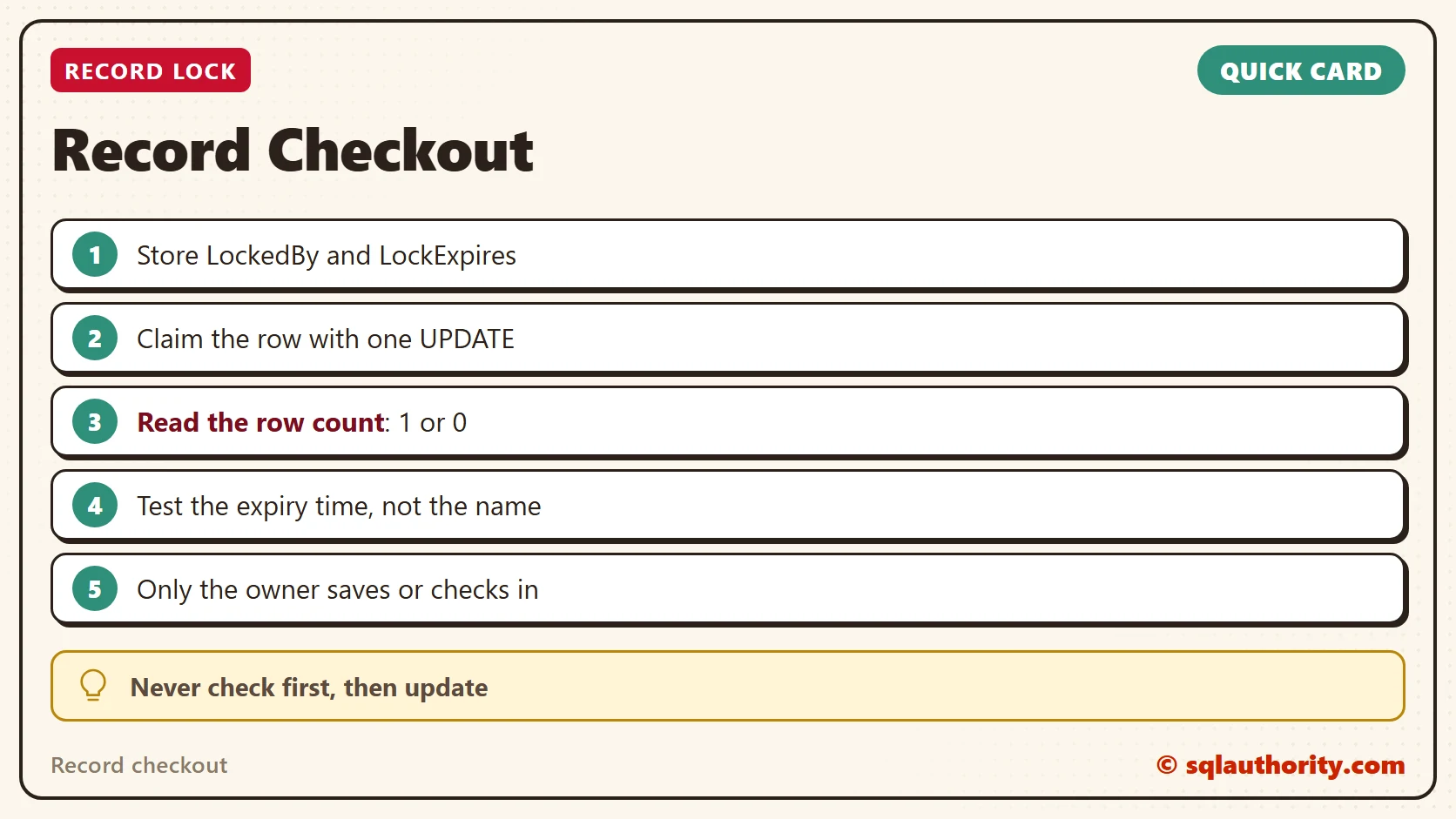
Claim the row with one UPDATE and read the row count. Store an expiry time, and test it every time you show or check the lock. Let only the owner save or check in.
To go further, read Lost Updates: Optimistic Concurrency With a rowversion Column and Application Locks With sp_getapplock: One Job at a Time.
A checkout is not a note on a screen, it is one UPDATE that either wins the row or doesn’t.
Published by Pinal Dave on SQLAuthority. More of my work at pinaldave.com.
Discover more from SQL Authority with Pinal Dave
Subscribe to get the latest posts sent to your email.