UNMASK on one column lets a user see that column in clear text while every other masked column stays masked. It does not give them SELECT permission, and it does not open the whole table. In SQL Server 2022 and later you can grant it as narrowly as one column.

The request: show the phone, hide the pay
Here is a request I hear often. The support team needs to call customers back, so they need phone numbers. They have no business seeing salaries. Both columns sit in the same table, and both are masked.
A column-level UNMASK fits this request neatly. Let me prove it works as promised. The demo creates one table and two users, and the last block removes them.
Set up two masked columns
The table has one row with a phone number and a salary, both using the default mask. The user ReportReader gets SELECT permission and nothing else.
DROP TABLE IF EXISTS dbo.StaffContact;
DROP USER IF EXISTS ReportReader;
DROP USER IF EXISTS PhoneOnlyUser;
GO
CREATE TABLE dbo.StaffContact (
    Id     int PRIMARY KEY,
    Phone  varchar(30) MASKED WITH (FUNCTION = 'default()'),
    Salary int         MASKED WITH (FUNCTION = 'default()'));

INSERT dbo.StaffContact (Id, Phone, Salary) VALUES (1, '8005550123', 80000);

CREATE USER ReportReader WITHOUT LOGIN;
GRANT SELECT ON dbo.StaffContact TO ReportReader;
Now read the row as ReportReader. Testing as yourself would be misleading, because an administrator sees clear values anyway.
EXECUTE AS USER = N'ReportReader';
SELECT Id, Phone, Salary FROM dbo.StaffContact ORDER BY Id;
REVERT;
The phone shows as xxxx and the salary as 0. That is the default mask for text and for numbers.
Grant UNMASK on just one column
The grant names the table and the column. After it, the same query runs again, and I list the permission from the catalog.
GRANT UNMASK ON dbo.StaffContact(Phone) TO ReportReader;

EXECUTE AS USER = N'ReportReader';
SELECT Id, Phone, Salary FROM dbo.StaffContact ORDER BY Id;
REVERT;

SELECT p.class_desc, p.permission_name, p.state_desc, COL_NAME(p.major_id, p.minor_id) AS ColumnName
FROM sys.database_permissions AS p
WHERE p.grantee_principal_id = USER_ID(N'ReportReader') AND p.permission_name = N'UNMASK';
The phone now reads 8005550123. The salary still shows 0. The catalog row says OBJECT_OR_COLUMN, UNMASK, GRANT, and the column name is Phone. That is the whole grant, and it is easy to audit.
Take it back and test again
Never trust a revoke you did not test. Revoke the grant and read the row once more as the same user.
REVOKE UNMASK ON dbo.StaffContact(Phone) FROM ReportReader;

EXECUTE AS USER = N'ReportReader';
SELECT Id, Phone, Salary FROM dbo.StaffContact ORDER BY Id;
REVERT;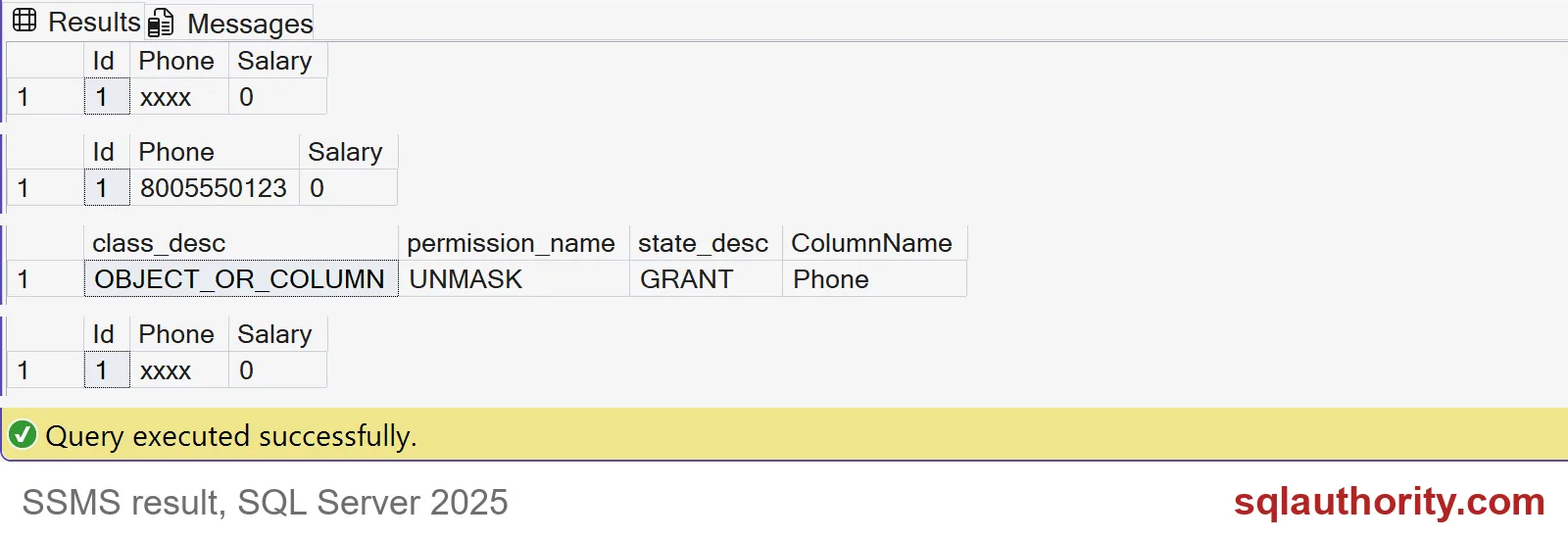
The screenshot shows all four results in order. Phone goes from xxxx to the real number and back to xxxx. The salary never moves. This revoke worked because no other permission path allowed unmasking. In a real system, roles can still give the right back, so test the user, not just the grant.

UNMASK is not SELECT
The two permissions are separate. A user with UNMASK but no SELECT cannot read the table at all. Let me create one and try.
CREATE USER PhoneOnlyUser WITHOUT LOGIN;
GRANT UNMASK ON dbo.StaffContact(Phone) TO PhoneOnlyUser;

EXECUTE AS USER = N'PhoneOnlyUser';
BEGIN TRY
    SELECT Id, Phone FROM dbo.StaffContact;
END TRY
BEGIN CATCH
    SELECT ERROR_NUMBER() AS ErrorNumber;
END CATCH;
REVERT;
The query fails with error 229, SELECT permission denied. UNMASK only changes what a reader sees. It never decides who may read.
The wide version, and why to avoid it
The same permission also exists at database level, with no table or column named. Watch what happens to the salary.
GRANT UNMASK TO ReportReader;

EXECUTE AS USER = N'ReportReader';
SELECT Id, Phone, Salary FROM dbo.StaffContact ORDER BY Id;
REVERT;

REVOKE UNMASK FROM ReportReader;
Now the salary reads 80000, too, along with the phone. One short statement opened every masked column in the database. Grant the smallest scope that does the job. Then clean up.
DROP TABLE IF EXISTS dbo.StaffContact;
DROP USER IF EXISTS ReportReader;
DROP USER IF EXISTS PhoneOnlyUser;
When someone asks for unmasking, ask which column they need.
UNMASK is not a read permission, it is permission for clear output.
Published by Pinal Dave on SQLAuthority. More of my work at pinaldave.com.
Discover more from SQL Authority with Pinal Dave
Subscribe to get the latest posts sent to your email.