SAMPLED vs DETAILED is a choice between cheap evidence and complete evidence. Before you pick either one, pick one object. A typo in a table name can turn a quick check into a scan of the whole database.

The typo that scans everything
Imagine a quiet evening check. You want fragmentation numbers for one table. You type the table name with one extra letter and run the query. The function does not complain. It just starts reading every index in the database.
Nobody enjoys explaining to the team why a tiny check slowed everything down. So let me show you the trap on a tiny database, where it is harmless. Please run this only in a small test database.
Build one small target
The table has 2,000 rows, each with a 400 character payload. That is enough to fill about a hundred pages. GENERATE_SERIES needs SQL Server 2022 or later. The first result reports how many pages the table uses in total, and the demo drops the table at the end.
DROP TABLE IF EXISTS dbo.PhysicalScanDemo;
CREATE TABLE dbo.PhysicalScanDemo (Id int PRIMARY KEY, Payload char(400));

INSERT dbo.PhysicalScanDemo
SELECT value, REPLICATE('x', 400) FROM GENERATE_SERIES(1, 2000, 1);

SELECT SUM(used_page_count) AS UsedPages
FROM sys.dm_db_partition_stats
WHERE object_id = OBJECT_ID(N'dbo.PhysicalScanDemo') AND index_id = 1;
Why a NULL object ID is dangerous
OBJECT_ID returns NULL when it cannot find the name. The function sys.dm_db_index_physical_stats reads a NULL object ID as “all objects.” So the typo below does not fail. It quietly asks about everything.
DECLARE @object int = OBJECT_ID(N'dbo.PhysicalScanDemoo');

SELECT @object AS object_id_found, COUNT(*) AS rows_returned
FROM sys.dm_db_index_physical_stats(DB_ID(), @object, NULL, NULL, 'LIMITED');
The object ID comes back NULL, and the function still returns rows instead of none. In my tiny test database that was 7 rows. In a production database it would be every table and index you own. The cure is a two-line guard, and it is the one piece of error handling I always keep.
Compare the three modes on the same index
Now do it properly. Look up the object ID, stop if it is NULL, then ask for the leaf level in each mode. I put the mode name beside each result so nobody mixes them up.
DECLARE @object int = OBJECT_ID(N'dbo.PhysicalScanDemo', N'U');
IF @object IS NULL THROW 50000, N'The inspection target was not found.', 1;

SELECT N'LIMITED' AS ScanMode, page_count, record_count, avg_page_space_used_in_percent
FROM sys.dm_db_index_physical_stats(DB_ID(), @object, 1, NULL, 'LIMITED')
WHERE index_level = 0 AND alloc_unit_type_desc = N'IN_ROW_DATA';

SELECT N'SAMPLED' AS ScanMode, page_count, record_count, avg_page_space_used_in_percent
FROM sys.dm_db_index_physical_stats(DB_ID(), @object, 1, NULL, 'SAMPLED')
WHERE index_level = 0 AND alloc_unit_type_desc = N'IN_ROW_DATA';

SELECT N'DETAILED' AS ScanMode, page_count, record_count, avg_page_space_used_in_percent
FROM sys.dm_db_index_physical_stats(DB_ID(), @object, 1, NULL, 'DETAILED')
WHERE index_level = 0 AND alloc_unit_type_desc = N'IN_ROW_DATA';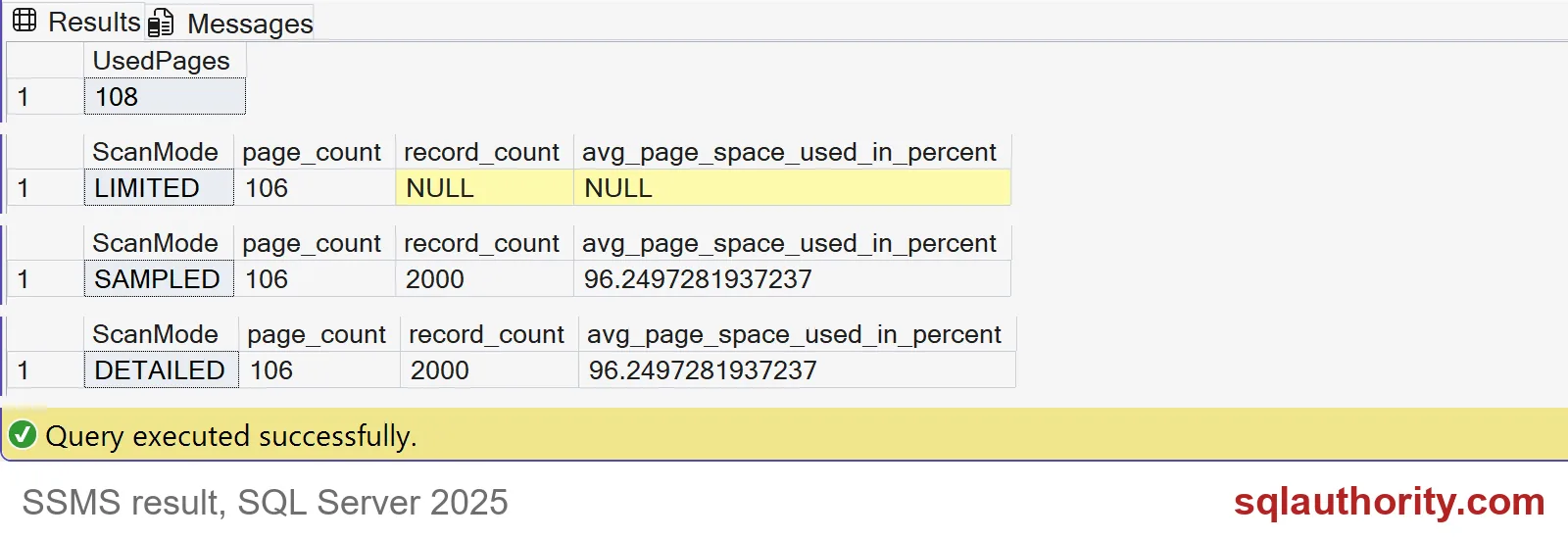
All three modes see 106 leaf pages. The table uses 108 pages in all. LIMITED leaves record count and page density NULL, and NULL here means “not collected,” not “empty.” SAMPLED and DETAILED both report 2,000 records and pages about 96 percent full.
They match because this index is small. On a big index, SAMPLED looks at only part of the pages, so its numbers are estimates. DETAILED reads everything, and you pay for it in time and I/O.

Pick the target from size data
Do not guess which table to inspect. Start from the size list, choose one object that matters, and pass its object ID, index ID and partition into the function. Filtering the result afterward is too late, because the wide call has already done its work. Here is a simple list of the biggest tables.
SELECT TOP (5) OBJECT_NAME(object_id) AS table_name, SUM(used_page_count) AS used_pages
FROM sys.dm_db_partition_stats
WHERE index_id IN (0, 1) AND OBJECTPROPERTY(object_id, 'IsUserTable') = 1
GROUP BY object_id
ORDER BY used_pages DESC, table_name;
In this test database there is only our one table. On your server the top of that list is where the real questions live. Remember that fragmentation alone is not a reason to rebuild. Page density and real query behavior belong in the decision too. Then clean up.
DROP TABLE IF EXISTS dbo.PhysicalScanDemo;Before you scan, ask which missing number would change your maintenance decision.
A detailed scan is not a better routine, it is more work for more evidence.
Published by Pinal Dave on SQLAuthority. More of my work at pinaldave.com.
Discover more from SQL Authority with Pinal Dave
Subscribe to get the latest posts sent to your email.