SUM of SUM looks strange, but it is simple: the inner SUM builds each group total, and the outer SUM adds those totals together. It lets one query show a region’s total and its share of the grand total. No subquery needed.

The question behind the double SUM
A manager asks, “What share of our sales comes from each region?” A junior DBA writes one query for the region totals and another for the grand total. Then they paste both into Excel and divide.
You can do better. One query can hold both numbers side by side. The trick is to see that a window function runs after GROUP BY, on the grouped rows.
Build a small table
Four sales in three regions. North has two sales, 10 and 20. South has one of 30. West has one of 40. So North and South tie at 30, and the grand total is 100.
DROP TABLE IF EXISTS #RegionalSales;
CREATE TABLE #RegionalSales (Region varchar(20), Amount decimal(12,2));

INSERT #RegionalSales
VALUES ('North', 10), ('North', 20), ('South', 30), ('West', 40);
Group first, then window across the groups
SQL Server works in a set order. It picks the rows (FROM and WHERE), groups them, filters the groups (HAVING), and only then calculates window functions. Last comes ORDER BY. So when the window runs, it sees three regional rows, not four sales.
That is why SUM(SUM(Amount)) OVER() works. The inner SUM is the group total. The outer SUM, with an empty OVER, adds up all the group totals. I wrap the division in NULLIF so an empty total gives NULL instead of a divide-by-zero error.
SELECT Region,
       SUM(Amount)                AS RegionTotal,
       SUM(SUM(Amount)) OVER ()   AS GrandTotal,
       100.0 * SUM(Amount) / NULLIF(SUM(SUM(Amount)) OVER (), 0) AS SharePercent
FROM #RegionalSales
GROUP BY Region
ORDER BY Region;
North and South each total 30. West totals 40. The grand total is 100 on every row, so the shares are 30, 30 and 40 percent.
The most common mistake is to write only one SUM, like SUM(Amount) OVER (). Try it, and SQL Server complains.
SELECT Region, SUM(Amount) AS RegionTotal, SUM(Amount) OVER () AS GrandTotal
FROM #RegionalSales
GROUP BY Region;
Error 8120 says Amount is not in an aggregate or the GROUP BY. Once rows are grouped, the raw Amount column is gone. All that is left is the group total, so that is what the outer SUM must add.

Ranking and running totals on grouped rows
The same idea works for other window functions. Here RANK orders the regions by total, and ties share a rank. The running total uses its own order, alphabetical by region, and a ROWS frame so each row adds only the rows before it. Those are two different orderings on purpose.
SELECT Region,
       SUM(Amount) AS RegionTotal,
       RANK() OVER (ORDER BY SUM(Amount) DESC) AS RegionRank,
       SUM(SUM(Amount)) OVER (ORDER BY Region ROWS UNBOUNDED PRECEDING) AS RunningTotal,
       COUNT(*) OVER () AS RegionCount,
       SUM(COUNT(*)) OVER () AS SaleCount
FROM #RegionalSales
GROUP BY Region
ORDER BY Region;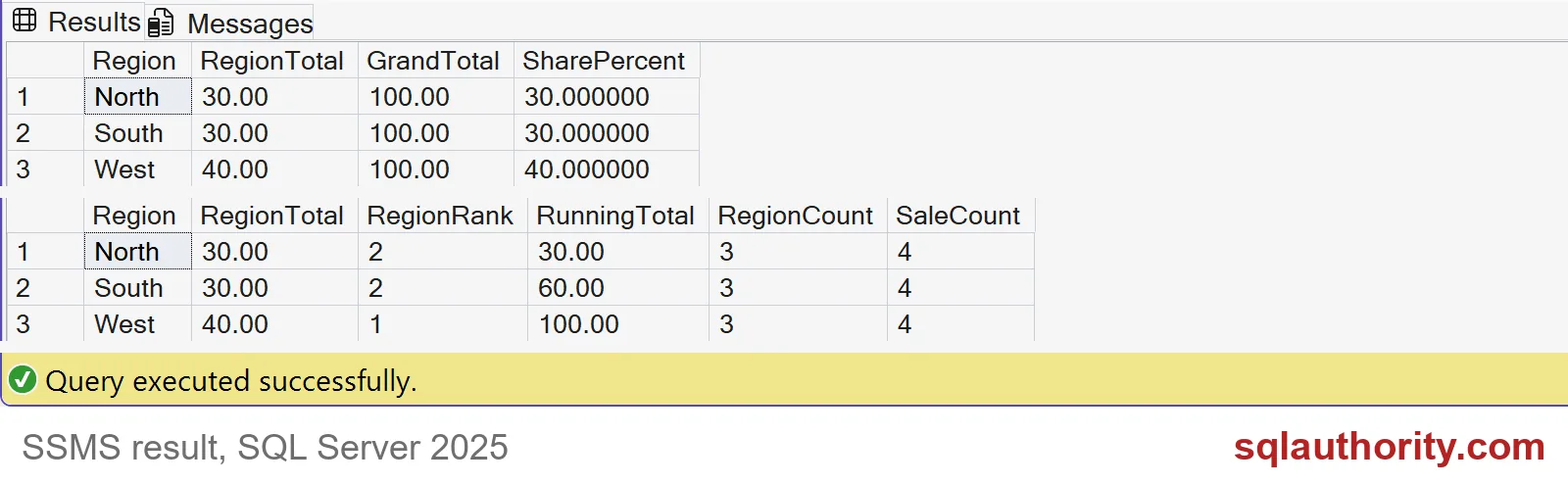
West ranks first. North and South tie for second. The running totals are 30, 60 and 100. RegionCount is 3, because COUNT(*) now counts grouped rows. SaleCount is 4, because it sums the group counts. Same function, different phase.
Put the filter where the question is
Where you filter changes the denominator. HAVING removes groups before the window runs, so the grand total shrinks. A filter in an outer query runs after, so the grand total stays at 100. Both are legal. They answer different questions, so pick on purpose.
SELECT Region, SUM(Amount) AS RegionTotal,
       100.0 * SUM(Amount) / SUM(SUM(Amount)) OVER () AS ShareOfShown
FROM #RegionalSales
GROUP BY Region
HAVING SUM(Amount) >= 40;

WITH g AS (
    SELECT Region, SUM(Amount) AS RegionTotal,
           100.0 * SUM(Amount) / SUM(SUM(Amount)) OVER () AS ShareOfAll
    FROM #RegionalSales
    GROUP BY Region)
SELECT Region, RegionTotal, ShareOfAll
FROM g
WHERE Region = 'West';
The first query says West holds 100 percent, because it is the only group left. The second says West holds 40 percent of all sales. If a report hides small regions but should still show true shares, use the second shape. One more warning: do not average regional averages, because groups with more rows deserve more weight.
DROP TABLE IF EXISTS #RegionalSales;When the expression gets crowded, name the grouped result with a CTE and read it in two steps.
SUM of SUM is not a trick, it is a window over grouped rows.
Published by Pinal Dave on SQLAuthority. More of my work at pinaldave.com.
Discover more from SQL Authority with Pinal Dave
Subscribe to get the latest posts sent to your email.