
Structured, Semi-Structured and Unstructured Data are the three shapes data can take. The shape decides how you store it, who defines its layout, and how you ask questions of it. Once you can name the shape in front of you, many design choices get easier.

Why the Shape Matters
Big data talk usually starts with size and speed. Variety matters as much. Data arrives from order systems, mobile apps, sensors, support emails and cameras, and they don’t agree on a layout.
A database can only help with data it understands. So the first question about any new source is simple. Does the data come with a layout, and who wrote it down?
Structured Data: The Table
Structured data fits rows and columns. Every row has the same columns, and every column has a type. An orders table with an order number, a date and a total is the classic case.
The schema, which is the description of those columns and types, is fixed before the data loads. The database refuses a text value in a money column. In return you get fast queries, joins and trust in the numbers. That’s the cost: change. A new column needs an ALTER TABLE and a plan.
Semi-Structured Data: The Document
Semi-structured data carries its own labels. JSON is the common example. Each value sits beside the name of its key, and values can nest or repeat. One order can hold a customer, a city and a list of juices, all in one document.
The schema travels with the data. Two documents in the same table or collection can have different keys. A coupon code appears only where one was used. That’s why apps and APIs love JSON. The risk is that nothing stops a typo in a key name. A key called city in one document and town in another will both load without complaint.
Unstructured Data: Text, Images and Audio
Unstructured data has no schema. A typed review, a photo of a receipt, a recorded phone call and a PDF are all unstructured. They have meaning, but the meaning sits inside the content, not in labeled fields. A log line sits in between. It has a time stamp and a level, then free text.
To query it, you first extract something. Free text can be searched with patterns. An image or an audio file needs a model that turns it into text or tags. A model can also turn it into a vector for similarity search. SQL Server 2025 has a vector data type for that.
A common design keeps the file in object storage and keeps its path and the extracted facts in a table.
The Three Shapes Side by Side
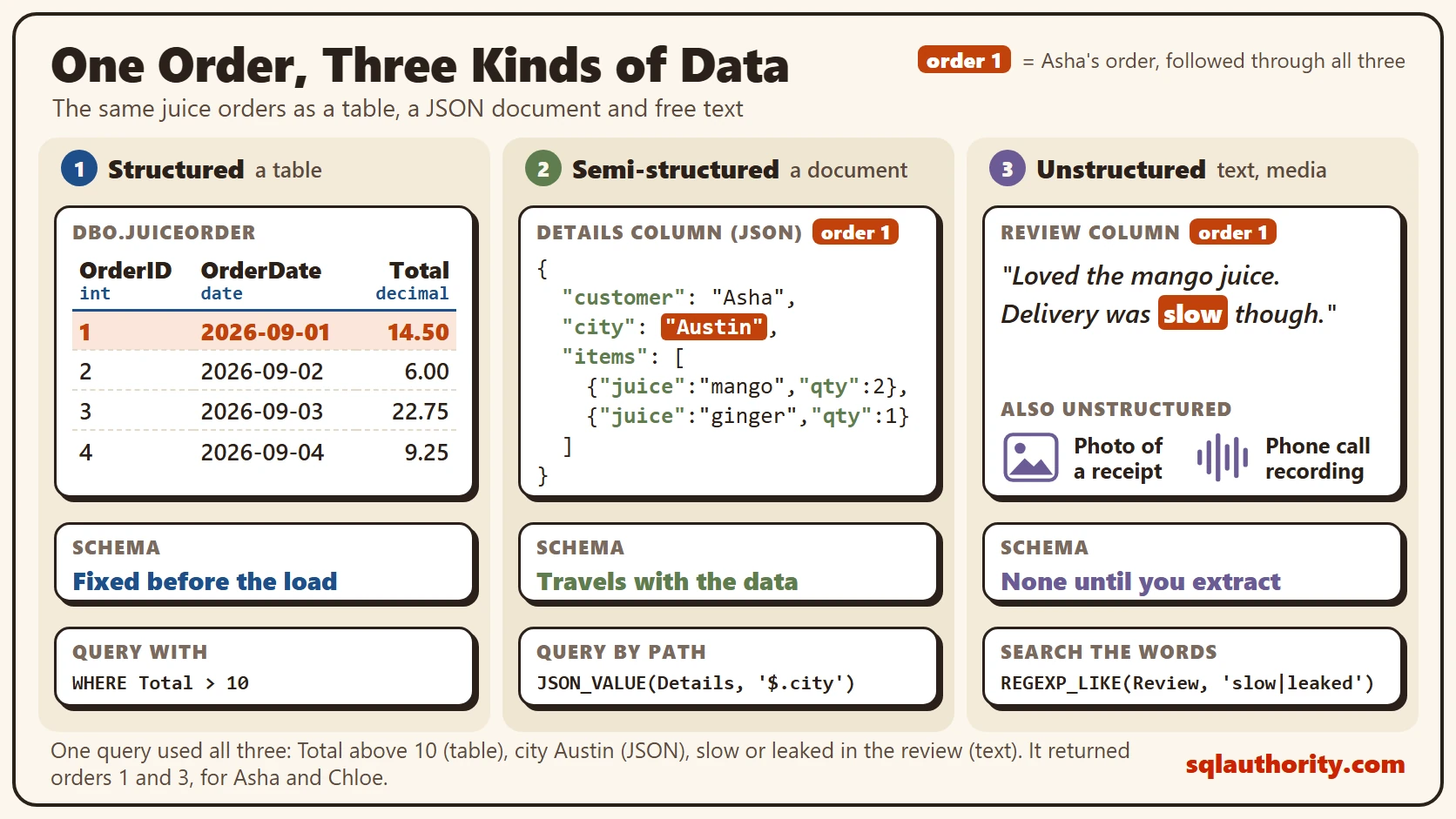
The picture below compares Structured, Semi-Structured and Unstructured Data with the same juice orders as the demo further down. On the left is a typed table. Its schema is fixed before the load, and you query it with plain SQL. In the middle is one JSON document with a customer, a city and a nested list of juices. Its schema travels with the data, and you query it by path. On the right are free text, an image and audio. There’s no schema, so you extract first and query after.
All Three in One Query
You can try this on a test server. The script creates a small database called SqlBigDataShapes, used only here. One table holds all three shapes. It has typed columns, a json column and a free text review. SQL Server 2025 supports the json data type.
IF DB_ID(N'SqlBigDataShapes') IS NULL CREATE DATABASE SqlBigDataShapes;
GO
USE SqlBigDataShapes;
GO
DROP TABLE IF EXISTS dbo.JuiceOrder;
CREATE TABLE dbo.JuiceOrder
(
    OrderID int NOT NULL PRIMARY KEY,
    OrderDate date NOT NULL,
    Total decimal(8,2) NOT NULL,
    Details json NOT NULL,
    Review nvarchar(400) NULL
);
INSERT INTO dbo.JuiceOrder (OrderID, OrderDate, Total, Details, Review)
VALUES
(1, '2026-09-01', 14.50, N'{"customer":"Asha","city":"Austin","items":[{"juice":"mango","qty":2},{"juice":"ginger","qty":1}]}', N'Loved the mango juice. Delivery was slow though.'),
(2, '2026-09-02', 6.00, N'{"customer":"Ben","city":"Denver","items":[{"juice":"carrot","qty":1}],"note":"no ice"}', N'Fresh and cold. Will order again.'),
(3, '2026-09-03', 22.75, N'{"customer":"Chloe","city":"Austin","items":[{"juice":"mango","qty":3},{"juice":"beet","qty":2}]}', N'The beet juice was too sweet and the cup leaked.'),
(4, '2026-09-04', 9.25, N'{"customer":"Dev","city":"Boston","items":[{"juice":"ginger","qty":2}],"coupon":"FALL5"}', NULL);
The json column isn’t a free-for-all. SQL Server checks that the text is valid JSON when it arrives. A broken document is refused with error 13609, which says the JSON text is not properly formatted.
INSERT INTO dbo.JuiceOrder (OrderID, OrderDate, Total, Details)
VALUES (5, '2026-09-05', 7.00, N'{"customer":"Eli",');
The syntax is checked, but the key names are still your business. Start with the structured part. A normal filter on typed columns returns orders 1 and 3, the two totals above 10.
SELECT OrderID, OrderDate, Total
FROM dbo.JuiceOrder
WHERE Total > 10
ORDER BY OrderID;
| OrderID | OrderDate | Total |
|---|---|---|
| 1 | 2026-09-01 | 14.50 |
| 3 | 2026-09-03 | 22.75 |
Next, the document. JSON_VALUE reads a value by its path. OPENJSON turns the items list into rows, one per juice. A key that is missing, such as note, comes back as NULL instead of an error.
SELECT OrderID, JSON_VALUE(Details, '$.customer') AS Customer, JSON_VALUE(Details, '$.note') AS Note
FROM dbo.JuiceOrder
ORDER BY OrderID;

SELECT o.OrderID, i.juice, i.qty
FROM dbo.JuiceOrder AS o
CROSS APPLY OPENJSON(o.Details, '$.items') WITH (juice nvarchar(30) '$.juice', qty int '$.qty') AS i
ORDER BY o.OrderID, i.juice;
Only order 2 has a note, so the first query shows no ice once and NULL three times. The second query turns six list entries into six rows. Orders 1 and 3 give two rows each, and orders 2 and 4 give one each.
Last comes the free text. A pattern search finds the reviews with a complaint. It’s the weakest tool of the three, because it matches words and not meaning. Two details trip people up. REGEXP_LIKE matches case by default, so add the i flag as a third argument to ignore case. It also needs database compatibility level 170, which a new database on SQL Server 2025 gets by default.
This final query uses all three shapes at once. It wants totals above 10 dollars (typed), placed in Austin (JSON), with a complaint in the review (text).
SELECT o.OrderID, JSON_VALUE(o.Details, '$.customer') AS Customer, o.Total, JSON_VALUE(o.Details, '$.city') AS City, o.Review
FROM dbo.JuiceOrder AS o
WHERE o.Total > 10
  AND JSON_VALUE(o.Details, '$.city') = N'Austin'
  AND REGEXP_LIKE(o.Review, N'slow|leaked')
ORDER BY o.OrderID;

It returned orders 1 and 3, for Asha and for Chloe. On this tiny sample each test alone would return the same two rows. On real tables the three tests cut the rows down together, and one engine runs them in one query.
Is This Too Neat?
The case against the labels for Structured, Semi-Structured and Unstructured Data is that real data mixes them. A JSON order holds a free text note, and a table can hold a json column, as the demo shows. That’s fair. The labels describe the dominant shape, not a strict class.
They still earn their place, because they point at the work. Structured data needs a design up front. Semi-structured data needs agreement on key names. Unstructured data needs an extraction step before anyone can count anything.
What to Remember
With Structured, Semi-Structured and Unstructured Data, ask where the schema lives. In a table it’s fixed before the load. In a document it travels with the data. In free text, images and audio it doesn’t exist until you extract it.
Ask which shape each source has and who owns its keys. A source with no owner fills up with typos. When you finish testing, remove the example database.
USE master;
GO
ALTER DATABASE SqlBigDataShapes SET SINGLE_USER WITH ROLLBACK IMMEDIATE;
DROP DATABASE SqlBigDataShapes;
Data is not either structured or unstructured, it is a spectrum, and the schema decides where you pay for it.
Published by Pinal Dave on SQLAuthority. More of my work at pinaldave.com.
Discover more from SQL Authority with Pinal Dave
Subscribe to get the latest posts sent to your email.



4 Comments. Leave new
Great article. But how are scientific data stored now, do they follow relational database model and having trouble, which leads to the discussion on ‘Big Data’ ?
you have make ‘Big Data’ to small & sweet blog post,
can you write same about ‘NoSQL’ in short & sweet
I liked the part where you listed the examples of Big Data. Thanks for the article..
How Microsoft is planning to accomodate big data? Are we going to have some different kind of SSMS or a next gen of query engine is gonna be launched? How do we prepare ourselves to cope with Big Data on Microsoft platform?