Gapless invoice numbers need the counter update and the invoice insert in one transaction. Then a rollback gives the number back, and a committed invoice keeps its number for good. Add one counter per year, and the numbering restarts on its own.

Why finance cares about gaps
Imagine the finance team asks, “Where is invoice 1042?” You open the table. It has 1041 and 1043. Someone now has to explain a missing number, and that is never a fun meeting.
Many businesses want invoice numbers with no holes and a fresh start each January. An IDENTITY column cannot do that, and I will show you why in a minute. A small counter table can.
Keep the last issued number in a counter table
The counter table has one row per year and stores the last number issued. The invoice table uses year plus number as its key, so number 1 can exist in 2026 and in 2027. You set up each year’s row before that year starts. The demo creates two small tables and drops them at the end.
DROP TABLE IF EXISTS dbo.AnnualInvoices;
DROP TABLE IF EXISTS dbo.AnnualCounter;

CREATE TABLE dbo.AnnualCounter (
    InvoiceYear int PRIMARY KEY,
    LastIssued  int NOT NULL CHECK (LastIssued >= 0));

CREATE TABLE dbo.AnnualInvoices (
    InvoiceYear int,
    InvoiceNo   int,
    Amount      decimal(12,2) NOT NULL,
    PRIMARY KEY (InvoiceYear, InvoiceNo));

INSERT dbo.AnnualCounter VALUES (2026, 0), (2027, 0);
Issue inside one short transaction
The recipe has three steps. Add one to the counter, insert the invoice with that number, then commit. The UPDATE locks the year’s counter row until the transaction ends. So a second session asking for a number waits its turn.
The block below issues invoice 1 and commits it. Then it starts invoice 2 and rolls it back, as if something failed halfway. Watch what the tables hold afterward.
SET XACT_ABORT ON;
DECLARE @n int;
BEGIN TRY
    BEGIN TRAN;
    UPDATE dbo.AnnualCounter WITH (UPDLOCK, HOLDLOCK)
    SET @n = LastIssued = LastIssued + 1 WHERE InvoiceYear = 2026;
    INSERT dbo.AnnualInvoices VALUES (2026, @n, 25.00);
    COMMIT;

    BEGIN TRAN;
    UPDATE dbo.AnnualCounter WITH (UPDLOCK, HOLDLOCK)
    SET @n = LastIssued = LastIssued + 1 WHERE InvoiceYear = 2026;
    INSERT dbo.AnnualInvoices VALUES (2026, @n, 50.00);
    ROLLBACK;
END TRY
BEGIN CATCH
    IF XACT_STATE() <> 0 ROLLBACK;
    THROW;
END CATCH;

SELECT InvoiceYear, LastIssued FROM dbo.AnnualCounter ORDER BY InvoiceYear;
SELECT InvoiceYear, InvoiceNo, Amount FROM dbo.AnnualInvoices ORDER BY InvoiceYear, InvoiceNo;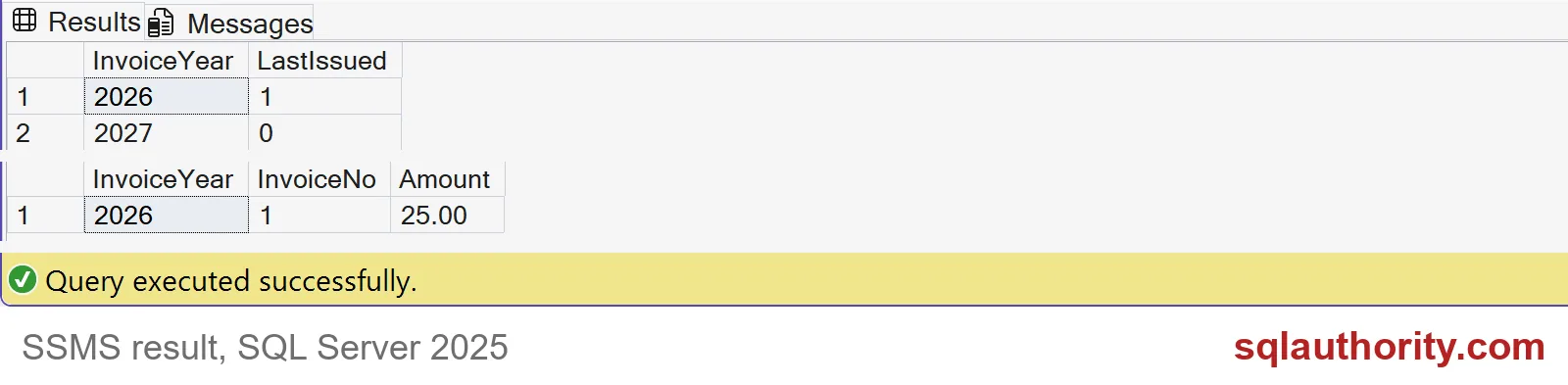
The 2026 counter says 1, and only invoice 1 exists. The rolled-back number went back into the counter, so the next invoice will be 2 and there is no hole. The 2027 counter is still 0.

Wrap it in a procedure and cross into a new year
Nobody should paste that logic into every application. Put it in one procedure, and keep the transaction short. Do not render a PDF or send an email inside it, because every other issuer for that year waits behind you.
CREATE OR ALTER PROCEDURE dbo.IssueInvoice
    @Year int, @Amount decimal(12,2), @InvoiceNo int OUTPUT
AS
BEGIN
    SET NOCOUNT ON;
    SET XACT_ABORT ON;
    BEGIN TRAN;
    UPDATE dbo.AnnualCounter WITH (UPDLOCK, HOLDLOCK)
    SET @InvoiceNo = LastIssued = LastIssued + 1 WHERE InvoiceYear = @Year;
    IF @@ROWCOUNT <> 1
    BEGIN
        ROLLBACK;
        THROW 50000, N'That invoice year is not set up.', 1;
    END;
    INSERT dbo.AnnualInvoices VALUES (@Year, @InvoiceNo, @Amount);
    COMMIT;
END;
Now issue three invoices, mixing the years. Each year counts on its own. A year nobody prepared fails loudly instead of inventing a number.
DECLARE @no int;
EXEC dbo.IssueInvoice 2027, 100.00, @no OUTPUT;
EXEC dbo.IssueInvoice 2026, 40.00, @no OUTPUT;
EXEC dbo.IssueInvoice 2027, 60.00, @no OUTPUT;

SELECT InvoiceYear, InvoiceNo, Amount FROM dbo.AnnualInvoices ORDER BY InvoiceYear, InvoiceNo;

BEGIN TRY
    EXEC dbo.IssueInvoice 2028, 10.00, @no OUTPUT;
END TRY
BEGIN CATCH
    SELECT ERROR_NUMBER() AS error_number, ERROR_MESSAGE() AS error_message;
END CATCH;
Year 2026 now has numbers 1 and 2. Year 2027 starts at 1 and reaches 2. The request for 2028 fails with error 50000, because no counter row exists for it.
Why IDENTITY leaves holes
Here is the same rollback with an IDENTITY column. SQL Server hands out the next value and never takes it back, even when the insert rolls back. A sequence object behaves the same way.
DROP TABLE IF EXISTS #IdentityInvoices;
CREATE TABLE #IdentityInvoices (InvoiceNo int IDENTITY(1,1) PRIMARY KEY, Amount decimal(12,2));

INSERT #IdentityInvoices (Amount) VALUES (10.00);
BEGIN TRAN;
INSERT #IdentityInvoices (Amount) VALUES (20.00);
ROLLBACK;
INSERT #IdentityInvoices (Amount) VALUES (30.00);

SELECT InvoiceNo, Amount FROM #IdentityInvoices ORDER BY InvoiceNo;
The result has invoice 1 and invoice 3. Number 2 is gone for good. That is the hole finance will ask about. Two last rules. If an invoice must be cancelled after commit, keep it and mark it void, never delete it and reuse the number. And pick the year in your agreed business time zone.
This is a database allocation design, not tax advice. Check your local invoicing rules.
DROP TABLE IF EXISTS #IdentityInvoices;
DROP PROCEDURE IF EXISTS dbo.IssueInvoice;
DROP TABLE IF EXISTS dbo.AnnualInvoices;
DROP TABLE IF EXISTS dbo.AnnualCounter;
Decide what counts as issued before you design the number.
A gapless number is not a generated value, it is a short, serialized transaction.
Published by Pinal Dave on SQLAuthority. More of my work at pinaldave.com.
Discover more from SQL Authority with Pinal Dave
Subscribe to get the latest posts sent to your email.