
To count rows and indexes for every table in a database, one query on the catalog views is enough. It answers four questions at once. How many tables are there, and which are heaps? How many nonclustered indexes does each have, and how many rows?

Four Questions, One Result
These questions come up in most performance reviews. A table without a clustered index is a heap, and heaps behave differently. A table with seven nonclustered indexes costs more to write than a table with one. A table with no rows can be dead weight. A table with millions of rows deserves more attention than the rest. You want all four answers in one grid.
First, a small database to run it on. The script creates IndexCountDemo with four tables that cover each case. Customers has a clustered primary key, a unique constraint on the email address and an index on the city. OrderLines is a heap with one nonclustered index. Products has only its primary key. OrderArchive is an empty heap with no index at all.
IF DB_ID(N'IndexCountDemo') IS NULL CREATE DATABASE IndexCountDemo;
GO
USE IndexCountDemo;
GO
DROP TABLE IF EXISTS dbo.Customers, dbo.OrderLines, dbo.Products, dbo.OrderArchive;
CREATE TABLE dbo.Customers (CustomerID int NOT NULL PRIMARY KEY, Email nvarchar(80) NOT NULL UNIQUE, City nvarchar(40) NOT NULL);
CREATE INDEX IX_Customers_City ON dbo.Customers (City);
CREATE TABLE dbo.Products (ProductID int NOT NULL PRIMARY KEY, ProductName nvarchar(60) NOT NULL);
CREATE TABLE dbo.OrderLines (OrderLineID int NOT NULL, ProductID int NOT NULL, Quantity int NOT NULL);
CREATE INDEX IX_OrderLines_ProductID ON dbo.OrderLines (ProductID);
CREATE TABLE dbo.OrderArchive (OrderLineID int NOT NULL, ArchivedOn date NOT NULL);
INSERT INTO dbo.Customers (CustomerID, Email, City)
SELECT TOP (1000) n, CONCAT(N'customer', n, N'@example.com'), CASE n % 4 WHEN 0 THEN N'Austin' WHEN 1 THEN N'Denver' WHEN 2 THEN N'Boston' ELSE N'Portland' END
FROM (SELECT ROW_NUMBER() OVER (ORDER BY (SELECT NULL)) AS n FROM sys.all_objects AS a CROSS JOIN sys.all_objects AS b) AS nums;
INSERT INTO dbo.Products (ProductID, ProductName)
SELECT TOP (40) n, CONCAT(N'Product ', n)
FROM (SELECT ROW_NUMBER() OVER (ORDER BY (SELECT NULL)) AS n FROM sys.all_objects) AS nums;
INSERT INTO dbo.OrderLines (OrderLineID, ProductID, Quantity)
SELECT TOP (5000) n, n % 40 + 1, n % 7 + 1
FROM (SELECT ROW_NUMBER() OVER (ORDER BY (SELECT NULL)) AS n FROM sys.all_objects AS a CROSS JOIN sys.all_objects AS b) AS nums;
The Query
To count rows and indexes for every table, the query starts from sys.tables. Every user table appears once, with or without indexes. Three small subqueries then answer the questions. The first looks for a clustered index, row store or columnstore. It calls the table a heap if it finds none. The second counts the nonclustered indexes. The third adds up the rows.
SELECT sch.name AS SchemaName,
       tbl.name AS TableName,
       CASE WHEN EXISTS (SELECT 1 FROM sys.indexes AS c WHERE c.object_id = tbl.object_id AND c.type IN (1, 5))
            THEN N'Clustered index' ELSE N'Heap' END AS Structure,
       (SELECT COUNT(*) FROM sys.indexes AS n
        WHERE n.object_id = tbl.object_id AND n.type = 2 AND n.is_hypothetical = 0) AS NonclusteredIndexes,
       (SELECT SUM(ps.row_count) FROM sys.dm_db_partition_stats AS ps
        WHERE ps.object_id = tbl.object_id AND ps.index_id IN (0, 1)) AS TableRows
FROM sys.tables AS tbl
JOIN sys.schemas AS sch ON sch.schema_id = tbl.schema_id
WHERE tbl.is_ms_shipped = 0
ORDER BY sch.name, tbl.name;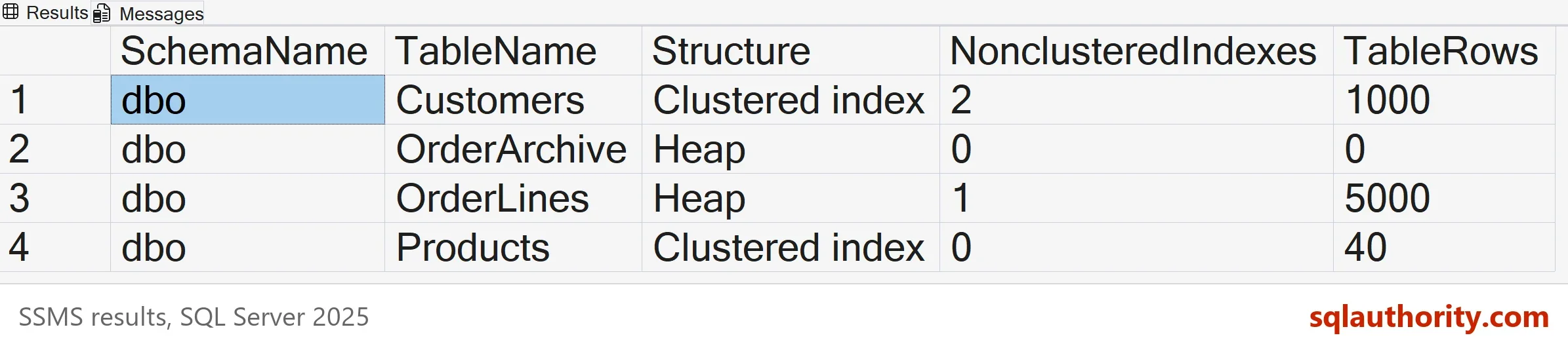
Read the grid from the top. Customers shows two nonclustered indexes, and only one of them is the index we named. The other is the unique constraint on the email address, which SQL Server builds as a nonclustered index. Products has none, because its primary key is the clustered index. OrderLines is a heap with 5,000 rows and one nonclustered index.
Where the Row Count Comes From
The row count doesn’t scan the table. It reads sys.dm_db_partition_stats, which keeps a row count for every partition of every index. The heap or clustered index holds all the rows of the table. So the query adds up index 0 or 1 across the partitions. That makes it fast, even on a table with hundreds of millions of rows.
The number comes from metadata, so treat it as the engine’s own count. Expect it to lag a little on a table that is changing under load. The DMV needs VIEW DATABASE STATE, or VIEW DATABASE PERFORMANCE STATE on SQL Server 2022 and later. When you need an exact figure for a report, run COUNT(*). The same applies when you need rows that match a condition, such as one status value. Metadata can’t answer that, and only a query against the table can.
Why Only Type 2
The query counts indexes with type 2, which means nonclustered. A common mistake is to count every row in sys.indexes for the table. That count includes the clustered index or the heap row. Each table then looks as if it has one more index than it does. Another mistake is to confuse indexes with statistics. Statistics live in sys.stats, and this query doesn’t touch them.
The filter on is_hypothetical leaves out indexes that a tuning tool created for what-if analysis. Queries can’t use them. XML, spatial and nonclustered columnstore indexes have other type values, so they don’t appear in the count. A clustered columnstore index counts as the clustered structure, so that table is not a heap. Add a column for them if your database uses them.
What the Grid Tells You
A heap with many rows and several nonclustered indexes is the first thing I check. OrderLines is a small version of that. Adding a clustered index can change how every query against it reads. You could argue that a heap is fine. For a staging table that is loaded and emptied each night, it is. For a table that queries read all day, the missing clustered index is a decision somebody should make on purpose.
The index count matters for a different reason. Every insert and delete changes every index of the table. An update changes only the indexes that contain a column it changed. So a table with seven indexes that is mostly inserted into pays seven times for each new row. Compare the index count with how the table is used before you add another.
What to Remember
To count rows and indexes, start from sys.tables. Count type 2 indexes, and sum the rows of the heap or clustered index. Run the query in each database you care about, because the catalog views belong to one database at a time. Save it with your other health checks, and read it after every big deployment. When you finish with the demo, run the cleanup script.
USE master;
GO
ALTER DATABASE IndexCountDemo SET SINGLE_USER WITH ROLLBACK IMMEDIATE;
DROP DATABASE IndexCountDemo;
A table is not only its rows, it is its rows plus every index that must follow them.
Published by Pinal Dave on SQLAuthority. More of my work at pinaldave.com.
Discover more from SQL Authority with Pinal Dave
Subscribe to get the latest posts sent to your email.




12 Comments. Leave new
Very informative….
what is meant by logical sorting and physical sorting of data in terms of index..
This script returns only details of tables which do not have any non-clustered indexes.
Script should be:
SELECT [schema_name] = s.name, table_name = o.name,
MAX(i1.type_desc) ClusteredIndexorHeap,
COUNT(i.TYPE) NoOfNonClusteredIndex, p.rows
FROM sys.indexes i
RIGHT JOIN sys.objects o ON i.[object_id] = o.[object_id] AND i.TYPE=2
INNER JOIN sys.schemas s ON o.[schema_id] = s.[schema_id]
LEFT JOIN sys.partitions p ON p.OBJECT_ID = o.OBJECT_ID AND p.index_id IN (0,1)
LEFT JOIN sys.indexes i1 ON o.OBJECT_ID = i1.OBJECT_ID AND i1.TYPE IN (0,1)
WHERE o.TYPE IN (‘U’)
GROUP BY s.name, o.name, p.rows
ORDER BY schema_name, table_name
Harsh,
I do not know how did I miss that. :-) Fixed!
One more change required in your script.
Joining Criteria of i1 should have o.OBJECT_ID in place of i.OBJECT_ID
Fixed. You have a big High Five from me!
The video is available anymore, can you send it again ?
I think rather than the toal number of non clustered indexes, it returns the total number of statistics on that table !
Hi sir , can you please help me on below requirement
I had two servers
server 1 ——-SSIS Package is present
server 2—– EXe location
I had SSIS Package in server 1 , at one step am calling the exe present in server 2 and passing arguments and working directory to server 2
when i execute the package the package should execute in Server 1, but when it trigger to exe the exe should execute in server 2 not in server 1
can any one help me on these i can use dotnet also
thanks in advance
The count of nonclustered index is actually returning total count of index type which includes Heap, clustered, non clustered.
SELECT
[schema_name] = s.name
,table_name = o.name
,MAX(i1.type_desc) ClusteredIndexorHeap
,MAX(COALESCE(i2.NCIC,0)) NoOfNonClusteredIndex
,p.rows
FROM sys.indexes i
RIGHT JOIN sys.objects o
ON i.[object_id] = o.[object_id]
INNER JOIN sys.schemas s
ON o.[schema_id] = s.[schema_id]
LEFT JOIN sys.partitions p
ON p.OBJECT_ID = o.OBJECT_ID AND p.index_id IN (0,1)
LEFT JOIN sys.indexes i1
ON i.OBJECT_ID = i1.OBJECT_ID AND i1.TYPE IN (0,1)
LEFT JOIN (
SELECT object_id,COUNT(Index_id) NCIC
FROM sys.indexes
where type = 2
GROUP BY object_id) I2
ON i.OBJECT_ID = i2.OBJECT_ID
WHERE o.TYPE IN (‘U’)
GROUP BY s.name, o.name, p.rows
ORDER BY schema_name, table_name
Now the column of NoOfNonClusteredIndexes will return count of non clustered indexes only.
The query may be further optimized.
Yes, In modified script, type=2 portion is missing from right join , this change will be enough to get count of non-clustered indexes
Is there any possibility to get the row count based on table column values as parameter.
example
SELECT *
FROM bigTransactionHistory
where column1 = ‘ ‘
Joing with your query??
It seems we also need to add 1 more parameter here ie ‘is_hypothetical=0’
SELECT [schema_name] = s.name, table_name = o.name,
MAX(i1.type_desc) ClusteredIndexorHeap,
MAX(COALESCE(i2.NCIC,0)) NoOfNonClusteredIndex,
p.rows
FROM sys.indexes i
RIGHT JOIN sys.objects o ON i.[object_id] = o.[object_id]
INNER JOIN sys.schemas s ON o.[schema_id] = s.[schema_id]
LEFT JOIN sys.partitions p ON p.OBJECT_ID = o.OBJECT_ID AND p.index_id IN (0,1)
LEFT JOIN sys.indexes i1 ON i.OBJECT_ID = i1.OBJECT_ID AND i1.TYPE IN (0,1)
LEFT JOIN (SELECT object_id,COUNT(Index_id) NCIC
FROM sys.indexes
WHERE type = 2 and is_hypothetical=0
GROUP BY object_id) I2
ON i.OBJECT_ID = i2.OBJECT_ID
WHERE o.TYPE IN (‘U’)
–and i.is_hypothetical=0
GROUP BY s.name, o.name, p.rows
ORDER BY 4 desc
–ORDER BY schema_name, table_name