Updatable views work when SQL Server can trace every column you write back to one base table. The view is only a doorway. The rules of the room behind it still apply.

A view you can write through
A developer once told me, “I only let the app touch the view, so the table is safe.” That sentence is half true. Writes through a view land in the table, and a few of them land somewhere you did not expect.
Let me build a small demo. The table has an Active column with a default of 1. The first view hides that column. The second view shows only active rows and adds WITH CHECK OPTION. The demo creates three objects in the current database and removes them at the end.
DROP VIEW IF EXISTS dbo.ActiveView;
DROP VIEW IF EXISTS dbo.LabelView;
DROP TABLE IF EXISTS dbo.LabelDemo;
GO
CREATE TABLE dbo.LabelDemo (
    Id     int PRIMARY KEY,
    Label  nvarchar(30),
    Active bit NOT NULL DEFAULT 1);
GO
CREATE VIEW dbo.LabelView AS
SELECT Id, Label FROM dbo.LabelDemo;
GO
CREATE VIEW dbo.ActiveView AS
SELECT Id, Label, Active
FROM dbo.LabelDemo
WHERE Active = 1
WITH CHECK OPTION;
Insert and update through the view
Now write through LabelView, which has no Active column. Notice that the insert does not mention it. SQL Server fills it from the default, so the stored row ends up with Active equal to 1. The update changes the label in the base table.
After that comes the interesting part. I try to flip Active to 0 through ActiveView. That would push the row outside the view’s own filter, and CHECK OPTION says no.
INSERT dbo.LabelView (Id, Label) VALUES (1, N'First');
UPDATE dbo.LabelView SET Label = N'Changed' WHERE Id = 1;

SELECT Id, Label, Active FROM dbo.LabelDemo ORDER BY Id;

BEGIN TRY
    UPDATE dbo.ActiveView SET Active = 0 WHERE Id = 1;
END TRY
BEGIN CATCH
    SELECT ERROR_NUMBER() AS ViewErrorNumber, ERROR_MESSAGE() AS ViewErrorMessage;
END CATCH;

SELECT Id, Label, Active FROM dbo.ActiveView ORDER BY Id;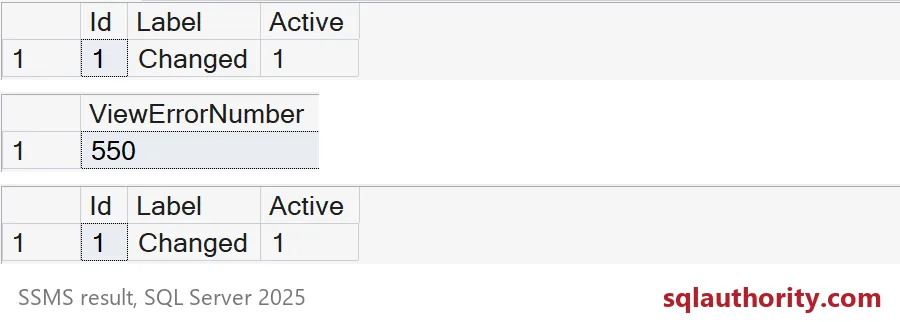
The first grid shows the base table with Label Changed and Active 1. The second shows error 550. The third shows the row is still in the filtered view. The update was rolled back as a whole, so nothing was half done. The screenshot crops the long message column, but the code returns it too.
What happens without CHECK OPTION
Here is the mistake I see most. Someone builds a filtered view and forgets the check option. Then an update that breaks the filter succeeds. The row quietly leaves the view, and the user says the data vanished.
Nothing vanished. The row is still in the table with Active equal to 0. It just does not qualify for the view anymore. The last statement puts the row back so the next demo starts clean.
CREATE VIEW dbo.ActiveNoCheck AS
SELECT Id, Label, Active
FROM dbo.LabelDemo
WHERE Active = 1;
GO
UPDATE dbo.ActiveNoCheck SET Active = 0 WHERE Id = 1;

SELECT Id, Label, Active FROM dbo.ActiveNoCheck ORDER BY Id;
SELECT Id, Label, Active FROM dbo.LabelDemo ORDER BY Id;

UPDATE dbo.LabelDemo SET Active = 1 WHERE Id = 1;
The first query returns no rows, the second returns the row with Active 0. That is the whole reason I add WITH CHECK OPTION to any view that filters and accepts writes.

When the view cannot be written to
A column that comes from a calculation or an aggregate has no single base cell behind it. SQL Server cannot know which cell you mean. So a grouped view refuses the write with error 4406, which names a derived field. I run the update through EXEC so the CATCH block can show you the message.
CREATE VIEW dbo.LabelCount AS
SELECT Label, COUNT(*) AS Total
FROM dbo.LabelDemo
GROUP BY Label;
GO
BEGIN TRY
    EXEC (N'UPDATE dbo.LabelCount SET Total = 5 WHERE Label = N''Changed'';');
END TRY
BEGIN CATCH
    SELECT ERROR_NUMBER() AS ErrorNumber, ERROR_MESSAGE() AS ErrorMessage;
END CATCH;
Joined views fall in between. Some writes work, as long as each statement touches columns from one base table. Test the exact INSERT, UPDATE and DELETE your application sends. Do not trust a rule of thumb.
If a write has to reach several tables, an INSTEAD OF trigger or a stored procedure is clearer. A trigger must then handle many rows and its own validation. Also remember that CHECK OPTION guards writes through its view only. Anyone with rights on the table can still write around it.
Clean up
DROP VIEW IF EXISTS dbo.LabelCount;
DROP VIEW IF EXISTS dbo.ActiveNoCheck;
DROP VIEW IF EXISTS dbo.ActiveView;
DROP VIEW IF EXISTS dbo.LabelView;
DROP TABLE IF EXISTS dbo.LabelDemo;
Try your own busiest view with one bad update, and see what it does.
A view is not a safe write path, it is a query with write rules.
Published by Pinal Dave on SQLAuthority. More of my work at pinaldave.com.
Discover more from SQL Authority with Pinal Dave
Subscribe to get the latest posts sent to your email.