Explicit identity values let you load rows with the keys they already have. You switch IDENTITY_INSERT on, insert the old keys, and switch it off again. Then you check where the counter stands, so the next normal insert does not collide.

Why keep the old keys at all
You are moving customers from an old system into a new table. Invoices, tickets and notes all point at customer 50. If the new table hands out fresh numbers, customer 50 becomes customer 7, and every invoice now points at the wrong person. Nobody wants that call.
So you keep the old keys. An identity column normally refuses that. Let me show the refusal first, on a small demo table.
DROP TABLE IF EXISTS dbo.ImportDemo;
CREATE TABLE dbo.ImportDemo (Id int IDENTITY(1,1) PRIMARY KEY, Label nvarchar(30));

BEGIN TRY
    INSERT dbo.ImportDemo (Id, Label) VALUES (50, N'Imported A');
END TRY
BEGIN CATCH
    SELECT ERROR_NUMBER() AS ErrorNumber, ERROR_MESSAGE() AS ErrorMessage;
END CATCH;
The insert fails with error 544. SQL Server owns the identity column, and it does not let you type into it by accident.
Switch it on, load, switch it off
IDENTITY_INSERT is a session setting for one table. Turn it on, insert with a column list that names the identity column, and turn it off right away. Then look at the state of the counter and do one normal insert.
SET IDENTITY_INSERT dbo.ImportDemo ON;
INSERT dbo.ImportDemo (Id, Label) VALUES (50, N'Imported A'), (60, N'Imported B');
SET IDENTITY_INSERT dbo.ImportDemo OFF;

SELECT IDENT_CURRENT(N'dbo.ImportDemo') AS CurrentIdentity, MAX(Id) AS MaximumStoredId
FROM dbo.ImportDemo;

INSERT dbo.ImportDemo (Label) VALUES (N'Normal insert');
SELECT Id, Label FROM dbo.ImportDemo ORDER BY Id;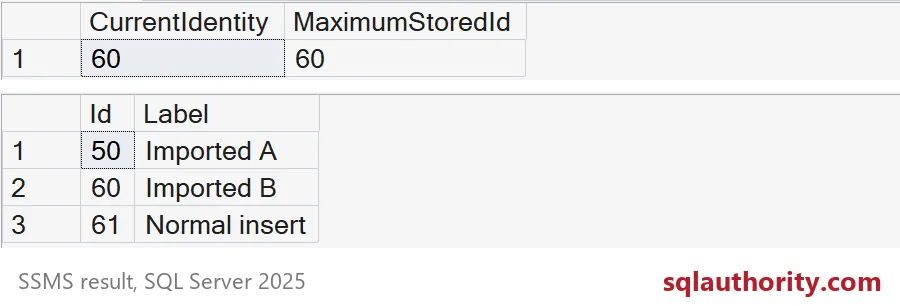
Read the two grids. After the load, the current identity is 60 and the highest stored Id is 60. SQL Server moved its counter up to the biggest key you loaded. So the normal insert that follows gets 61, not 1. That is what you want, because 1 to 49 are not used, but there is no collision with 50 or 60.
Check this on your own migration. Do one normal insert before you let the application back in.

The column list is required
People forget this one. With IDENTITY_INSERT on, you must name the columns. An insert without a column list fails, even if you supply every value.
SET IDENTITY_INSERT dbo.ImportDemo ON;
BEGIN TRY
    EXEC sys.sp_executesql N'INSERT dbo.ImportDemo VALUES (70, N''No column list'');';
END TRY
BEGIN CATCH
    SELECT ERROR_NUMBER() AS ErrorNumber, ERROR_MESSAGE() AS ErrorMessage;
END CATCH;
SET IDENTITY_INSERT dbo.ImportDemo OFF;
I run the bad insert through sp_executesql so the error can be caught and shown. The error is 8101, and the message says a column list is required. I like this rule. It stops a short insert from putting a value into the wrong column during a late-night migration. And the OFF at the end matters. Switch it off the moment the load ends, so a stray insert cannot slip a hand-typed key into the table.
The counter and the data can disagree
The generator and the stored maximum are two different numbers. Delete the newest row and you will see it.
DELETE dbo.ImportDemo WHERE Id = 61;

SELECT IDENT_CURRENT(N'dbo.ImportDemo') AS CurrentIdentity, MAX(Id) AS MaximumStoredId
FROM dbo.ImportDemo;
The current identity still says 61, while the highest stored Id is 60. The counter never goes backward by itself, so a gap appears. Gaps are normal and harmless. But in a migration you may want the counter to match the data. Check first. Reseeding below the highest key invites duplicate errors, so only reseed to the real maximum.
DECLARE @Max int = (SELECT MAX(Id) FROM dbo.ImportDemo);
DBCC CHECKIDENT (N'dbo.ImportDemo', RESEED, @Max);

INSERT dbo.ImportDemo (Label) VALUES (N'After reseed');
SELECT Id, Label FROM dbo.ImportDemo ORDER BY Id;
The reseeded counter hands out 61 again, because the table’s highest key is 60. The old 61 is gone, so nothing collides.
Keep the references honest
IDENTITY_INSERT does not bypass your primary key or foreign keys. Reconcile the source keys and the child rows before you let writers back in, and keep the mapping of what was loaded and what failed. A preserved key is only useful if the references still point at the right row. Clean up the demo table when you are done.
DROP TABLE IF EXISTS dbo.ImportDemo;Next time you load old keys, finish with one normal insert and a look at the counter.
Keeping old keys is not just copying data, it is a decision about the counter.
Published by Pinal Dave on SQLAuthority. More of my work at pinaldave.com.
Discover more from SQL Authority with Pinal Dave
Subscribe to get the latest posts sent to your email.