CHAR returns a character from a supported integer code, while unsuitable codes can produce NULL. I keep the input code beside the output. A blank-looking character and a missing character are different results.

Construct a character rather than print the code
The query supplies six explicit integer inputs. Codes sixty-five and ninety-seven are expected to construct A and a. Their output is a character, not the decimal digits of the supplied number.
Code thirty-two is expected to construct an ordinary space. The display expression surrounds it with square brackets. That makes the present blank character visible without changing the value sent to CHAR.
The bracketed column is a viewing aid. The byte-count and returned-code expressions inspect the constructed character itself. They do not include either bracket in the character measurement.
I include both letter cases because they share a readable identity but have different ordinary codes. The expected returned-code values preserve that distinction. A case-insensitive application comparison would answer another question.
WITH Codes AS
(
    SELECT CaseId,CodeValue
    FROM (VALUES (1,CAST(-1 AS int)),(2,32),(3,65),(4,97),(5,256),
        (6,CAST(NULL AS int))) AS v(CaseId,CodeValue)
)
SELECT CaseId,CodeValue,'['+CHAR(CodeValue)+']' AS CharacterVisible,
    DATALENGTH(CHAR(CodeValue)) AS CharacterBytes,
    ASCII(CHAR(CodeValue)) AS ReturnedCode
FROM Codes
ORDER BY CaseId;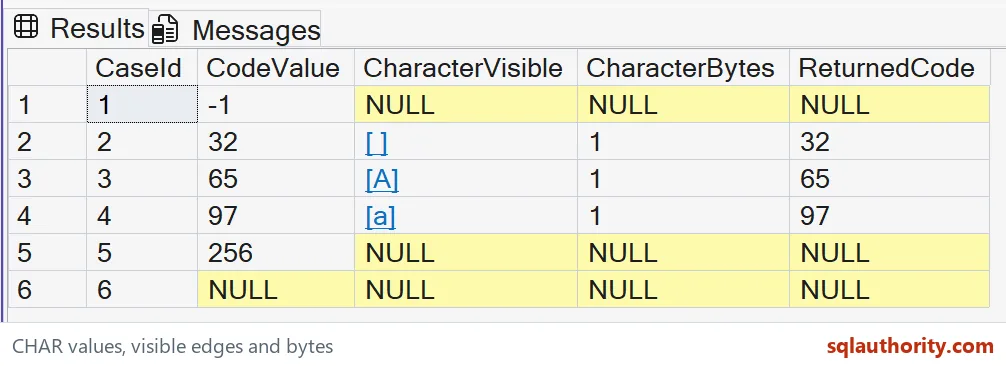
Keep the input range explicit
The input range is zero through 255. Negative one and 256 lie outside it. Their expected constructed values are NULL, along with their byte counts and returned codes.
The final row supplies a missing integer. Its expected outputs are also NULL. Keeping CodeValue visible separates an outside supplied number from an absent code.
Do not silently wrap a number into the permitted range. Changing 256 to zero would construct a different value under a different policy. This example leaves unsuitable inputs visible instead of inventing replacement characters.
A valid range alone does not guarantee a complete character in every encoding. Some codes can belong to multibyte sequences. CHAR can return NULL when the supplied code does not represent a complete character.

Measure the successful space as present data
The expected byte count is one for the space and both letters. The bracketed space displays as an opening bracket, one space and a closing bracket. It is not the same result as an empty string.
An empty string contains no character to construct. This example does not produce it as a replacement for invalid codes. A present single space remains a distinct source outcome.
The returned ASCII code is expected to be thirty-two for that blank character. This companion value explains what the client may visually hide. It also prevents a blank-looking cell from being mistaken for NULL.
I’d retain an explicit status when importing character codes into a real system. The constructor result alone may not explain why it is missing. Range validity and complete-character validity can require different rejection reasons.
Do not confuse database encoding with Unicode identity
CHAR follows the default database character set and encoding. It is not a general Unicode code-point constructor. A Unicode character outside its byte-code contract needs an appropriate Unicode operation instead.
These successful examples use ordinary ASCII subset characters. That makes the expected rows portable across common database encodings. No non-ASCII byte is assumed to represent the same glyph everywhere.
Applying a different collation to the completed character does not reconstruct it from a different original code. Construction has already occurred. Define the intended encoding before using a byte code as source data.
The query reads small made-up values and changes no settings. It avoids invisible control characters that would complicate grid display. A separate serialization test should define tabs, line endings or other control characters explicitly.
When adapting the example, preserve the code, visible display and returned code together. Include one present space, one ordinary letter and one invalid number. Those cases make three different outcomes inspectable without relying solely on a font.
Keep the code in sight, and a blank cell stops being a mystery.
A blank character is not missing data, it is a present value that deserves an explicit representation.
Published by Pinal Dave on SQLAuthority. More of my work at pinaldave.com.
Discover more from SQL Authority with Pinal Dave
Subscribe to get the latest posts sent to your email.