DATEDIFF counts boundaries, not elapsed time. It asks how many calendar markers you crossed between two values, such as midnight or New Year. It never asks whether a full day or a full year has passed.

One day apart, one year of service
Picture an HR report that says a new hire has “1 year of service.” The person started on December 31 and the report ran on January 1. One day. One year. The report is not lying. It is answering a different question from the one you asked.
DATEDIFF(year, …) counts how many times the year number changed. It does not check whether a whole year went by. The same trick works for days: 23:59:59.9999999 and 00:00:00 on the next day are a hundred nanoseconds apart, and DATEDIFF(day, …) still says 1.
Let me show four small questions in one run. The comments mark each one.
Ask which boundaries crossed
-- 1. Boundaries: one year marker, one midnight marker
SELECT DATEDIFF(year, CONVERT(date, '20251231'), CONVERT(date, '20260101')) AS YearBoundaries,
       DATEDIFF(day, CONVERT(datetime2, '2026-01-01T23:59:59.9999999'),
                     CONVERT(datetime2, '2026-01-02T00:00:00.0000000')) AS DayBoundaries;

-- 2. Completed years, using an anniversary rule
DECLARE @Start date = '20251231', @AsOf date = '20260101';
DECLARE @Years int = DATEDIFF(year, @Start, @AsOf);
SELECT @Years - CASE WHEN DATEADD(year, @Years, @Start) > @AsOf THEN 1 ELSE 0 END AS WholeYears;

-- 3. The same interval in seconds and in milliseconds
DECLARE @a datetime2 = '2026-01-01T10:00:00.250', @b datetime2 = '2026-01-01T10:01:02.750';
SELECT DATEDIFF(second, @a, @b) AS SecondBoundaries,
       DATEDIFF_BIG(millisecond, @a, @b) AS MillisecondBoundaries,
       CONVERT(decimal(20, 3), DATEDIFF_BIG(millisecond, @a, @b)) / 1000 AS SecondsAtMillisecondPrecision;

-- 4. Two calendar edges
SELECT DATEADD(year, 1, CONVERT(date, '20240229')) AS LeapDayAnniversary,
       DATEDIFF(day, CAST(NULL AS date), CONVERT(date, '20260101')) AS MissingEndpoint;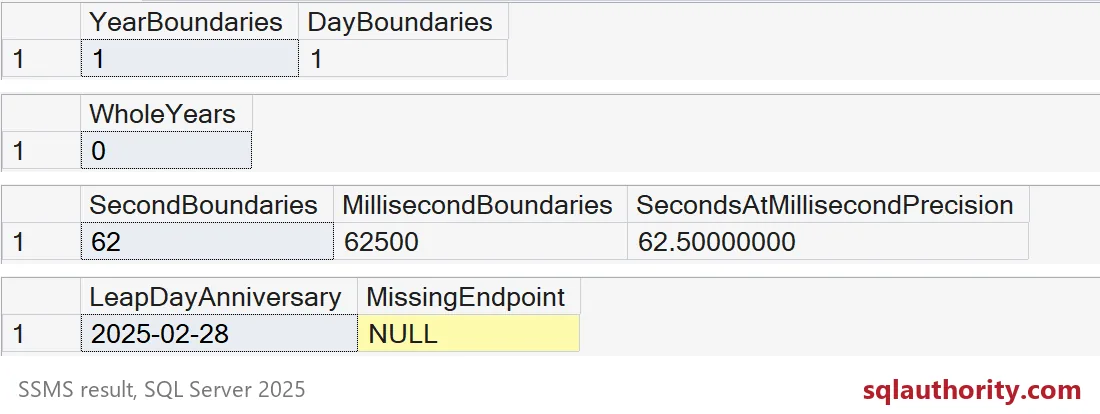
The first grid shows 1 and 1, even though the dates are a day or less apart. The second grid shows WholeYears as 0, which is the honest answer. The rest of this post walks through grids two to four.
Whole years need an anniversary rule
The recipe in step 2 is short. Take the boundary count. Add that many years to the start date. If you land after the as-of date, you counted one year too many, so subtract 1.
Here it is on a few people, with a fixed as-of date so the result never changes.
DROP TABLE IF EXISTS #Staff;
CREATE TABLE #Staff (PersonName varchar(20), HireDate date);
INSERT #Staff (PersonName, HireDate)
VALUES ('Ava', '20250315'), ('Ben', '20250316'), ('Cara', '20241231'), ('Dev', '20240229');

DECLARE @AsOf date = '20260315';
SELECT PersonName, HireDate,
       DATEDIFF(year, HireDate, @AsOf) AS YearBoundaries,
       DATEDIFF(year, HireDate, @AsOf)
         - CASE WHEN DATEADD(year, DATEDIFF(year, HireDate, @AsOf), HireDate) > @AsOf THEN 1 ELSE 0 END AS WholeYears
FROM #Staff
ORDER BY HireDate, PersonName;
Look at the rows from the bottom. Ava started exactly one year ago today, so both columns say 1. Ben is one day short. The boundary count still says 1, but WholeYears says 0. Cara started on December 31, 2024. The boundary count says 2, but only 1 full year has passed. Dev started on a leap day, and the count agrees with the anniversary at 2. If your bonus rule says “after one full year”, the wrong column pays the wrong people.

Pick the unit you can defend
Grid three shows the same interval of 62.5 seconds. DATEDIFF(second) says 62 because it counts second boundaries crossed, and the fraction is gone. In milliseconds you get 62500, and dividing by 1000 gives 62.5. Choose the finest unit your report needs, and write it next to the number.
There is a second catch. DATEDIFF returns an int. A big gap in a small unit does not fit, so the call fails. DATEDIFF_BIG returns a bigint and does not.
BEGIN TRY
    SELECT DATEDIFF(millisecond, '20000101', '20260101') AS WithDatediff;
END TRY
BEGIN CATCH
    SELECT ERROR_NUMBER() AS ErrorNumber, ERROR_MESSAGE() AS ErrorMessage;
END CATCH;

SELECT DATEDIFF_BIG(millisecond, '20000101', '20260101') AS WithDatediffBig;
The first call fails, so you land in the CATCH block with error 535. The second returns a large number without complaint.
Say your calendar rules out loud
Grid four shows two edges. A person with a leap-day date has an anniversary of February 28 in a normal year, because DATEADD clamps to the last day of the month. Maybe your policy says March 1. Decide, and write it down.
A missing endpoint gives NULL, not zero. Keep it that way. A zero tells the reader a person had no tenure, while NULL tells the reader the date is unknown. Also decide what a start date in the future should mean before the report goes out.
Finally, drop the demo table.
DROP TABLE IF EXISTS #Staff;The next time a tenure number looks off by one, check which question the query really asked.
DATEDIFF is not a stopwatch, it is a count of markers crossed.
Published by Pinal Dave on SQLAuthority. More of my work at pinaldave.com.
Discover more from SQL Authority with Pinal Dave
Subscribe to get the latest posts sent to your email.