Session SET options travel with every connection, and SSMS and your application may not agree on them. When a query is fast in SSMS and slow from the app, compare the two sessions before you touch the query text.

Same query, two different answers
Here is a call I have taken more than once. “The report runs in two seconds in SSMS. From the application it times out.” The text is identical, the database is the same, and the developer is sure the server is broken.
Often the query is fine and the context is different. Every connection carries a set of options, such as ARITHABORT, ANSI_NULLS, DATEFORMAT and the language. Two connections can run the same text and behave differently. Sometimes the result changes. Sometimes only the cached plan changes.
Let me show both effects on your own connection, with nothing to set up.
Read your own session first
Start by looking at the session you are in. The view sys.dm_exec_sessions lists the options for every connection, and this query filters to yours.
SELECT session_id, quoted_identifier, arithabort, ansi_nulls,
       transaction_isolation_level, date_format, language
FROM sys.dm_exec_sessions
WHERE session_id = @@SPID;
You get one row with your own settings. Look at the arithabort column. On my test connection, a command-line tool, it shows 0. Drivers and tools start with different defaults, and that is the point. On a real server, remove the WHERE clause and add program_name and login_name. Then compare the row for SSMS with the row for your application. Do it while the application is running, because an idle connection with the same program name may be the wrong one.
Watch one setting change the answer
DATEFORMAT decides how a string like 01/02/2026 is read. The unambiguous string 20260102 never changes. The block saves the current format, tries both, and restores it, so you leave your session as you found it.
DECLARE @OldFormat nvarchar(3) = (SELECT date_format FROM sys.dm_exec_sessions WHERE session_id = @@SPID);

SET DATEFORMAT mdy;
SELECT CONVERT(date, N'01/02/2026') AS MdyDate, CONVERT(date, N'20260102') AS UnambiguousDate;

SET DATEFORMAT dmy;
SELECT CONVERT(date, N'01/02/2026') AS DmyDate, CONVERT(date, N'20260102') AS UnambiguousDate;

SET DATEFORMAT @OldFormat;
SELECT date_format AS RestoredDateFormat FROM sys.dm_exec_sessions WHERE session_id = @@SPID;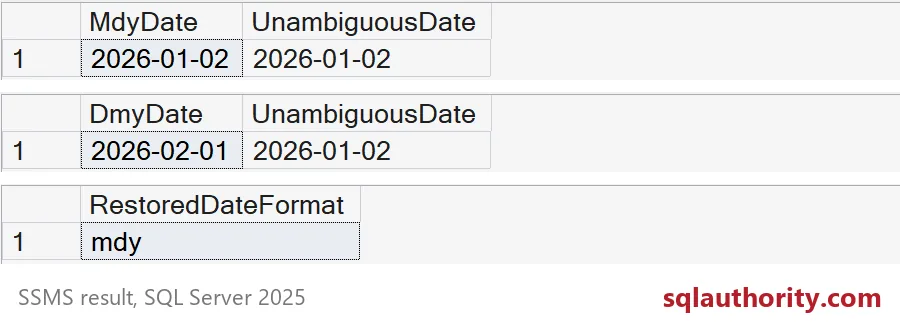
The same string becomes January 2 under mdy and February 1 under dmy. The unambiguous string stays January 2 both times. The last grid shows the original format is back. If a report works for a US login and shifts months for a login with another language, this is the first place to look. Better still, send dates as 20260102 or as proper date parameters.
Watch one setting split the plan cache
Now the quieter effect. SQL Server stores the options a plan was compiled with in a plan attribute called set_options. If two connections use different options, they cannot share a plan. Each gets its own, and its own parameter values at compile time. That is how “fast in SSMS, slow in the app” often happens, with no change to the text.
I run one identical query under two ARITHABORT settings. The SET lines sit in their own batches so the query text stays the same.
SET ARITHABORT ON;
GO
SELECT COUNT(*) AS ContextDemoCount FROM sys.objects;
GO
SET ARITHABORT OFF;
GO
SELECT COUNT(*) AS ContextDemoCount FROM sys.objects;
GO
SET ARITHABORT ON;
GO
Then ask the plan cache what it kept.
SELECT DISTINCT CONVERT(int, pa.value) AS SetOptions
FROM sys.dm_exec_cached_plans AS cp
CROSS APPLY sys.dm_exec_sql_text(cp.plan_handle) AS t
CROSS APPLY sys.dm_exec_plan_attributes(cp.plan_handle) AS pa
WHERE pa.attribute = N'set_options'
  AND t.text LIKE N'%AS ContextDemoCount%'
  AND t.text NOT LIKE N'%dm_exec_cached_plans%'
ORDER BY SetOptions;
Two rows come back, and the two SetOptions values differ by exactly 4096, the bit that stands for ARITHABORT. One identical query, two cached plans. Neither is wrong. But a plan built for one set of values can be slow for another.

What to do next
Do not set ARITHABORT OFF in SSMS and call the case closed. That is a test, not a fix. A faster run after a change may only mean you got a fresh compile. Look at the estimates and the parameter values the plan was compiled for. Keep every setting your application truly needs. Then test again from the real caller.
Next time a query behaves differently, compare the two sessions before you touch the query text.
Matching query text is not matching context, it is one part of the comparison.
Published by Pinal Dave on SQLAuthority. More of my work at pinaldave.com.
Discover more from SQL Authority with Pinal Dave
Subscribe to get the latest posts sent to your email.