SSMS template parameters let you fill repeated placeholders once with Ctrl+Shift+M. It feels like a safe, bound parameter. It is not. SSMS swaps in text, and the text goes to the server exactly as it appears.
Write the placeholders
Think of the script you reuse every month, the one with the same value typed in four places. Someone always misses one. Template parameters fix that. You write a placeholder in the form <Name, type, default>, and every copy with the same name is filled in together.
Open a fresh query window and type these two lines. Note that this is template text, so it will not run until you fill it.
SET NOCOUNT ON;SELECT <Limit, int, 5> AS FirstLimit,<Limit, int, 5> AS SecondLimit;
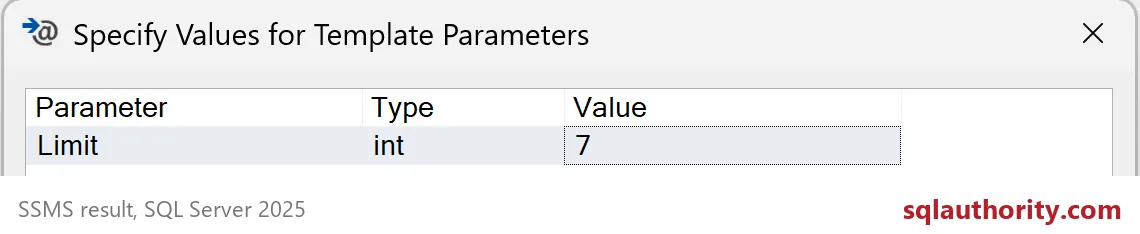
Press Ctrl+Shift+M. A dialog opens with one row, because both placeholders share the name Limit. The type column says int and the value column starts at the default, 5. I changed it to 7 and clicked OK.
Run the filled statement
After you click OK, the window holds an ordinary statement. This is what is left, and what you should read before you press Execute.
SET NOCOUNT ON;
SELECT 7 AS FirstLimit,7 AS SecondLimit;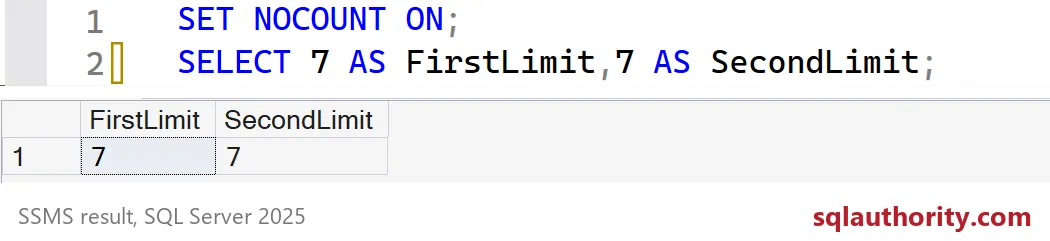
Both columns return 7. Look at the editor in the screenshot: the 7 sits right there in the code. No parameter object exists. SQL Server never sees the word Limit.
Why text replacement can bite
Now let me show what that means. I cannot click through the dialog inside a script, so I copy what it does with REPLACE. The template wraps a name in quotes. I fill it first with Alice, then with O’Brien.
DECLARE @Template nvarchar(max) = N'SELECT ''<Name, nvarchar(50), Alice>'' AS CustomerName;';
DECLARE @Good nvarchar(max) = REPLACE(@Template, N'<Name, nvarchar(50), Alice>', N'Alice');
DECLARE @Quote nvarchar(max) = REPLACE(@Template, N'<Name, nvarchar(50), Alice>', N'O''Brien');

SELECT @Good AS GoodStatement, @Quote AS QuoteStatement;

EXEC (@Good);

BEGIN TRY
    EXEC (@Quote);
END TRY
BEGIN CATCH
    SELECT ERROR_NUMBER() AS ErrorNumber, ERROR_MESSAGE() AS Problem;
END CATCH;
The first statement runs and returns Alice. The second one is broken. The apostrophe in O’Brien closes the string early, and SQL Server raises a syntax error. A bound parameter would have carried the name through untouched. A template cannot, because it only pastes.
The type label is no safety net either. It describes what you meant to type. It does not check what you typed.
DECLARE @Template nvarchar(max) = N'SELECT <Limit, int, 5>;';
DECLARE @Typed nvarchar(max) = REPLACE(@Template, N'<Limit, int, 5>', N'7; SELECT 99 AS Extra');

SELECT @Typed AS FilledStatement;
EXEC (@Typed);
I typed “7; SELECT 99 AS Extra” into an int parameter, and it was accepted. The filled statement became two statements, so the server returned 7 and also a second result, Extra 99. Nothing complained.

Habits that keep templates safe
I keep a clean template file and never save the filled copy over it. Each run starts from the template, fills it, and gets read before it executes. That one glance catches wrong connection context, a missing quote, or a value that landed in the wrong place.
If the template does administration work, read the database name and the object names twice. Do not put passwords or other secrets in a reusable template. And if a value can contain quotes or brackets, escape them yourself before you type them in.
The small SELECT above is a good way to learn the dialog. Practice there before you template anything that can delete something.
Next time the dialog fills your script, read the result before you run it.
A template value is not a bound parameter, it is text that needs review.
Published by Pinal Dave on SQLAuthority. More of my work at pinaldave.com.
Discover more from SQL Authority with Pinal Dave
Subscribe to get the latest posts sent to your email.