Columnstore data types raise two separate questions: will the index accept the column, and how well does the loaded data compress? People answer the second one and forget the first, usually on deployment day.

Two questions, one index
Imagine a teammate who has read that columnstore shrinks a fact table to a fraction of its size. They build the index on a dev copy, see a lovely number, and schedule the change. On the production table, the CREATE INDEX fails, because one column holds XML. Nobody checked what the index would accept.
So I ask the two questions in order. First: is the type allowed? Second: after loading real data, how many bytes do the segments take? I will show both with small demos.
Build a small table and measure it
The table has an int Id, an int Category that repeats 0 to 3, and an nvarchar Description that is different on every row. I create the clustered columnstore index after the rows are loaded, so there is compressed data to look at.
DROP TABLE IF EXISTS dbo.ColumnDemo;
CREATE TABLE dbo.ColumnDemo (Id int, Category int, Description nvarchar(100));

INSERT dbo.ColumnDemo
SELECT value, value % 4, CONCAT(N'Item ', value)
FROM GENERATE_SERIES(1, 5000);

CREATE CLUSTERED COLUMNSTORE INDEX CCI_ColumnDemo ON dbo.ColumnDemo;

SELECT c.name, t.name AS TypeName, c.max_length
FROM sys.columns AS c
JOIN sys.types AS t ON t.user_type_id = c.user_type_id
WHERE c.object_id = OBJECT_ID(N'dbo.ColumnDemo')
ORDER BY c.column_id;

SELECT c.name, SUM(s.on_disk_size) AS SegmentBytes
FROM sys.column_store_segments AS s
JOIN sys.partitions AS p ON p.partition_id = s.partition_id
JOIN sys.columns AS c ON c.object_id = p.object_id AND c.column_id = s.column_id
WHERE p.object_id = OBJECT_ID(N'dbo.ColumnDemo')
GROUP BY c.name
ORDER BY SegmentBytes DESC, c.name;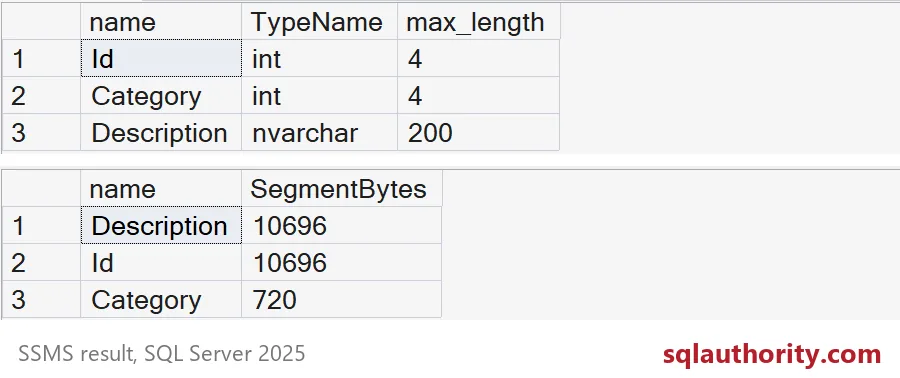
The first grid lists the declared types. Notice max_length for Description is 200, because nvarchar uses two bytes per character. The second grid shows what the segments actually take on disk. The repeated Category column is tiny, 720 bytes, because only four different values exist. The unique Id and Description columns are far larger.
Be careful with that comparison. SegmentBytes counts compressed segments only. Dictionaries and other structures add their own cost. And a repeated category is the friendly case. Your own columns, with your own distribution, will behave differently.
Check which types the index accepts
Now the first question. This loop creates a one-column table for each type, tries to build a clustered columnstore index on it, and records the answer. I use dynamic SQL so a failure on one type does not stop the rest.
CREATE TABLE #TypeResults (TypeName nvarchar(60), Result nvarchar(300));
DECLARE @Types TABLE (n int IDENTITY, TypeName nvarchar(60));
INSERT @Types (TypeName) VALUES
    (N'int'), (N'varchar(max)'), (N'nvarchar(max)'), (N'varbinary(max)'),
    (N'uniqueidentifier'), (N'datetimeoffset'), (N'json'), (N'vector(3)'),
    (N'xml'), (N'text'), (N'ntext'), (N'image'), (N'sql_variant'),
    (N'geography'), (N'geometry'), (N'hierarchyid'), (N'rowversion');

DECLARE @TypeName nvarchar(60), @Sql nvarchar(max);
DECLARE TypeCursor CURSOR FOR SELECT TypeName FROM @Types ORDER BY n;
OPEN TypeCursor;
FETCH NEXT FROM TypeCursor INTO @TypeName;
WHILE @@FETCH_STATUS = 0
BEGIN
    DROP TABLE IF EXISTS dbo.TypeTest;
    BEGIN TRY
        SET @Sql = N'CREATE TABLE dbo.TypeTest (Id int, Col ' + @TypeName + N' NULL);
                     CREATE CLUSTERED COLUMNSTORE INDEX CCI_TypeTest ON dbo.TypeTest;';
        EXEC (@Sql);
        INSERT #TypeResults VALUES (@TypeName, N'Accepted');
    END TRY
    BEGIN CATCH
        INSERT #TypeResults VALUES (@TypeName, CONCAT(ERROR_NUMBER(), N': ', ERROR_MESSAGE()));
    END CATCH;
    FETCH NEXT FROM TypeCursor INTO @TypeName;
END;
CLOSE TypeCursor;
DEALLOCATE TypeCursor;

SELECT TypeName, Result FROM #TypeResults ORDER BY Result, TypeName;
On my SQL Server 2025 test server, these are accepted: int, varchar(max), nvarchar(max), varbinary(max), uniqueidentifier, datetimeoffset, json and vector(3). These are rejected with error 35343: xml, text, ntext, image, sql_variant, geography, geometry, hierarchyid and rowversion. The message says the column has a data type that cannot participate in a columnstore index.
The list changes between versions. Newer types in particular deserve a probe like this before you plan anything. Run it on the build you deploy to, not the one you read about.

What to do with a blocked column
If one column is rejected, you have choices. Leave the unsupported column out of the analytical table and keep it in a rowstore table joined by Id. Or store the data in a type the index accepts. A successful build is still not the finish line. Test your real queries and your real loads.
My probe used a clustered columnstore index. If you plan a nonclustered one, change that one line and run the probe again, so you test the index you will really create.
Clean up
DROP TABLE IF EXISTS dbo.TypeTest;
DROP TABLE IF EXISTS #TypeResults;
DROP TABLE IF EXISTS dbo.ColumnDemo;
Next time someone shows a great compression number, ask whether the index accepted every column.
Compression is not a type guarantee, it is a measurement of the data you loaded.
Published by Pinal Dave on SQLAuthority. More of my work at pinaldave.com.
Discover more from SQL Authority with Pinal Dave
Subscribe to get the latest posts sent to your email.