This Stored Procedure Recompile Quiz asks which everyday action makes SQL Server build a new plan for a procedure. Most people guess the parameter value. Pick your answer first, then let the plan counters show you who is right.

The Quiz
Jordan owns a stored procedure that counts café orders for one city. It’s called GetOrdersByCity, and it takes the city name as a parameter. SQL Server compiled a plan on the first call and keeps that plan in the plan cache.
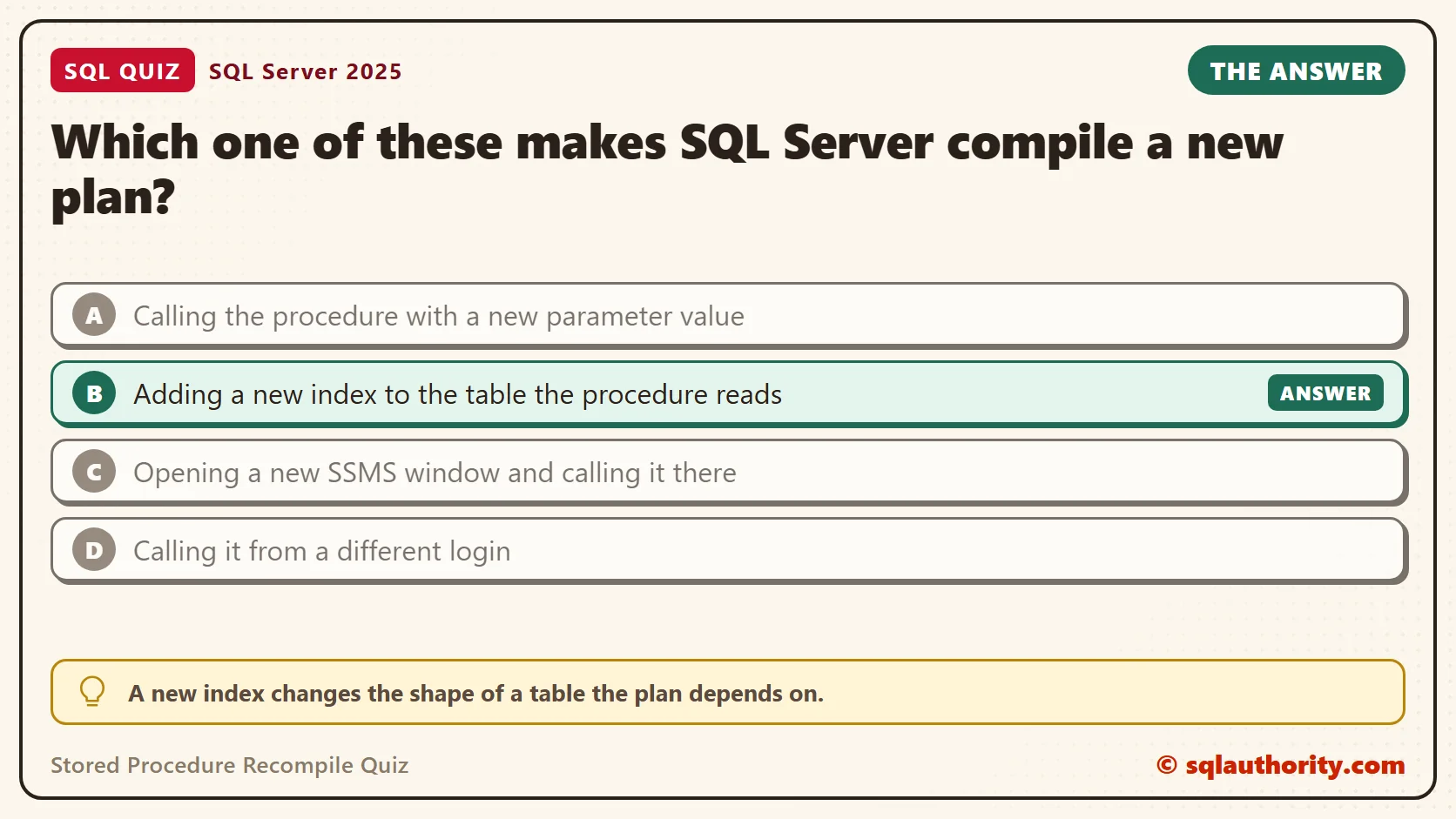
Which one of these makes SQL Server compile a new plan?
A. Calling the procedure with a new parameter value
B. Adding a new index to the table the procedure reads
C. Opening a new SSMS window and calling it there
D. Calling it from a different login
Take a moment and pick one before you read on.
The Answer
The answer is B. A new index changes the shape of a table the plan depends on. So does adding a column or dropping a key. SQL Server marks the old plan as invalid and builds a fresh one on the next call.
The other three leave the cached plan alone. SQL Server compiles the procedure once and reuses the plan, because compiling costs CPU. That is a good default. It’s also where parameter sniffing comes from. The plan is built for the first value it sees, and in this procedure every later value used it.
Prove It
This script creates a database called SqlQuizStoredProcedureRecompile, used only for this example, so run it on a test server. It also creates a small view named PlanCheck. PlanGeneration goes up each time the plan is rebuilt. Executions counts how many times that plan has run.
IF DB_ID(N'SqlQuizStoredProcedureRecompile') IS NULL CREATE DATABASE SqlQuizStoredProcedureRecompile;
GO
USE SqlQuizStoredProcedureRecompile;
GO
DROP VIEW IF EXISTS dbo.PlanCheck;
DROP VIEW IF EXISTS dbo.CompiledFor;
DROP PROCEDURE IF EXISTS dbo.GetOrdersByCity;
DROP TABLE IF EXISTS dbo.CafeOrder;
DROP USER IF EXISTS QuizVisitor;
CREATE TABLE dbo.CafeOrder
(
    OrderID int IDENTITY(1,1) PRIMARY KEY,
    City nvarchar(30) NOT NULL,
    Amount decimal(8,2) NOT NULL
);
INSERT INTO dbo.CafeOrder (City, Amount)
SELECT TOP (5000) CASE WHEN n % 100 = 0 THEN N'Boise' ELSE N'Austin' END, 5 + n % 20
FROM (SELECT ROW_NUMBER() OVER (ORDER BY (SELECT NULL)) AS n FROM sys.all_objects AS a CROSS JOIN sys.all_objects AS b) AS x;
GO
CREATE PROCEDURE dbo.GetOrdersByCity @City nvarchar(30)
AS
SELECT COUNT(*) AS OrderCount, SUM(Amount) AS Total FROM dbo.CafeOrder WHERE City = @City;
GO
CREATE VIEW dbo.PlanCheck
AS
SELECT s.plan_generation_num AS PlanGeneration, s.execution_count AS Executions,
       IIF(CONVERT(int, a.value) & 4096 = 4096, N'ON', N'OFF') AS ArithAbort
FROM sys.dm_exec_query_stats AS s
CROSS APPLY sys.dm_exec_sql_text(s.sql_handle) AS t
CROSS APPLY sys.dm_exec_plan_attributes(s.plan_handle) AS a
WHERE t.dbid = DB_ID() AND t.objectid = OBJECT_ID(N'dbo.GetOrdersByCity') AND a.attribute = N'set_options';
GO
CREATE VIEW dbo.CompiledFor
AS
SELECT q.query_plan.value('(//*:ParameterList/*:ColumnReference/@ParameterCompiledValue)[1]', 'nvarchar(60)') AS CompiledFor
FROM sys.dm_exec_procedure_stats AS p
CROSS APPLY sys.dm_exec_query_plan(p.plan_handle) AS q
WHERE p.database_id = DB_ID() AND p.object_id = OBJECT_ID(N'dbo.GetOrdersByCity');
GO
SET ARITHABORT ON;
SET QUOTED_IDENTIFIER ON;
EXEC dbo.GetOrdersByCity @City = N'Boise';
SELECT * FROM dbo.PlanCheck;
EXEC dbo.GetOrdersByCity @City = N'Austin';
SELECT * FROM dbo.PlanCheck;
SELECT * FROM dbo.CompiledFor;
CREATE USER QuizVisitor WITHOUT LOGIN;
GRANT EXECUTE ON dbo.GetOrdersByCity TO QuizVisitor;
EXECUTE AS USER = N'QuizVisitor';
EXEC dbo.GetOrdersByCity @City = N'Austin';
REVERT;
SELECT * FROM dbo.PlanCheck;
GO
CREATE INDEX IX_CafeOrder_City ON dbo.CafeOrder (City);
GO
SET ARITHABORT ON;
SET QUOTED_IDENTIFIER ON;
EXEC dbo.GetOrdersByCity @City = N'Austin';
SELECT * FROM dbo.PlanCheck;
SELECT * FROM dbo.CompiledFor;
The two SET lines make the connection behave like a default SSMS window. The script calls the procedure four times and checks the counters after each call. On SQL Server 2025, the checks gave these values.
| After this step | PlanGeneration | Executions |
|---|---|---|
| First call, city Boise | 1 | 1 |
| Second call, city Austin | 1 | 2 |
| Call as a different user | 1 | 3 |
| New index, then a call | 2 | 1 |
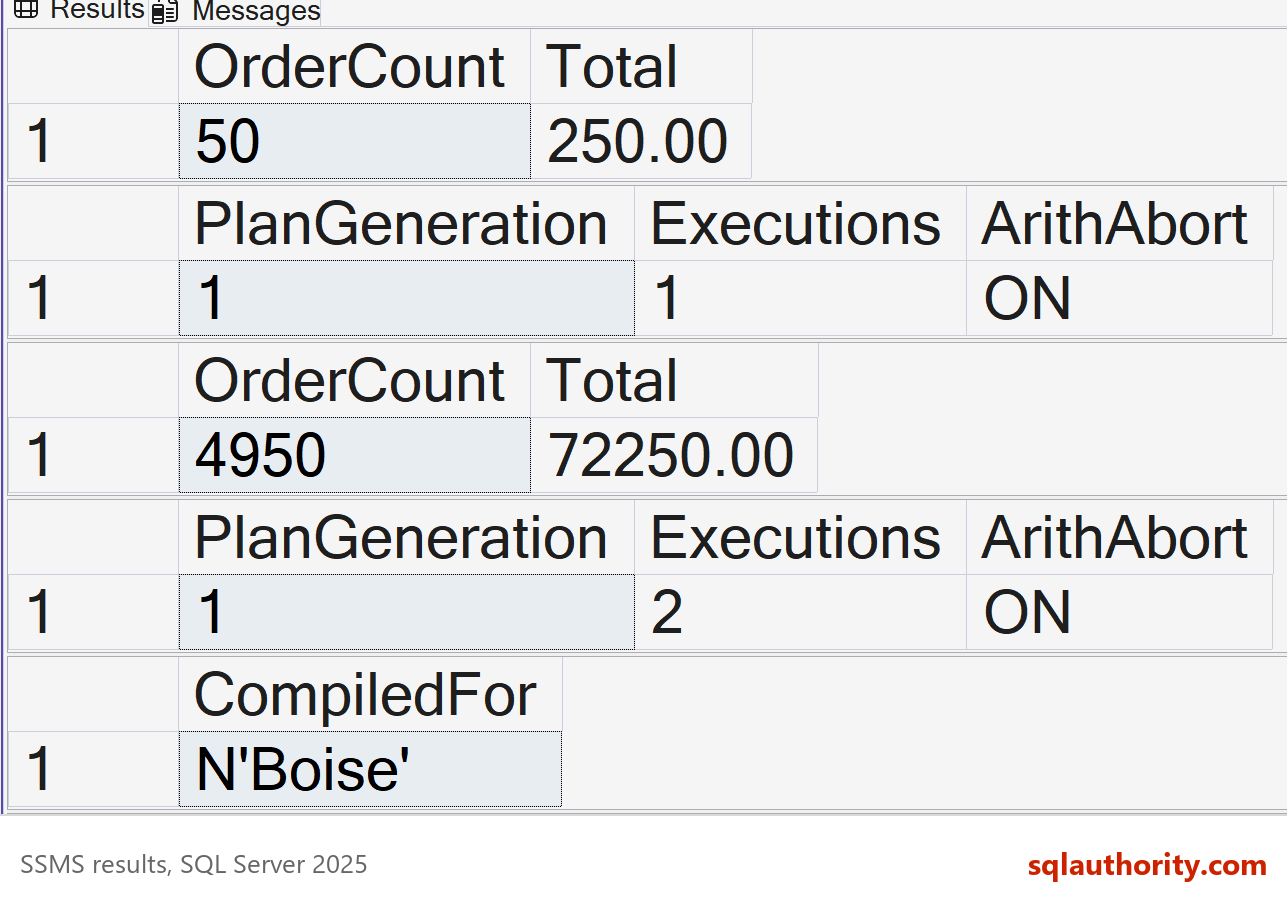
A new value and a new user only added to Executions. The index raised PlanGeneration to 2 and restarted the count. The CompiledFor view shows why that matters. After the second call it returned N’Boise’, the value the plan was built for, even though Austin ran last. After the index it returned N’Austin’.
Why the Other Answers Are Wrong
A is the popular guess. A new value doesn’t force a new plan. The table above shows it: Austin used the plan that was built for Boise. Here SQL Server reused one plan for both values. That is fast, and it’s also the root of parameter sniffing.
C fails because the plan cache belongs to the server, not to a window. Open a second query window and run this. The counters continue where the first window stopped.
USE SqlQuizStoredProcedureRecompile;
GO
EXEC dbo.GetOrdersByCity @City = N'Austin';
SELECT * FROM dbo.PlanCheck;
In my test, a second connection returned PlanGeneration 2 and Executions 2. It used the plan the first window had built.
D fails for the same reason. A plan isn’t tied to a login. The call as QuizVisitor, a user with no login at all, raised Executions to 3 and left the generation alone.
The Catch: One Plan Is Not a Law
Reusing one plan is what this procedure did in my test. It isn’t a rule for every query. Since SQL Server 2022, databases at compatibility level 160 and higher can use parameter sensitive plan optimization. When an eligible query’s values return different row counts, SQL Server can keep several plan variants. Query Store records them.
This query shows whether the feature is on for your database.
SELECT name, value FROM sys.database_scoped_configurations WHERE name = N'PARAMETER_SENSITIVE_PLAN_OPTIMIZATION';
On my SQL Server 2025 test database, the value was 1, so the feature was on. This procedure still kept one plan, and Query Store listed no variants. The quiz answer holds for the procedure shown. For your own queries, check before you assume one plan serves every value.
The Catch: Different SET Options Make a Second Plan
Here is where C is almost right. SQL Server keeps a separate plan for each combination of SET options. SSMS starts with ARITHABORT ON, and most client drivers start with it OFF. So the same procedure can hold two plans, one for each kind of connection.
SET ARITHABORT OFF;
EXEC dbo.GetOrdersByCity @City = N'Austin';
SELECT * FROM dbo.PlanCheck ORDER BY ArithAbort;
SET ARITHABORT ON;
The check returned two rows. One plan has ArithAbort OFF at generation 1, and the older plan has ArithAbort ON at generation 2. Each plan was built for whatever value arrived first on its own kind of connection. That is why a query can be fast in the application and slow in SSMS, or the other way around.
Forcing a Fresh Plan on Purpose
Sometimes you want a new plan without changing the table. The system procedure sp_recompile marks the procedure for recompilation, and the next call builds a new plan.
EXEC sp_recompile N'dbo.GetOrdersByCity';
EXEC dbo.GetOrdersByCity @City = N'Boise';
SELECT * FROM dbo.PlanCheck;
SQL Server answered with the message that the object was marked for recompilation. The check then showed one plan, PlanGeneration 1 and Executions 1, built for Boise. Both older plans were gone.
Large data changes can also trigger a recompile. When enough rows change, SQL Server updates the statistics on that table. A plan built on the old statistics is then replaced on its next call. So a nightly load can rebuild plans without anyone touching the procedure.
You can also ask for a new plan on every call. Use WITH RECOMPILE on the procedure or OPTION (RECOMPILE) on one statement. Each call then pays the compile cost. Choose a single statement whose best plan depends on the value, not the whole procedure.
What to Remember
A procedure’s plan is rebuilt when the objects it uses change, not when the caller changes. In this procedure, new parameter values, windows and logins reused the plan. Different SET options create a second plan next to the first.
When a procedure is slow for some values only, I look at the compiled value first. If that value is the odd one out, I know where to look. When you finish testing, remove the example database.
USE master;
GO
ALTER DATABASE SqlQuizStoredProcedureRecompile SET SINGLE_USER WITH ROLLBACK IMMEDIATE;
DROP DATABASE SqlQuizStoredProcedureRecompile;
A cached plan is not tied to the caller, it is tied to what it reads.
Published by Pinal Dave on SQLAuthority. More of my work at pinaldave.com.
Discover more from SQL Authority with Pinal Dave
Subscribe to get the latest posts sent to your email.