This DACPAC vs BACPAC Quiz asks which file carries your data to Azure SQL Database. The two names look almost the same. In the default setup, mixing them up gives you a database with every table and no rows. Pick your answer first, then check it against the script.

The Quiz
Avery runs a small café ordering database on a local SQL Server. It has a MenuItem table, an OrderLine table and a few rows in each. Avery needs to move all of it, structure and rows, to Azure SQL Database.
SqlPackage, the command line tool for this job, can write two kinds of file: a DACPAC and a BACPAC. Avery wants the package built to carry the schema and the data together.
Which package does SqlPackage’s Export action create for that move?
A. A DACPAC, because it holds the whole database
B. A BACPAC, because it holds the schema and the data
C. Either one, because both always carry every row
D. Neither, because Azure SQL Database only accepts a .bak backup file
Take a moment and pick one before you read on.
The Answer
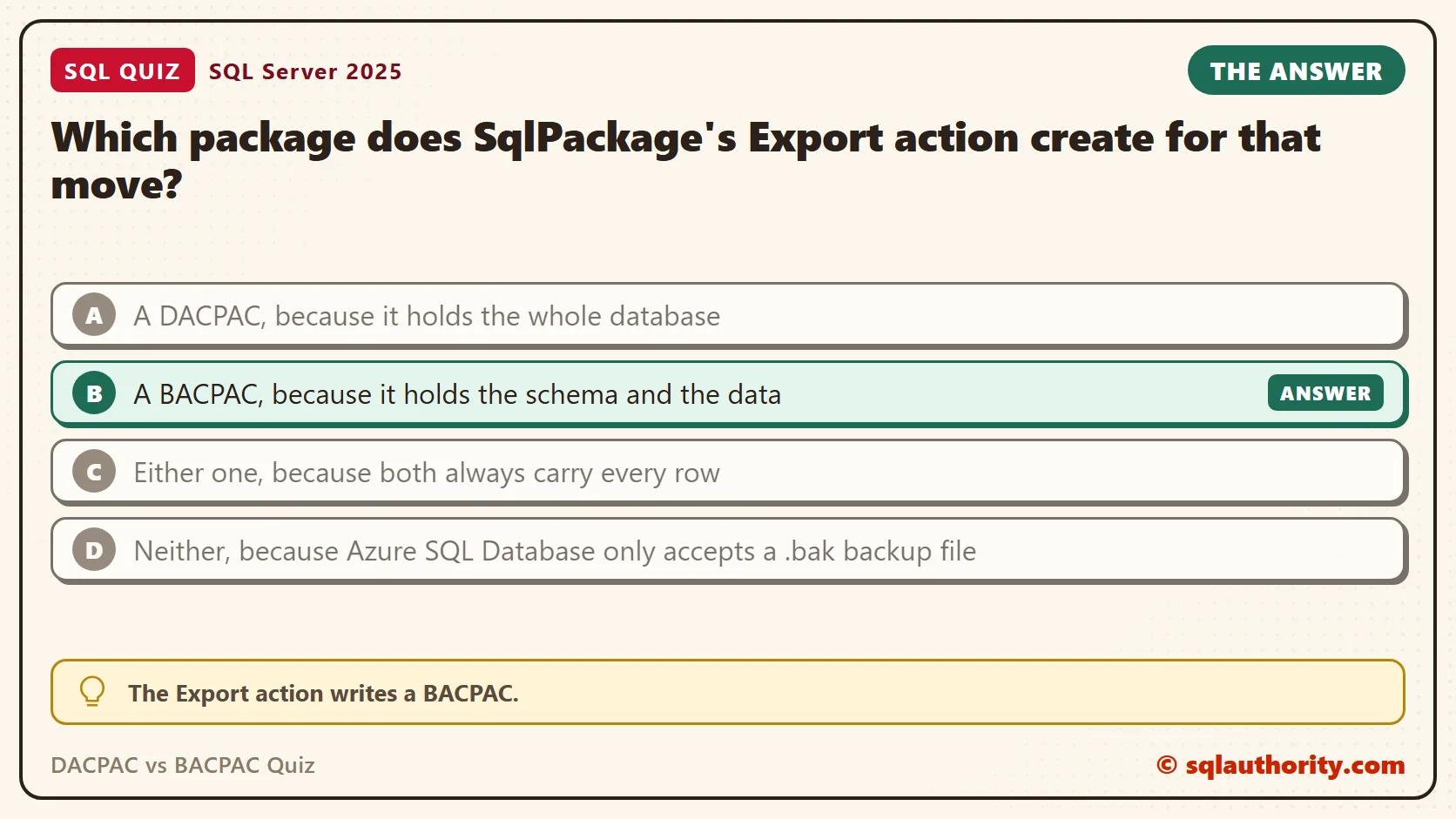
The answer is B. The Export action writes a BACPAC. A BACPAC describes the database and carries the rows. A DACPAC describes the database and, by default, carries no rows.
A DACPAC holds definitions: tables, columns, keys, views and procedures. It’s built for deployments. SqlPackage compares it with a target database and builds a plan to make the target match. A DACPAC can carry table data when you ask for it. The Extract action has options for that, such as ExtractAllTableData and TableData. They exist for small seed data in a deployment, not for moving a whole database.
A BACPAC holds the same definitions plus every row, stored as bulk data. It’s built for moving a database. You export from the source and import into a new database. Both files are zip packages with a different extension, which is why they’re easy to confuse.
Prove It
This script builds a tiny version of Avery’s database, called SqlQuizDacpacVsBacpac, and used only for this example. Run it on a test server. The two result sets split the database into the two things the two files carry.
IF DB_ID(N'SqlQuizDacpacVsBacpac') IS NULL CREATE DATABASE SqlQuizDacpacVsBacpac;
GO
USE SqlQuizDacpacVsBacpac;
GO
DROP TABLE IF EXISTS dbo.OrderLine;
DROP TABLE IF EXISTS dbo.MenuItem;
CREATE TABLE dbo.MenuItem
(
    MenuItemID int IDENTITY(1,1) PRIMARY KEY,
    ItemName nvarchar(60) NOT NULL,
    Price decimal(6,2) NOT NULL
);
CREATE TABLE dbo.OrderLine
(
    OrderLineID int IDENTITY(1,1) PRIMARY KEY,
    MenuItemID int NOT NULL REFERENCES dbo.MenuItem (MenuItemID),
    Quantity int NOT NULL
);
INSERT INTO dbo.MenuItem (ItemName, Price)
VALUES (N'Paneer wrap', 8.50), (N'Lentil soup', 6.25), (N'Mango lassi', 4.00);
INSERT INTO dbo.OrderLine (MenuItemID, Quantity)
VALUES (1, 2), (2, 1), (3, 3), (1, 1);
GO
SELECT type_desc AS ObjectType, COUNT(*) AS ObjectCount
FROM sys.objects
WHERE is_ms_shipped = 0
GROUP BY type_desc
ORDER BY type_desc;
SELECT t.name AS TableName, SUM(p.rows) AS RowsInTable
FROM sys.tables AS t
JOIN sys.partitions AS p ON p.object_id = t.object_id AND p.index_id IN (0, 1)
GROUP BY t.name
ORDER BY t.name;
On SQL Server 2025, the first query returned this list. It’s the shape of the database, and it’s what a DACPAC describes.
| ObjectType | ObjectCount |
|---|---|
| FOREIGN_KEY_CONSTRAINT | 1 |
| PRIMARY_KEY_CONSTRAINT | 2 |
| USER_TABLE | 2 |
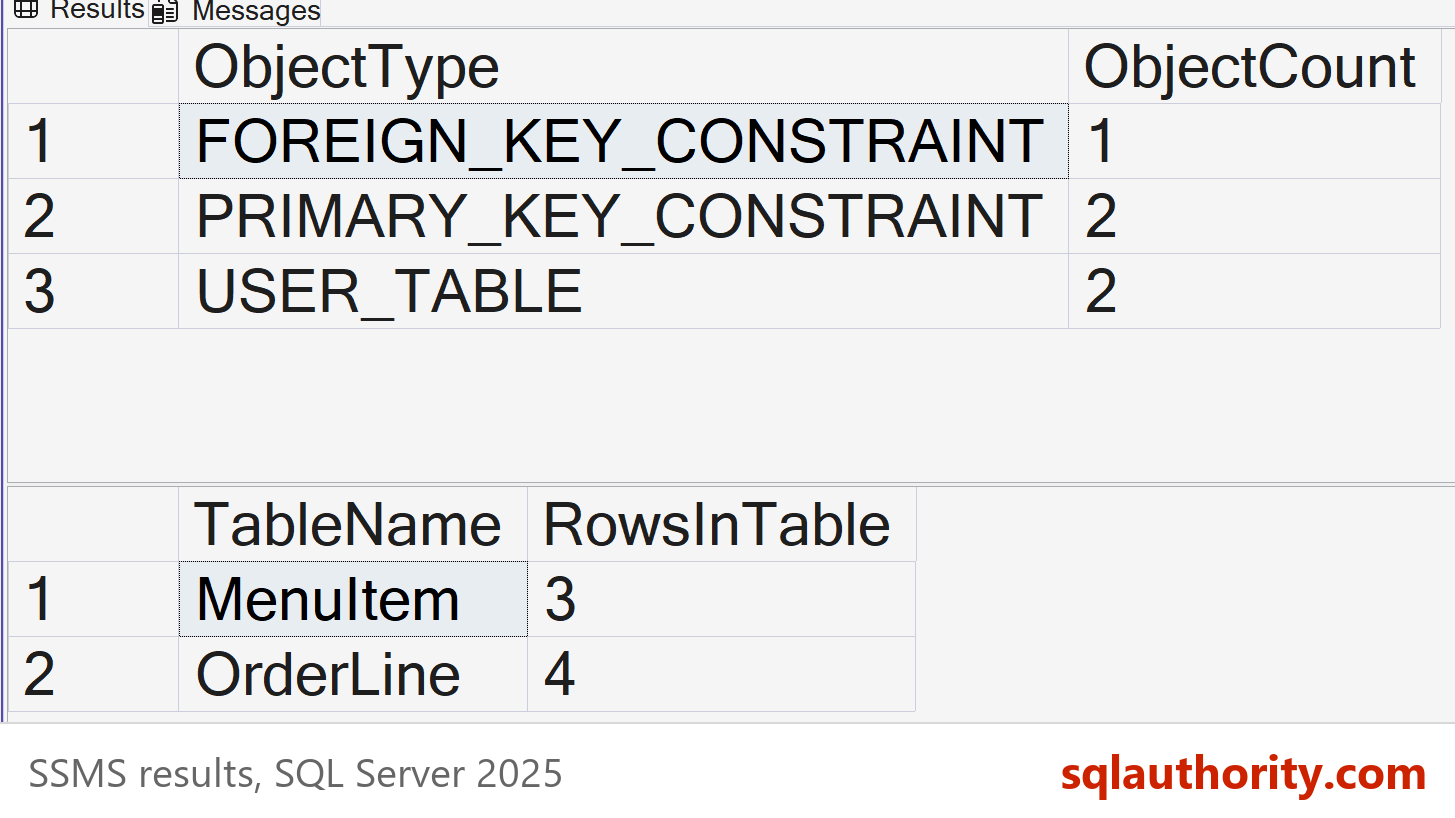
The second query returned the rows. Those seven rows are what a BACPAC adds.
| TableName | RowsInTable |
|---|---|
| MenuItem | 3 |
| OrderLine | 4 |
Why the Other Answers Are Wrong
A is the tempting one, because “whole database” sounds right. But Export doesn’t write a DACPAC, and a DACPAC carries the shape and, by default, no table data. Avery’s tables would arrive on Azure empty. Developers do ship small lookup rows with a DACPAC, through a post-deployment script or the Extract data options. That works for a list of order statuses. It’s the wrong tool for a year of orders.
C fails on the word “always”. Both files carry the schema, but a DACPAC holds rows only when someone asks for them. The BACPAC is the file made to carry them. Both come from the same tool and look the same on disk, so this mix-up is common.
D is half true. Azure SQL Database can’t restore a .bak file. SQL Server and Azure SQL Managed Instance can. That’s the reason the BACPAC exists for Azure SQL Database: it’s the portable way to move rows into it.
Moving the Database With a BACPAC
I haven’t run the two commands below on this PC, because SqlPackage isn’t installed on it. They follow SqlPackage’s documented options. Replace every name in angle brackets with your own, and read the output of each step before you move on.
First, export the source database to a BACPAC file. The TrustServerCertificate option is for a local server with a self-signed certificate.
SqlPackage /Action:Export /SourceServerName:"<source-server>" /SourceDatabaseName:"<database-name>" /SourceTrustServerCertificate:True /TargetFile:"C:\Temp\<database-name>.bacpac"
Then import the file into Azure SQL Database. The import creates the database, so pick a name that doesn’t exist yet.
SqlPackage /Action:Import /SourceFile:"C:\Temp\<database-name>.bacpac" /TargetConnectionString:"Server=tcp:<server-name>.database.windows.net,1433;Database=<new-database-name>;Authentication=Active Directory Interactive;Encrypt=True;"
Export reads the tables one after another. If people keep writing during the export, the file can hold tables from slightly different moments. Export during a quiet window, or export from a copy of the database.
Check Before and After
Before you export, look for code that names another database. A three-part name such as OtherDb.dbo.Customer breaks after the move, because Azure SQL Database doesn’t run ordinary cross-database queries. This query lists every such reference. It returned no rows in my test database, which means nothing is in the way.
SELECT OBJECT_NAME(referencing_id) AS ReferencingObject, referenced_database_name, referenced_entity_name
FROM sys.sql_expression_dependencies
WHERE referenced_database_name IS NOT NULL;
After the import, run the row count query from the script above in the new database. You should see 3 and 4 for the two tables. Matching counts are the quickest proof that the data came across. Compare the object list from the first query too. It catches a missing table or key.
One more check belongs before the export. A BACPAC carries every row, so the biggest tables decide how long the export and the import take. This query lists each table with its rows and the space it uses.
SELECT t.name AS TableName,
       SUM(CASE WHEN ps.index_id IN (0, 1) THEN ps.row_count ELSE 0 END) AS RowsInTable,
       CAST(SUM(ps.used_page_count) * 8 / 1024.0 AS decimal(12,2)) AS UsedMB
FROM sys.dm_db_partition_stats AS ps
JOIN sys.tables AS t ON t.object_id = ps.object_id
GROUP BY t.name
ORDER BY UsedMB DESC;
In my tiny test database, MenuItem used about 0.02 MB and OrderLine about the same. Your own database will show larger numbers. If one table holds most of the space, plan the export around it.
When a DACPAC Is the Right Choice
A DACPAC fits a deployment, where the target database already exists and should end up with the source’s structure. Extract the schema from the source. Then publish it to the target. Publish applies a deployment plan, and that plan can change tables and columns that hold data. Some changes can lose rows, so the plan needs a review before it touches anything you want to keep.
The Script action writes the plan as a T-SQL file without running it. Read that file first. Publish also blocks changes that would lose data unless you turn that protection off, and I’d leave it on. Then test the publish against a copy of the target, and only then point it at the real database.
SqlPackage /Action:Extract /SourceServerName:"<source-server>" /SourceDatabaseName:"<database-name>" /SourceTrustServerCertificate:True /TargetFile:"C:\Temp\<database-name>.dacpac"

SqlPackage /Action:Script /SourceFile:"C:\Temp\<database-name>.dacpac" /TargetConnectionString:"Server=tcp:<server-name>.database.windows.net,1433;Database=<existing-database-name>;Authentication=Active Directory Interactive;Encrypt=True;" /OutputPath:"C:\Temp\<database-name>-deployment.sql"

SqlPackage /Action:Publish /SourceFile:"C:\Temp\<database-name>.dacpac" /TargetConnectionString:"Server=tcp:<server-name>.database.windows.net,1433;Database=<existing-database-name>;Authentication=Active Directory Interactive;Encrypt=True;"
What to Remember
A DACPAC is for schema and deployments. A BACPAC is for schema plus data and for moving a database. When someone asks you to move a database with its rows, the answer is the BACPAC.
When I plan a move, I settle one question first. Does the target already hold data I must keep? If it doesn’t, import a BACPAC. If it does, treat the job as a deployment. Review the plan, test it on a copy, and publish only after both checks pass. When you finish testing, remove the example database.
USE master;
GO
ALTER DATABASE SqlQuizDacpacVsBacpac SET SINGLE_USER WITH ROLLBACK IMMEDIATE;
DROP DATABASE SqlQuizDacpacVsBacpac;
A DACPAC is not a backup of your data, it is a blueprint of your database.
Published by Pinal Dave on SQLAuthority. More of my work at pinaldave.com.
Discover more from SQL Authority with Pinal Dave
Subscribe to get the latest posts sent to your email.