
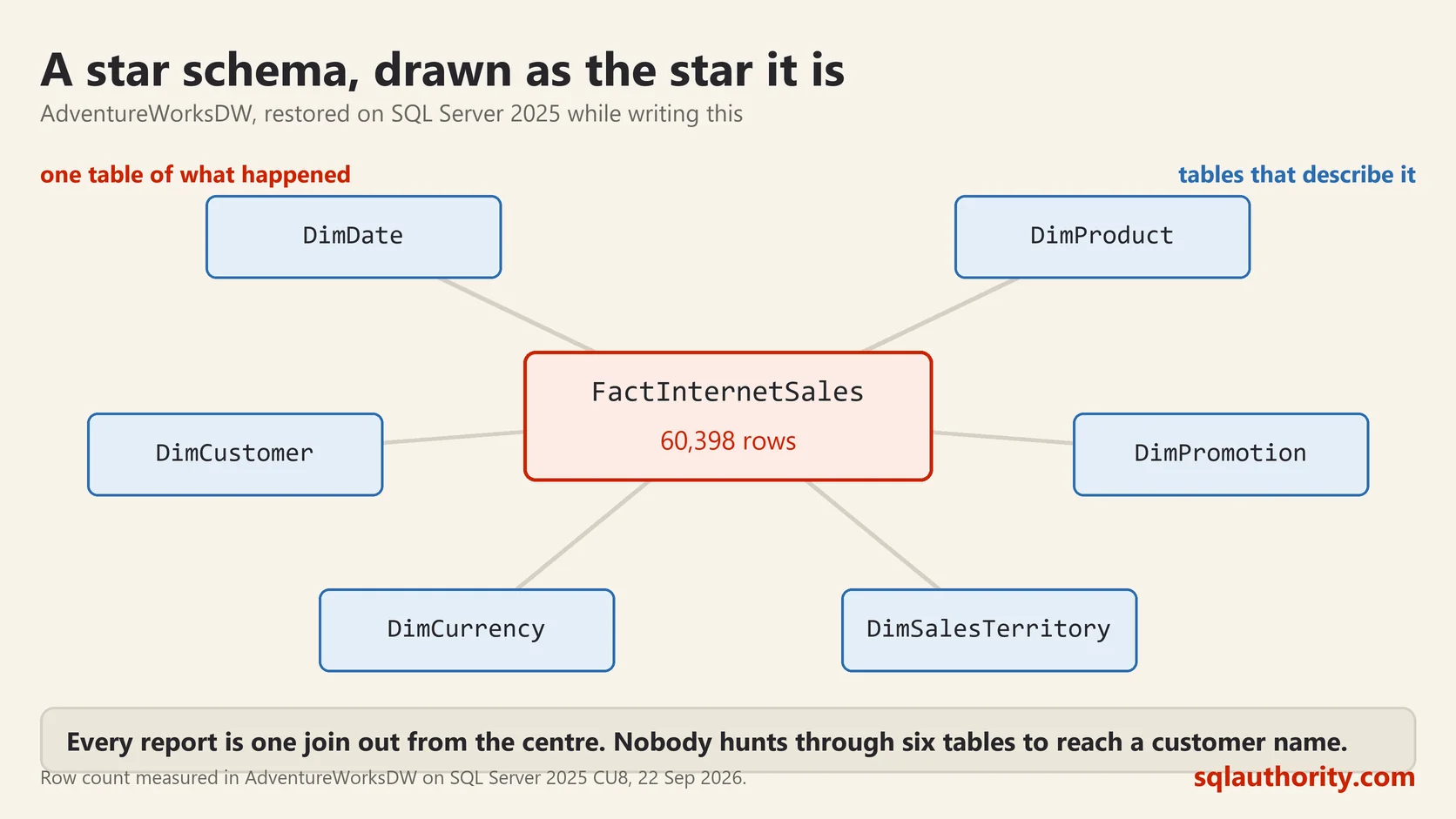
A star schema is one big table of things that happened, surrounded by small tables that describe them. Draw it on paper and the shape is a star, which is where the name comes from. It is the standard way to lay out data for reporting. It also looks wrong to anyone who has spent years normalising databases properly.

Facts and Dimensions
A fact table holds events. One row per sale, per click, per payment. It carries the numbers you add up, and a set of keys pointing out to the tables that explain the row. Fact tables are long and thin, and they are where all the rows live.
A dimension table holds the descriptions. One row per product, per customer, per date. It carries the words you group and filter by. Dimension tables are short and wide.
That is the whole idea. Numbers in the middle, words around the outside.
A Real One You Can Open
Microsoft ships a star schema you can restore in a minute, called AdventureWorksDW. I restored it on SQL Server 2025 while writing this post. Here is what it holds:
SELECT TOP (6) t.name, p.rows
FROM sys.tables AS t
JOIN sys.partitions AS p ON p.object_id = t.object_id AND p.index_id IN (0, 1)
WHERE t.name LIKE 'Fact%'
ORDER BY p.rows DESC;
name rows
FactProductInventory 776286
FactInternetSalesReason 64515
FactResellerSales 60855
FactInternetSales 60398
FactFinance 39409
FactCurrencyRate 14264Six fact tables, and sixteen dimension tables alongside them. Notice the naming. Every table announces which kind it is before you open it, and that convention is worth copying.
The Query That Explains the Shape
Here is why anybody bothers. Sales by year, which means one fact table joined to one dimension:
SELECT d.CalendarYear,
       COUNT(*) AS sales,
       CAST(SUM(f.SalesAmount) AS decimal(18,2)) AS amount
FROM FactInternetSales AS f
JOIN DimDate AS d ON d.DateKey = f.OrderDateKey
GROUP BY d.CalendarYear
ORDER BY d.CalendarYear;
CalendarYear sales amount
2010 14 43421.04
2011 2216 7075525.93
2012 3397 5842485.20
2013 52801 16351550.34
2014 1970 45694.72Now sales by product, which is the same fact table joined to a different dimension:
SELECT TOP (5) p.EnglishProductName,
       CAST(SUM(f.SalesAmount) AS decimal(18,2)) AS amount
FROM FactInternetSales AS f
JOIN DimProduct AS p ON p.ProductKey = f.ProductKey
GROUP BY p.EnglishProductName
ORDER BY amount DESC;
EnglishProductName amount
Mountain-200 Black, 46 1373469.55
Mountain-200 Black, 42 1363142.09
Mountain-200 Silver, 38 1339462.79Same shape, one hop out from the centre, different question. Every report you are asked for follows that pattern, always one join from the fact table. Nobody has to work out a path through six tables to reach a customer name.
Grain, the Decision That Matters Most
Grain is what one row of the fact table means. Say it out loud in a sentence before you build anything. One row is one line of one order. One row is one product on one day.
Get it wrong and the table cannot answer the question you built it for. If your grain is one row per order, you can never report by product line, because that detail was thrown away before the row was written. Grain is close to impossible to change later, because the rows that would carry the detail no longer exist.
Yes, the Data Repeats
A dimension table breaks the rules you were taught. DimProduct carries the category and the subcategory as plain text, repeated on every product row. In a normalised design those would be separate tables.
The repetition is deliberate. A query touching one dimension instead of three is simpler to write and faster to run. Storage is cheap, and a load process writes the data once. The usual argument against repetition does not apply here.
If you do split those out into further tables, the picture stops being a star and becomes a snowflake. That is a real pattern with real uses. It is also how people rebuild the complexity they were trying to escape.
When Not to Use One
A star schema is for reading. The application that takes the orders should stay normalised, because it needs to write single rows safely and avoid storing the same fact twice.
The star is the copy you build for reporting, loaded on a schedule from the system that does the real work. Two shapes, two jobs. Make one database do both and the order system locks up every time somebody opens a dashboard.
A star schema is not a badly normalised database, it is a database normalised for reading instead of writing.
This post was rewritten from scratch in September 2026. The original, published on 2013-03-03, was a short announcement about something that no longer exists. The address is the same, the subject is now a basic idea worth keeping.
Published by Pinal Dave on SQLAuthority. More of my work at pinaldave.com.
Discover more from SQL Authority with Pinal Dave
Subscribe to get the latest posts sent to your email.



1 Comment. Leave new
Hi sir,
plz help me and urgent
Attach database failed for Server ‘NAVEEN-VAIO’. (Microsoft.SqlServer.Smo)
For help, click:
——————————
The database ‘foconet5’ cannot be opened because it is version 661. This server supports version 655 and earlier. A downgrade path is not supported.
Could not open new database ‘foconet5’. CREATE DATABASE is aborted. (Microsoft SQL Server, Error: 948)
For help, click:
———————————————————–
Plz help me how to rectify this error, is it possible to convert version 661(sql server 2008 R2) to Version 655(Sql server 2008) OR i need to install sql server 2008 R2 SP1…..
is there any script for conversion?
And Tell me the diference b/w sql server 2008 sp1 and sp2
plz send me u r reply to this mail : pravnkumar.net@gmail.com