A grand total count can ride along with every page of rows. One query gives the grid its ten rows and the “of 200” label, and you never run a second count.

What the grid really needs
Every paged grid shows two things: a small page of rows, and a label such as “Showing 41 to 50 of 200”. The rows are easy. The label needs the count of everything that matched, not just the rows on screen.
Many developers send two requests, one for the page and one for the count. It works, but it costs two trips, and the two answers can disagree if someone inserts a row in between. A window function can return both in one query.
The trick is COUNT_BIG(*) OVER (). Without PARTITION BY or ORDER BY inside the parentheses, it counts every row that passed the WHERE clause. That happens before OFFSET and FETCH cut the result down to a page. So the same total repeats beside each row you get back.
Set up some rows to page through
The demo uses a temp table with 250 rows. The first 200 are active. The other 50 are inactive, so the total will tell us about matches, not about the whole table. Every row has the same date on purpose. That matters in a minute.
DROP TABLE IF EXISTS #PagedRows;
CREATE TABLE #PagedRows (Id int PRIMARY KEY, CreatedAt date NOT NULL, IsActive bit NOT NULL);

INSERT #PagedRows (Id, CreatedAt, IsActive)
SELECT value, '20260101', 1 FROM GENERATE_SERIES(1, 200);

INSERT #PagedRows (Id, CreatedAt, IsActive)
SELECT value, '20260101', 0 FROM GENERATE_SERIES(201, 250);
Fetch page 5, then page 21
Page 5 with a page size of 10 starts after 40 rows, so it returns Ids 41 to 50. Page 21 starts after 200 rows, which is past the end. A third query counts the matches by itself, for comparison.
DECLARE @PageNumber int = 5, @PageSize int = 10;

SELECT Id, CreatedAt, COUNT_BIG(*) OVER () AS TotalMatches
FROM #PagedRows
WHERE IsActive = 1
ORDER BY CreatedAt, Id
OFFSET (@PageNumber - 1) * @PageSize ROWS FETCH NEXT @PageSize ROWS ONLY;

SET @PageNumber = 21;

SELECT Id, COUNT_BIG(*) OVER () AS TotalMatches
FROM #PagedRows
WHERE IsActive = 1
ORDER BY CreatedAt, Id
OFFSET (@PageNumber - 1) * @PageSize ROWS FETCH NEXT @PageSize ROWS ONLY;

SELECT COUNT_BIG(*) AS TotalMatches FROM #PagedRows WHERE IsActive = 1;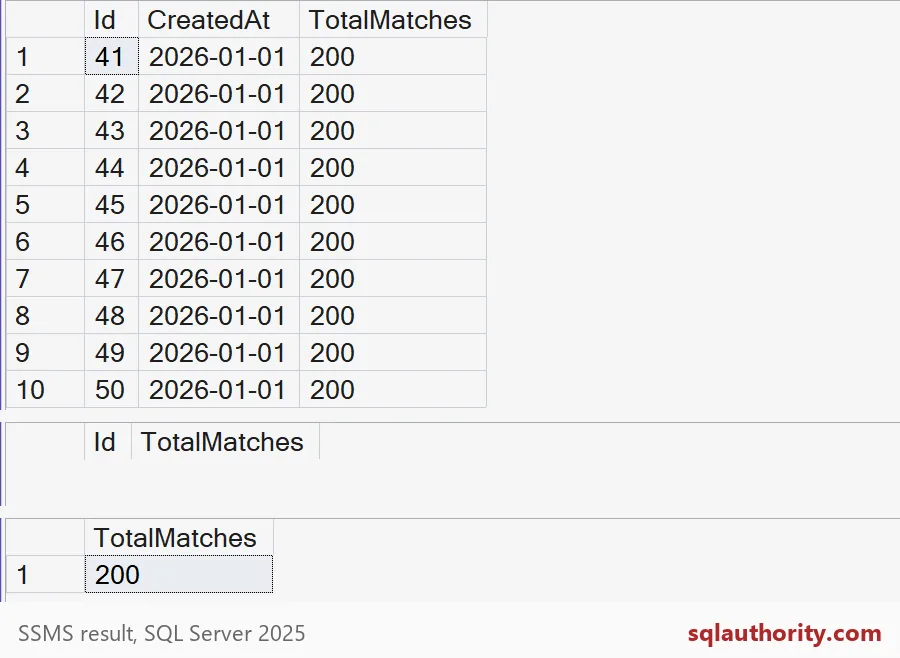
The first grid has ten rows, and TotalMatches says 200 on every one. The inactive rows are not counted, because the WHERE clause removed them first. The second grid is empty. It has the column headers and no rows. The last grid shows the same total of 200 from a plain count.
Notice the ORDER BY has a tie-breaker. All 200 rows share one date, so ordering by date alone could shuffle rows between requests. Adding Id makes the order the same every time.
The empty page has no total
Here is the catch. When the page is empty, no row exists to carry the total. A user jumps to a page that no longer exists after rows were deleted, and the grid cannot say “of 200” because the query returned nothing. Worse, a client that treats a missing total as zero will tell the user there is no data.
One fix is to compute the count on its own and attach the page with a LEFT JOIN. The count always returns one row. The page rows hang off it, or come back as NULL when there are none.
DECLARE @PageNumber int = 21, @PageSize int = 10;

SELECT t.TotalMatches, p.Id, p.CreatedAt
FROM (SELECT COUNT_BIG(*) AS TotalMatches FROM #PagedRows WHERE IsActive = 1) AS t
LEFT JOIN (SELECT Id, CreatedAt
           FROM #PagedRows
           WHERE IsActive = 1
           ORDER BY CreatedAt, Id
           OFFSET (@PageNumber - 1) * @PageSize ROWS FETCH NEXT @PageSize ROWS ONLY) AS p ON 1 = 1
ORDER BY p.CreatedAt, p.Id;
GO
DROP TABLE IF EXISTS #PagedRows;
You get one row with TotalMatches 200 and NULL in Id and CreatedAt. Your code can read the total and see that the page is simply empty. The last statement drops the temp table.

Watch the cost on big tables
A total count has to look at every matching row, even when you only want ten. On 200 rows nobody notices. On millions of matches, every click on “next page” pays for the full count again. Deep OFFSET values add their own cost, because SQL Server still walks past all the skipped rows.
I have not measured this on a large table here, so test on your own data. If the exact count is not worth the price, cache it for a few minutes. Or show “about 200” and let the client skip the work.
Before you wire this into a grid, decide what it should show when the page comes back empty.
A page is not the whole answer, it is a window into the full matching set.
Published by Pinal Dave on SQLAuthority. More of my work at pinaldave.com.
Discover more from SQL Authority with Pinal Dave
Subscribe to get the latest posts sent to your email.