A DELETE without a WHERE clause is not the only way to wipe a table. A trigger cannot read the wording of a statement, but it can count the rows that disappear and refuse when the number is too big.

The statement everyone fears
Here is how it usually happens. A junior DBA highlights two lines of a script in SSMS and presses F5. The WHERE line sits just outside the selection. The DELETE runs without it, and the whole table is gone before anyone blinks.
The obvious fix sounds simple: write a trigger that blocks any DELETE without a WHERE. But a trigger never sees the text of the statement. It only sees the rows that were removed.
That is not a weakness in this case. A careless DELETE ... WHERE Id > 0 wipes the table just as well as a missing clause. What you really fear is the damage, so let’s guard against the damage.
Judge the damage, not the wording
An AFTER DELETE trigger receives the removed rows in a pseudo-table called deleted. Count them, add the rows still in the table, and you know how big the table was before the statement. If the statement removed more than half, the trigger rolls back and raises its own error.
Half is my choice for this demo. Pick a rule that fits your table. The rule looks at the effect. So it works for an unfiltered DELETE and for a WHERE clause that matches everything.
DROP TABLE IF EXISTS dbo.DeleteGuard;
GO
CREATE TABLE dbo.DeleteGuard (Id int PRIMARY KEY);
INSERT dbo.DeleteGuard (Id) VALUES (1), (2), (3), (4), (5), (6);
GO
CREATE TRIGGER dbo.LimitDelete ON dbo.DeleteGuard
AFTER DELETE
AS
BEGIN
    SET NOCOUNT ON;
    DECLARE @Gone bigint = (SELECT COUNT_BIG(*) FROM deleted);
    DECLARE @Before bigint = @Gone + (SELECT COUNT_BIG(*) FROM dbo.DeleteGuard);
    IF @Gone * 2 > @Before
    BEGIN
        ROLLBACK TRANSACTION;
        THROW 50001, 'Delete blocked: more than half the table would be removed.', 1;
    END;
END;
GO
The table is tiny on purpose, six rows with Id 1 to 6. The trigger is set-based, so it works the same for one row or a million.

Try it with a WHERE clause that matches everything
First I delete a single row, Id 1. That is one row out of six, well under half, so the trigger lets it pass. Then I run a DELETE that does have a WHERE clause, but one that matches every remaining row.
DELETE dbo.DeleteGuard WHERE Id = 1;

BEGIN TRY
    DELETE dbo.DeleteGuard WHERE Id > 0;
END TRY
BEGIN CATCH
    SELECT ERROR_NUMBER() AS ErrorNumber;
    PRINT ERROR_MESSAGE();
END CATCH;

SELECT Id FROM dbo.DeleteGuard ORDER BY Id;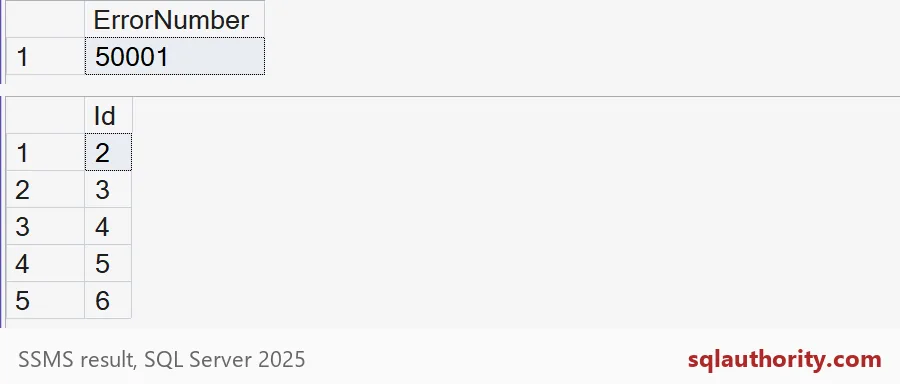
The first result shows error number 50001. The message tab carries our text, “Delete blocked: more than half the table would be removed.” The second result shows Ids 2 to 6 still there. The small delete stayed committed, and the big one was undone.
What happens inside a bigger transaction
Here is the part people miss. The trigger uses ROLLBACK TRANSACTION, and that rolls back the whole transaction, not just the DELETE. If your app opened a transaction, did some work and then hit the guard, all of that work goes too.
Let me show it. I put Id 1 back, open a transaction, delete Id 1 (allowed), then try to delete the rest (blocked). Afterward, no transaction is open and Id 1 is back, because its delete was rolled back with everything else.
INSERT dbo.DeleteGuard (Id) VALUES (1);

BEGIN TRY
    BEGIN TRANSACTION;
    DELETE dbo.DeleteGuard WHERE Id = 1;
    DELETE dbo.DeleteGuard WHERE Id > 1;
    COMMIT TRANSACTION;
END TRY
BEGIN CATCH
    SELECT ERROR_NUMBER() AS ErrorNumber, @@TRANCOUNT AS OpenTransactions;
END CATCH;

SELECT Id FROM dbo.DeleteGuard ORDER BY Id;
You should see 50001 and zero open transactions. Then all six Ids come back. If that surprises your application code, handle it before you ship the trigger. Test it in a bigger transaction, not only in a one-line demo.
Where this guard does not help
A trigger is a speed bump, not a wall. TRUNCATE TABLE does not fire DELETE triggers at all. Anyone who can alter the table can also disable the trigger. And on a busy table the “before” count moves while other sessions write, so the half-way line is a little fuzzy.
Watch the first one in action. The truncate below succeeds without a single complaint, and the table ends up empty. The last line removes the demo table and its trigger.
TRUNCATE TABLE dbo.DeleteGuard;

SELECT COUNT(*) AS RowsLeft FROM dbo.DeleteGuard;
GO
DROP TABLE IF EXISTS dbo.DeleteGuard;
So treat the trigger as one layer. Keep permissions tight, run changes through reviewed procedures, and wrap manual deletes in a transaction you check before you commit. The trigger is the net under all of that.
Next time you run a DELETE, ask how many rows it should touch, then check that it did.
A WHERE clause is not a safety guarantee, it is only a way to pick rows.
Published by Pinal Dave on SQLAuthority. More of my work at pinaldave.com.
Discover more from SQL Authority with Pinal Dave
Subscribe to get the latest posts sent to your email.