Storing percentages requires a named unit, because 0.15 and 15 can represent the same fifteen-percent discount. A valid numeric range cannot identify the source’s convention.

Declare the unit before storing percentages
DiscountRate uses a fractional rate: 0.15 means fifteen percent. DiscountPercent uses percentage points: 15.00 means fifteen percent. Both conventions are useful when documented. A column named Discount leaves the essential question unanswered.
I would prefer one authoritative stored representation. A conversion at the interface can expose the other unit. But that preference cannot override an existing external contract. Confirm the source convention before choosing a conversion.
Use constraints for a stated discount policy
This example permits discounts from zero through the full amount. DiscountRate therefore ranges from zero to one. DiscountPercent ranges from zero to one hundred. Negative adjustments and growth rates require their own policies, rather than these discount constraints.
The setup block below creates two demo tables and fills them with sample rows. A conversion view comes later.
SET NUMERIC_ROUNDABORT OFF;
DROP VIEW IF EXISTS dbo.PercentAsRate;
DROP TABLE IF EXISTS dbo.RateDiscounts, dbo.PercentDiscounts;

CREATE TABLE dbo.RateDiscounts
(Id int NOT NULL PRIMARY KEY,DiscountRate decimal(5,4) NOT NULL
 CHECK(DiscountRate BETWEEN 0 AND 1));
CREATE TABLE dbo.PercentDiscounts
(Id int NOT NULL PRIMARY KEY,DiscountPercent decimal(5,2) NOT NULL
 CHECK(DiscountPercent BETWEEN 0 AND 100));

INSERT dbo.RateDiscounts VALUES
 (1,0),(2,0.15),(3,1),(4,0.15555),(5,1.00004);
INSERT dbo.PercentDiscounts VALUES
 (1,0),(2,15),(3,100),(4,12.345),(5,0.15);
NOT NULL defines whether a missing discount is acceptable. A range CHECK alone does not reject NULL, because its comparison becomes UNKNOWN. Keeping both rules makes this policy explicit.
A plausible wrong unit passes the range
A value of 0.15 fits the percentage-point range. In DiscountPercent, it means 0.15 percent, rather than fifteen percent. The range is valid while the mapping is wrong. Constraints cannot infer an intended unit from a plausible number.
DECLARE @Amount decimal(12,2)=199;
SELECT DiscountRate,@Amount*DiscountRate AS DiscountAmount
FROM dbo.RateDiscounts WHERE Id=2;

SELECT DiscountPercent,@Amount*DiscountPercent/100.0 AS DiscountAmount
FROM dbo.PercentDiscounts WHERE Id IN(2,5);
The intended fractional rate and percentage-point value both give a discount of 29.85 on an amount of 199. Treating 0.15 as percentage points gives 0.2985 instead. That smaller result is numerically legal. Source metadata must determine which calculation belongs to the field.

Keep a conversion boundary visible
Divide percentage points by 100 to obtain a fractional rate. Multiply a rate by 100 for percentage points. Name the converted output for its unit. A view avoids maintaining two independently editable stored values.
EXEC sys.sp_executesql N'CREATE VIEW dbo.PercentAsRate AS
SELECT Id,CONVERT(decimal(5,4),DiscountPercent/100.0) AS DiscountRate
FROM dbo.PercentDiscounts;';

SELECT Id,DiscountRate FROM dbo.PercentAsRate ORDER BY Id;
The example creates the view in a separate dynamic batch. CREATE VIEW must be the first statement in its batch. The explicit decimal output fixes this interface’s storage scale. It does not recover precision already discarded upstream.
Check rounding at the storage boundary
The columns retain four fractional-rate places or two percentage-point places. Converting extra decimal places can round them. The setup block turned NUMERIC_ROUNDABORT off and inserted 0.15555 and 12.345 into the chosen columns. This query shows what was stored.
SELECT Id,DiscountRate FROM dbo.RateDiscounts ORDER BY Id;
SELECT Id,DiscountPercent FROM dbo.PercentDiscounts ORDER BY Id;
The sample rows also include 1.00004 in the fractional-rate column. Rounding to four places produces 1.0000 before the stored-value CHECK is evaluated. A raw value outside the stated input range can therefore become an accepted stored value. Validate raw import range and precision before narrowing when that distinction matters.
Changing decimal-expression precision is a separate problem from changing units. This article uses bounded discount types and explicit outputs. It does not derive every arithmetic expression’s precision rules. Currency rounding also needs its own explicit business policy.
Avoid losing fractional percentage points
An integer percentage cannot retain 15.75 exactly. Integer division can also lose the fractional rate before a later cast. Test the operand types at the conversion boundary. A decimal operand keeps this small example’s intended fraction.
SELECT CONVERT(int,15.75) AS IntegerPercent,
 15/100 AS IntegerDivision,
 CONVERT(decimal(8,4),CONVERT(decimal(5,2),15.75)/100.0) AS DecimalRate,
 199*15/100 AS IntegerAmount,
 CONVERT(decimal(12,2),199*15.00/100.0) AS DecimalAmount;

-- Cleanup
DROP VIEW IF EXISTS dbo.PercentAsRate;
DROP TABLE IF EXISTS dbo.RateDiscounts, dbo.PercentDiscounts;
Do not classify every value below one as a fractional rate. A genuine percentage-point value can also be that small. Preserve the incoming value and declared unit during reconciliation. Convert once through the approved mapping, then validate the destination.
Actual values from the example
I ran this on SQL Server 2025 Enterprise Developer, build 17.0.5005.3. Fractional 0.15 and percentage points 15 both produced a discount of 29.85 from an amount of 199.
The plausible wrong percentage value 0.15 instead produced 0.2985. Stored decimal values also show the conversion rounding, including 0.1556, 1.0000 and 12.35.
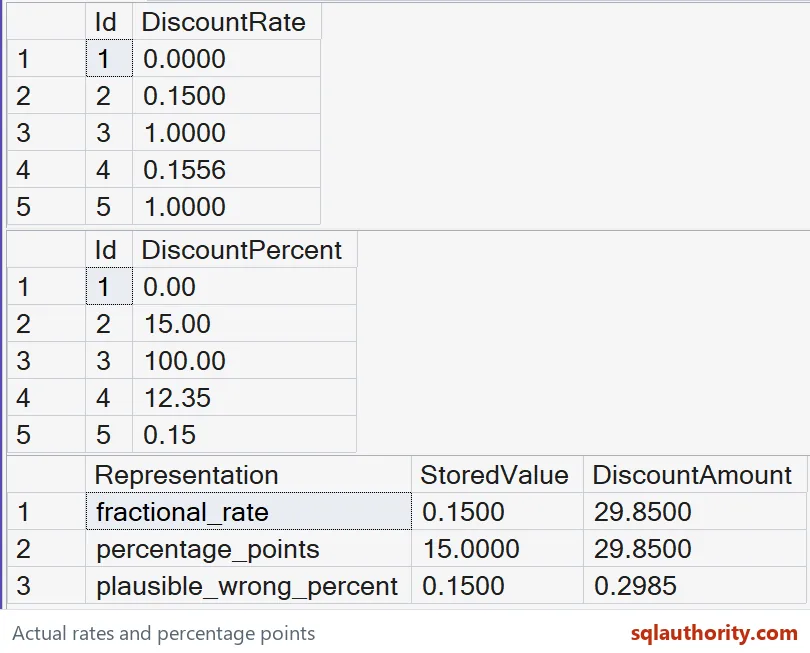
These native SSMS grids show the stored values and the discount comparisons.
Put the unit in the column name and save someone a long afternoon.
A percentage value is not a self-describing quantity, it is a number whose declared unit controls the calculation.
Published by Pinal Dave on SQLAuthority. More of my work at pinaldave.com.
Discover more from SQL Authority with Pinal Dave
Subscribe to get the latest posts sent to your email.