A shared SEQUENCE hands out one stream of numbers to several tables, so invoices and credit notes never fight over the same number by accident. It does not promise gapless numbers, and it does not stop someone from typing a duplicate. Let me show you both limits.

The auditor who asks about number 8
Finance says invoices and credit notes must share one number range. So you create one sequence and let both tables take their defaults from it. It works nicely. Then an auditor asks, “Where is document number 8?” Nobody can answer.
A sequence belongs to the schema, not to a table. Every default that calls NEXT VALUE FOR draws from the same counter. That is allocation. It is not enforcement, and the demo will show the difference. Start with the objects and one row in each table.
DROP TABLE IF EXISTS dbo.Invoice;
DROP TABLE IF EXISTS dbo.CreditNote;
DROP TABLE IF EXISTS dbo.DocumentRegister;
DROP SEQUENCE IF EXISTS dbo.DocumentNumberSeq;
GO
CREATE SEQUENCE dbo.DocumentNumberSeq AS bigint
    START WITH 1 INCREMENT BY 1 NO CACHE NO CYCLE;
CREATE TABLE dbo.Invoice (
    DocumentNumber bigint PRIMARY KEY DEFAULT NEXT VALUE FOR dbo.DocumentNumberSeq,
    Amount decimal(12,2));
CREATE TABLE dbo.CreditNote (
    DocumentNumber bigint PRIMARY KEY DEFAULT NEXT VALUE FOR dbo.DocumentNumberSeq,
    Amount decimal(12,2));
INSERT dbo.Invoice (Amount) VALUES (100);
INSERT dbo.CreditNote (Amount) VALUES (25);
The invoice gets number 1 and the credit note gets number 2. I use NO CACHE only to keep the numbers easy to follow in a demo.
Reserve a range and see the gap
Some applications ask for a block of numbers up front. The procedure sp_sequence_get_range reserves them. Whatever the application does not use stays unused.
DECLARE @first sql_variant, @last sql_variant;
EXEC sys.sp_sequence_get_range @sequence_name = N'dbo.DocumentNumberSeq', @range_size = 5,
     @range_first_value = @first OUTPUT, @range_last_value = @last OUTPUT;
SELECT @first AS FirstReserved, @last AS LastReserved;
The reserved range is 3 through 7. Those five numbers now belong to the caller. If nobody inserts them, they are gaps.
Roll back and watch the number disappear
Now the classic gap. Insert an invoice inside a transaction, roll it back, then insert another one. The OUTPUT clause shows the number the rolled-back row had.
BEGIN TRANSACTION;
INSERT dbo.Invoice (Amount)
OUTPUT inserted.DocumentNumber AS RolledBackAllocation
VALUES (200);
ROLLBACK TRANSACTION;

INSERT dbo.Invoice (Amount) VALUES (300);

SELECT N'Invoice' AS Kind, DocumentNumber, Amount FROM dbo.Invoice
UNION ALL
SELECT N'Credit', DocumentNumber, Amount FROM dbo.CreditNote
ORDER BY DocumentNumber;
The rolled-back invoice consumed 8. The next invoice got 9. The final list shows 1, 2 and 9. Numbers 3 to 8 are gone for good. A sequence never hands a number back, even when the transaction fails. That is your answer for the auditor.
Bypass the default and create a duplicate
Each table has its own primary key, and that protects only that table. Watch what happens when someone supplies a number by hand.
INSERT dbo.CreditNote (DocumentNumber, Amount) VALUES (1, 5);

SELECT DocumentNumber, COUNT_BIG(*) AS Occurrences
FROM (SELECT DocumentNumber FROM dbo.Invoice
      UNION ALL
      SELECT DocumentNumber FROM dbo.CreditNote) AS d
GROUP BY DocumentNumber
HAVING COUNT_BIG(*) > 1;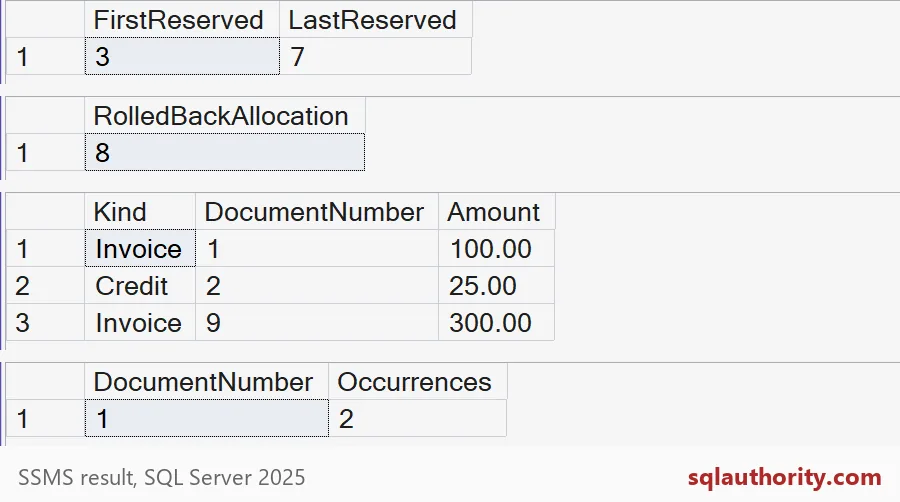
The insert succeeds, and the report shows DocumentNumber 1 with 2 occurrences. Number 1 is now both an invoice and a credit note. No error was raised, because each primary key only sees its own table.

Enforce uniqueness in one place
If the number must be unique across document types, give it one home. A small register table holds every number once, with one primary key. Invoices and credit notes can then point to it. Here is the register on its own.
CREATE TABLE dbo.DocumentRegister (
    DocumentNumber bigint NOT NULL PRIMARY KEY DEFAULT NEXT VALUE FOR dbo.DocumentNumberSeq,
    Kind nchar(1) NOT NULL);
INSERT dbo.DocumentRegister (Kind) VALUES (N'I'), (N'C');
SELECT DocumentNumber, Kind FROM dbo.DocumentRegister ORDER BY DocumentNumber;

BEGIN TRY
    INSERT dbo.DocumentRegister (DocumentNumber, Kind) VALUES (10, N'C');
END TRY
BEGIN CATCH
    SELECT ERROR_NUMBER() AS DuplicateError;
END CATCH;
The two normal inserts take 10 and 11 from the sequence. Typing 10 again fails with error 2627, a primary key violation. One table, one constraint, no duplicates. You can restrict who may supply numbers by hand as a second layer.
Clean up and choose a policy
DROP TABLE IF EXISTS dbo.Invoice;
DROP TABLE IF EXISTS dbo.CreditNote;
DROP TABLE IF EXISTS dbo.DocumentRegister;
DROP SEQUENCE IF EXISTS dbo.DocumentNumberSeq;
If your numbers must be gapless, decide first what cancellations, failed transactions and concurrent requests mean. A sequence is fast and simple. It is not an accounting policy.
Decide which numbering promises the database must actually keep.
A shared sequence is not a global constraint, it is a common number allocator.
Published by Pinal Dave on SQLAuthority. More of my work at pinaldave.com.
Discover more from SQL Authority with Pinal Dave
Subscribe to get the latest posts sent to your email.